5
REMOTE/LOCAL
CONTROL
The REMOTE/LOCAL
facility
enables
the instrument
to receive commands
from
either
a remote
or a local source.
The
remote
facility is
provided by the GPIB interface
and has priority over
local control.
The
instrument offers two
forms of
local
control:
Local
1 Commands
accepted from
the instrument
front
panel
and/or from the
serial interface.
The two
sources
have equal priority.
Local 2 Commands
accepted from
the RS423
port only. No settings
can be
changed from
the front panel,
but the LOCAL
key and the ON/OFF switch
are still
operative. The Menu
keys can
be used to examine, but not alter,
the
state of the controls.
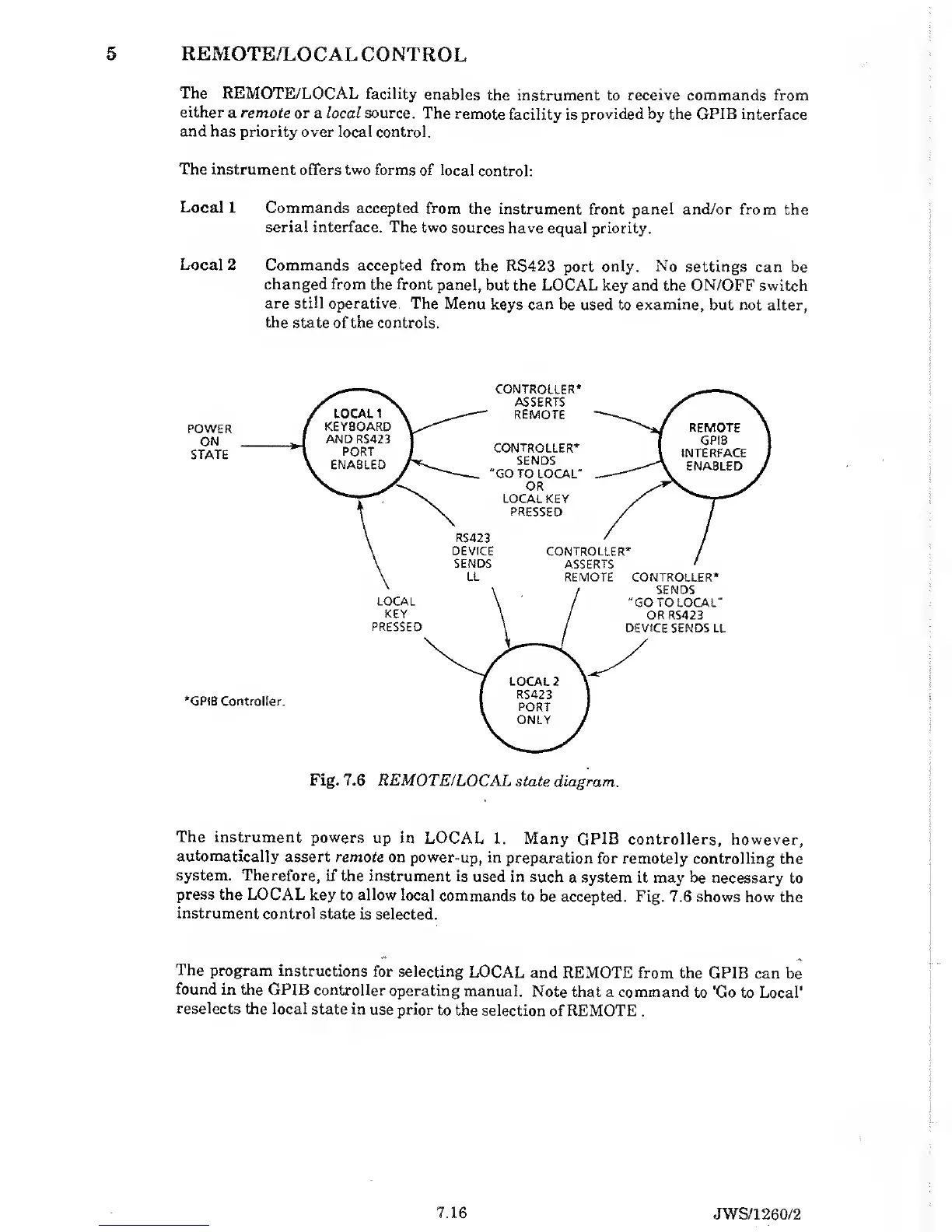
Fig. 7.6
REMOTE/LOCAL
state diagram.
The instrument
powers
up in LOCAL
1. Many
GPIB controllers, however,
automatically
assert remote
on power-up,
in preparation
for remotely controlling
the
system.
Therefore, if the
instrument is
used in
such a system it may
be necessary
to
press the
LOCAL key
to
allow
local commands
to be accepted. Fig. 7.6 shows
how the
instrument
control state
is selected.
The
program
instructions
for selecting
LOCAL
and REMOTE from the
GPIB can
be
found
in the
GPIB controller
operating
manual.
Note that a command
to 'Go to Local*
reselects the local
state in
use prior to
the selection
of REMOTE
.
7.16
JWS/1260/2



 To Next Page