EasyManua.ls Logo

Solartron 1260 - Connection Procedure; Power Cable

Solartron 1260
295 pages
Print Icon
To Next Page IconTo Next Page
To Previous Page IconTo Previous Page
Loading...
3.3
POWER
CABLE
The
power
cable
supplied has an IEC socket
on one end
(which
mates with
the power
input plug on the
instrument) and
a
power plug,
compatible with power
sockets in the
country
of
destination,
on the other end.
This cable should
be connected
to
the user's
ac
power
supply according
to the following
colour
code:
BROWN
=
LINE
BLUE
=
NEUTRAL
GREEN/YELLOW
=
GROUND
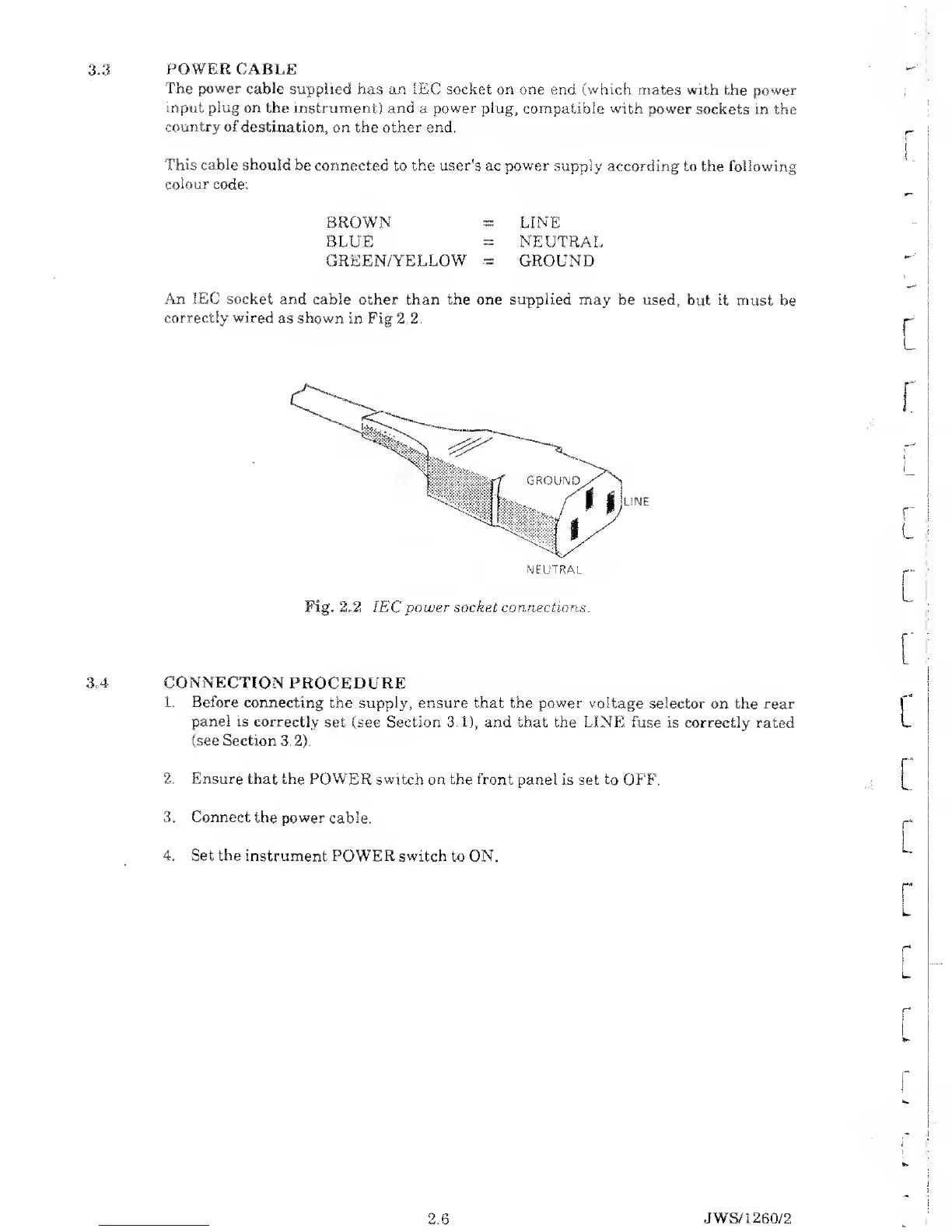
An IEC socket
and cable other than the one supplied
may be used,
but it must be
correctly wired
as shown in Fig 2.2.
Fig. 2.2 IEC power
socket
connections
3A CONNECTION
PROCEDURE
1.
Before connecting
the
supply,
ensure that the
power
voltage selector
on the rear
panel
is correctly
set (see Section
3.1),
and that the LINE fuse
is
correctly
rated
(see Section
3.2).
2. Ensure that
the POWER switch
on
the front
panel is set to OFF.
3.
Connect
the power
cable.
4. Set the instrument
POWER switch
to
ON.
[
r
r~
i
c
r
L
[
2.6
JWS/1
260/2

Table of Contents

Related product manuals