EasyManua.ls Logo

Solartron 1260 - Scaling a Measurement Using Functions and Constants

Solartron 1260
295 pages
Print Icon
To Next Page IconTo Next Page
To Previous Page IconTo Previous Page
Loading...
3
SCALING
A
MEASUREMENT
Individual
measurements
are
scaled by
entering
a
user-defined
scaling
function
and
then
selecting
"FUNCTION”
as
the
display
source.
A
scaling
function
may
include
user-defined
scaling
constants.
Eighteen
scaling
functions
may
nine
in
non-volatile
memory,
maintained
memory.
be
stored,
nine
in
battery-
maintained
memory
and
Nine
scaling
constants
may
be
stored,
in
battery-
3.1
CHECKING
THE
CONSTANTS
STORE
Before
trying
to
enter
a
constant
check
that a
slot
is
available
for
it
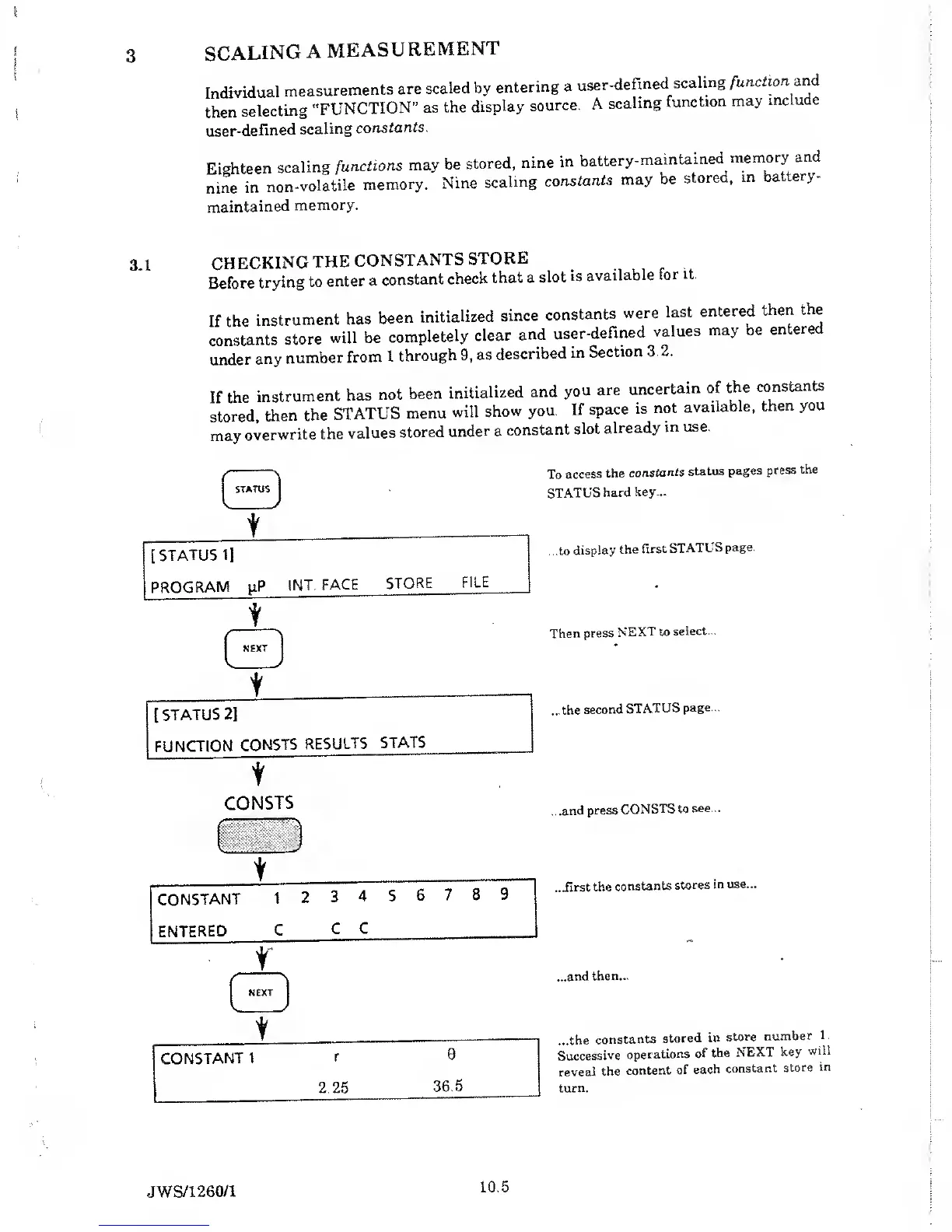
If the
instrument
has
been
initialized
since
constants
were
last
entered
then
the
constants
store
will be
completely
clear
and
user-defined
values
may
be
entered
under
any
number
from
1
through
9,
as
described
in
Section
3.2.
If the
instrument
has
not
been
initialized
and
you
are
uncertain
of
the
constan
s
stored,
then
the
STATUS
menu
will
show
you.
If
space
is
not
available,
then
you
may
overwrite
the
values
stored
under a
constant
slot
already
in use.
t
To
access
the
constants
status
pages
press
the
STATUS
hard
key...
...to
display
the
first
STATUS
page.
Then press
NEXT to
select...
...the
second
STATUS
page...
CONSTS
ZJ
CONSTANT
1
2
3
4 5
6
7 8
9
ENTERED
C
C
C
r
^
NEXT
j
t
CONSTANT
1
r
0
2.25
36.5
...and
press
CONSTS
to
see...
...first
the
constants
stores
in
use...
...and
then...
...the
constants
stored
in
store
number
1.
Successive
operations
of
the
NEXT
key
will
reveal
the
content
of
each
constant
store
in
turn.
JWS/1260/1
10.5

Table of Contents

Related product manuals