EasyManua.ls Logo

Solartron 1260 - Page 47

Solartron 1260
295 pages
Print Icon
To Next Page IconTo Next Page
To Previous Page IconTo Previous Page
Loading...
t
A LOG
f
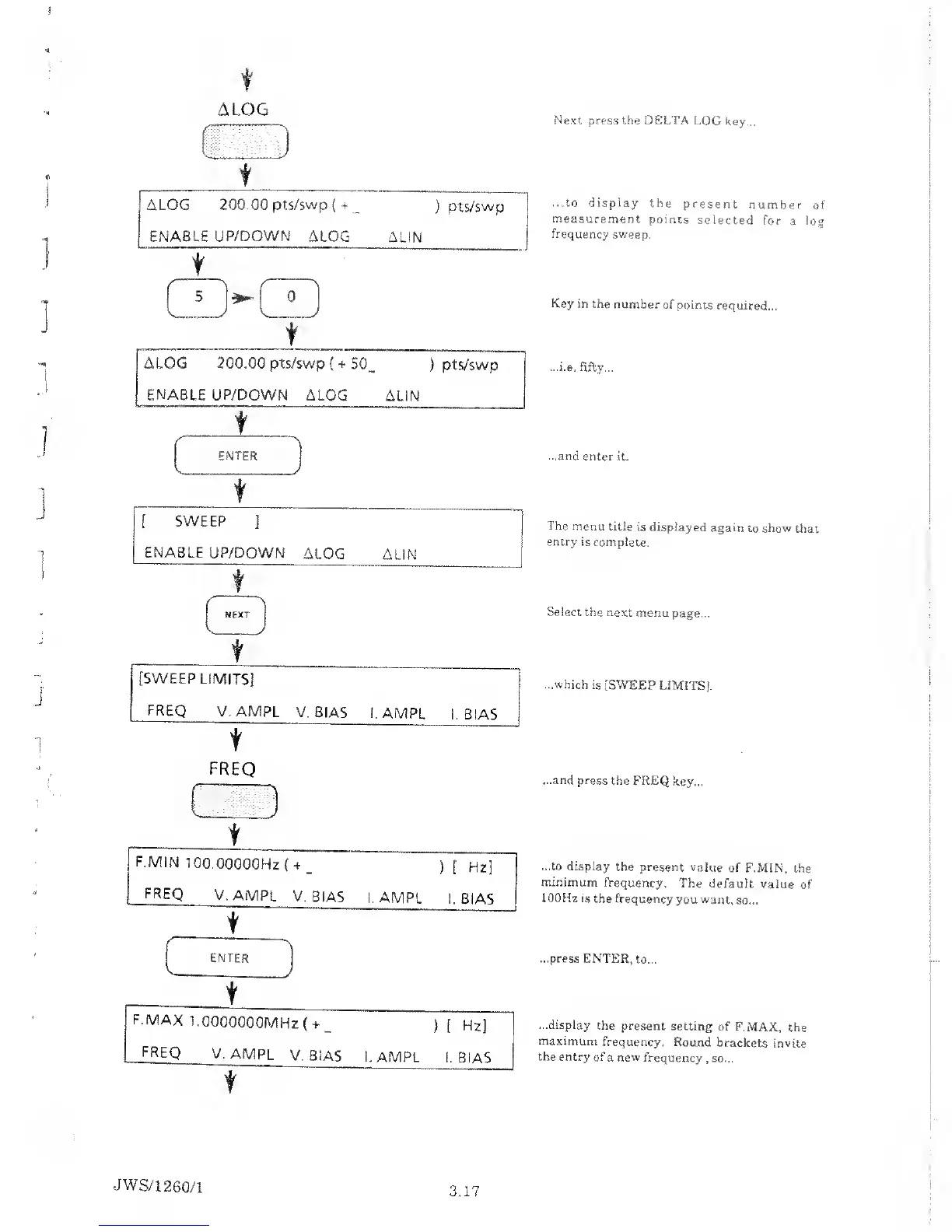
Next press the DELTA
LOG
key
...to
display
the
present
number
of
measurement
points
selected
for
a
log
frequency
sweep.
Key in the
number
of points
required...
...i.e. fifty...
...and
enter it.
The menu
title is
displayed
again
to show
that
entry is
complete.
Select
the next
menu
page...
t
[SWEEP
LIMITS]
FREQ
V.AMPL
V. 3IAS
i. AMPL
1. BIAS
t
...which
is [SWEEP
LIMITS).
FREQ
-A:'-::-
\
t
1
F.MIN
100.00000Hz
(
4
[
Hz]
FREQ
V.
AMPL
V. BIAS
1. AMPL
1.
BIAS
c
t
X
V-
ENTER
t
F.MAX
1.0000000MHz
(
+
_ ) [
Hz]
FREQ
V.
AMPL
v.
BIAS
1.
AMPL
1. BIAS
*
...and press
the FREQ
key...
...to display
the present
value
of F.MIN,
the
minimum
frequency.
The
default
value
of
100Hz is
the frequency
you
want,
so...
...press
ENTER,
to...
...display
the
present setting
of F.MAX,
the
maximum
frequency.
Round
brackets
invite
the entry
of
a
new
frequency
,
so...
JWS/1
260/1
3.17

Table of Contents

Related product manuals