SERIAL INTERFACE
RS 423
connector
k
f*
mum
|
o
ON
\
)
V
O
Connector detail, showing
pm functions.
ooooooooooooo
oooooooooooo
25
14
Pin 1
=
Ground
Pin
2
=
Serial
Data to instrument
Pin
3
=
Serial
Data from instrument
Pin 4
=
RTS (Request
to Send) Pin 7
=
Ground
Pin
5
=
CIS (Clear
to
Send)
Pin
8
=
DCD (Data
Carrier
Detect)
Pin 6
=
DSR
(Data Set Ready) Pin 20
=
DTR
(Data Terminal Ready)
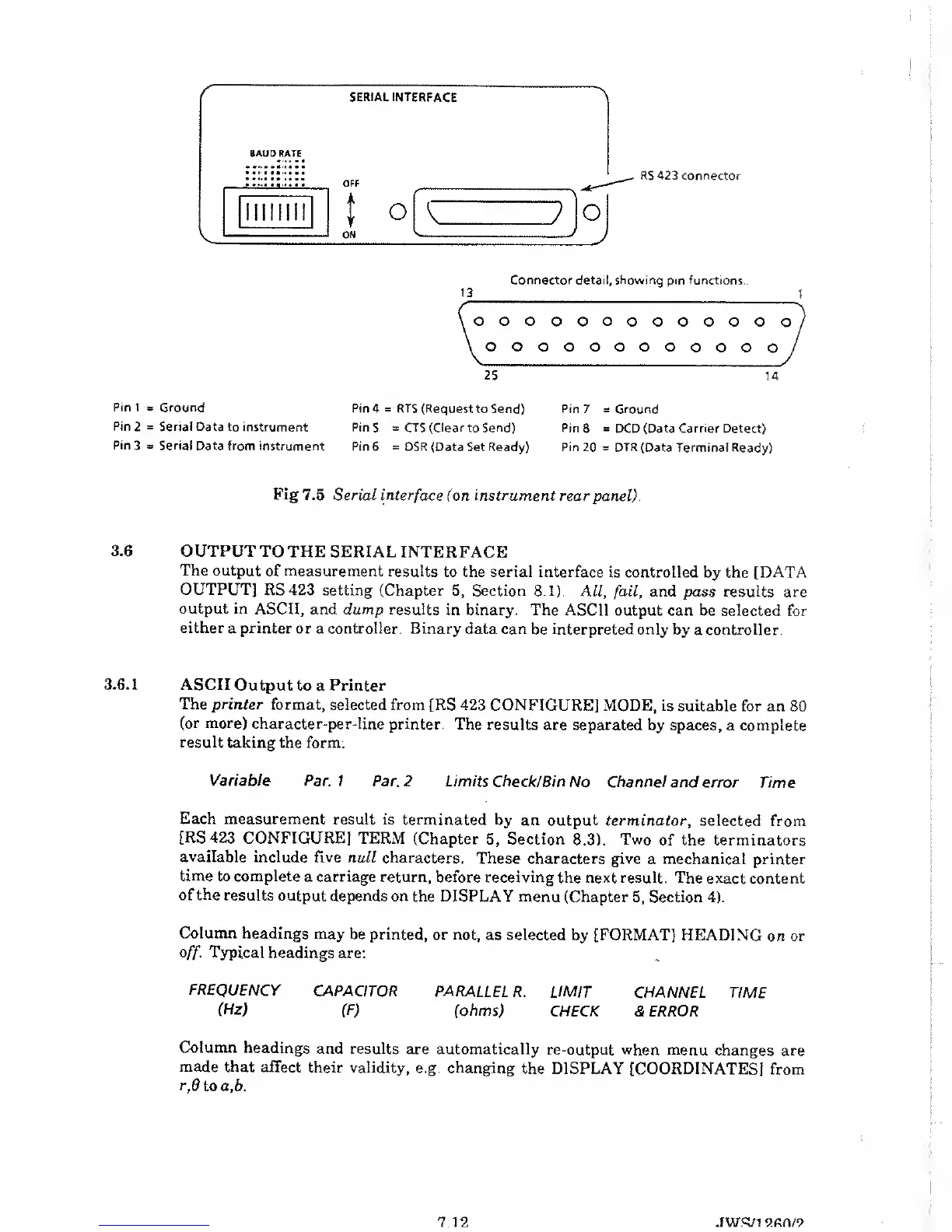
Fig 7.5 Serial
interface (on instrument rear
panel).
3.6
OUTPUT TO
THE SERIAL INTERFACE
The output
of measurement
results
to
the
serial interface is controlled
by the
[DATA
OUTPUT]
RS423 setting
(Chapter
5,
Section 8.1). All,
fail,
and
pass results are
output
in ASCII, and dump
results in
binary. The ASCII output
can be selected for
either
a printer or a controller.
Binary
data can be interpreted only
by a controller.
3.6.1
ASCII Output to
a Printer
The printer
format, selected from
[RS 423 CONFIGURE]
MODE, is suitable for
an 80
(or more)
character-per-line
printer. The results
are separated by spaces,
a complete
result taking
the form:
Variable
Par. 1 Par.
2 Limits Check/Bin
No Channel and error
Time
Each
measurement result
is terminated
by an
output
terminator,
selected from
[RS423
CONFIGURE]
TERM
(Chapter
5,
Section
8.3).
Two
of the terminators
available
include five
null characters.
These characters
give a mechanical
printer
time
to complete
a carriage return,
before receiving
the next result. The exact
content
of the
results
output depends
on
the DISPLAY
menu
(Chapter
5,
Section
4).
Column
headings
may be printed,
or not, as selected
by [FORMAT] HEADING
on or
off.
Typical
headings are:
FREQUENCY
CAPACITOR PARALLEL
R. LIMIT
CHANNEL
TIME
(Hz)
(F)
(ohms)
CHECK & ERROR
Column
headings
and results
are automatically
re-output when menu
changes are
made
that affect
their validity,
e.g.
changing
the DISPLAY [COORDINATES]
from
r,6
to a,b.
7
12 JWS/i
2fin/9



 To Next Page