EasyManua.ls Logo

Solartron 1260 - Page 54

Solartron 1260
295 pages
Print Icon
To Next Page IconTo Next Page
To Previous Page IconTo Previous Page
Loading...
j
vuap.
j
f
ITEM
[
par
1
]
ITEM LIMITS
LIN/LOG PEN
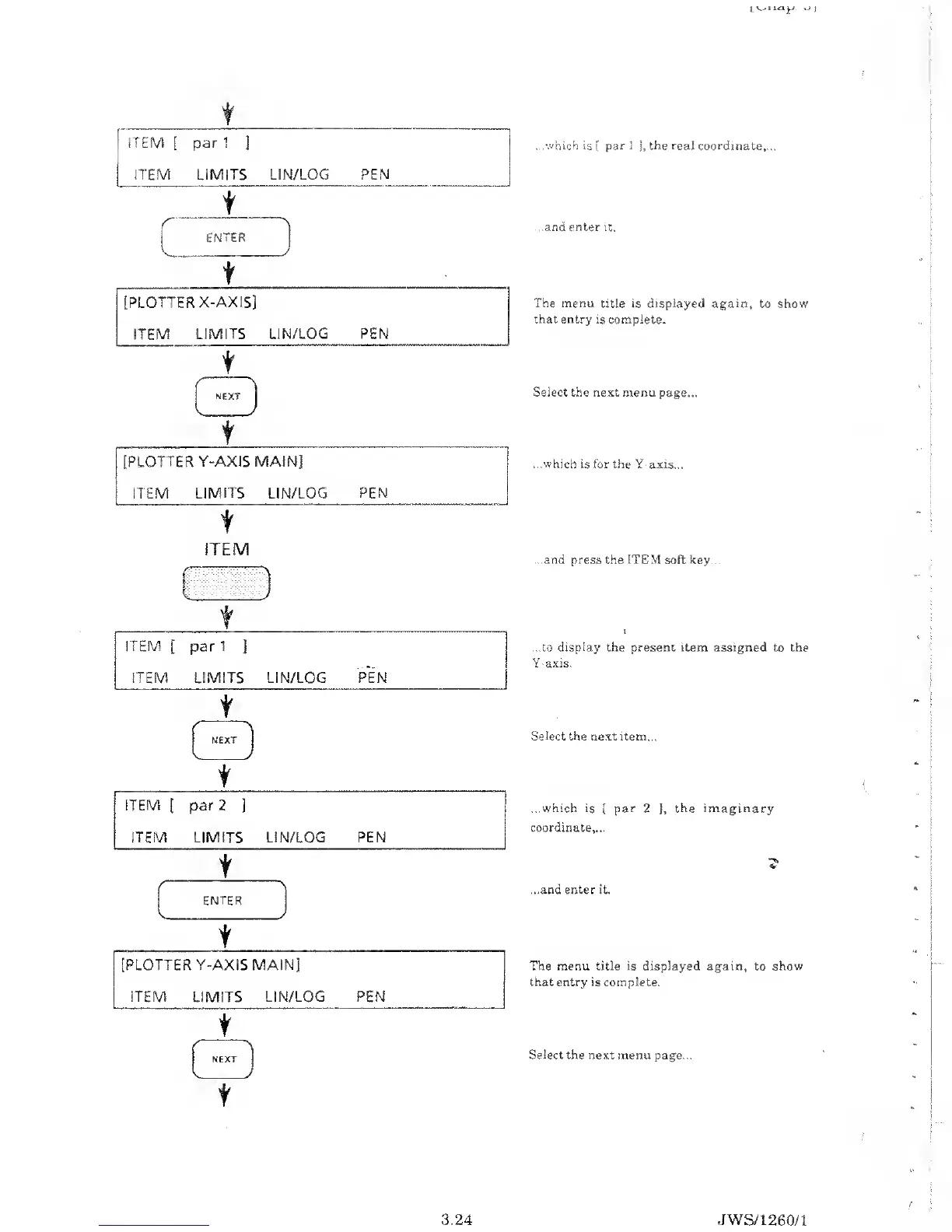
.which is
[
par I
j,
the real coordinate,...
t
ENTER
J
t
[PLOTTER
X-AXIS]
ITEM
LIMITS
LIN/LOG PEN
t
t
[PLOTTER Y-AXIS
MAIN]
ITEM
LIMITS
LIN/LOG
PEN
t
ITEM
'
ITEM
[
par
1
]
ITEM LIMITS
LIN/LOG
PEN
t
t
ITEM
[
par
2
]
ITEM
LIMITS
LIN/LOG
PEN
t
/
N
ENTER
K
/
t
t
...and enter it.
The menu
title is
displayed
again, to show
that entry is complete.
Select the next menu
page...
...which
is for the Y-axis...
..and press the ITEM soft key...
...to
display
the
present
item assigned to the
Y-axis.
Select
the next item...
...which is
[
par
2
],
the imaginary
coordinate,...
...and enter it.
The menu title is displayed again,
to
show
that entry is complete.
Select the next menu
page...
3.24 JWS/1
260/1

Table of Contents

Related product manuals