EasyManua.ls Logo

Solartron 1260 - Page 72

Solartron 1260
295 pages
Print Icon
To Next Page IconTo Next Page
To Previous Page IconTo Previous Page
Loading...
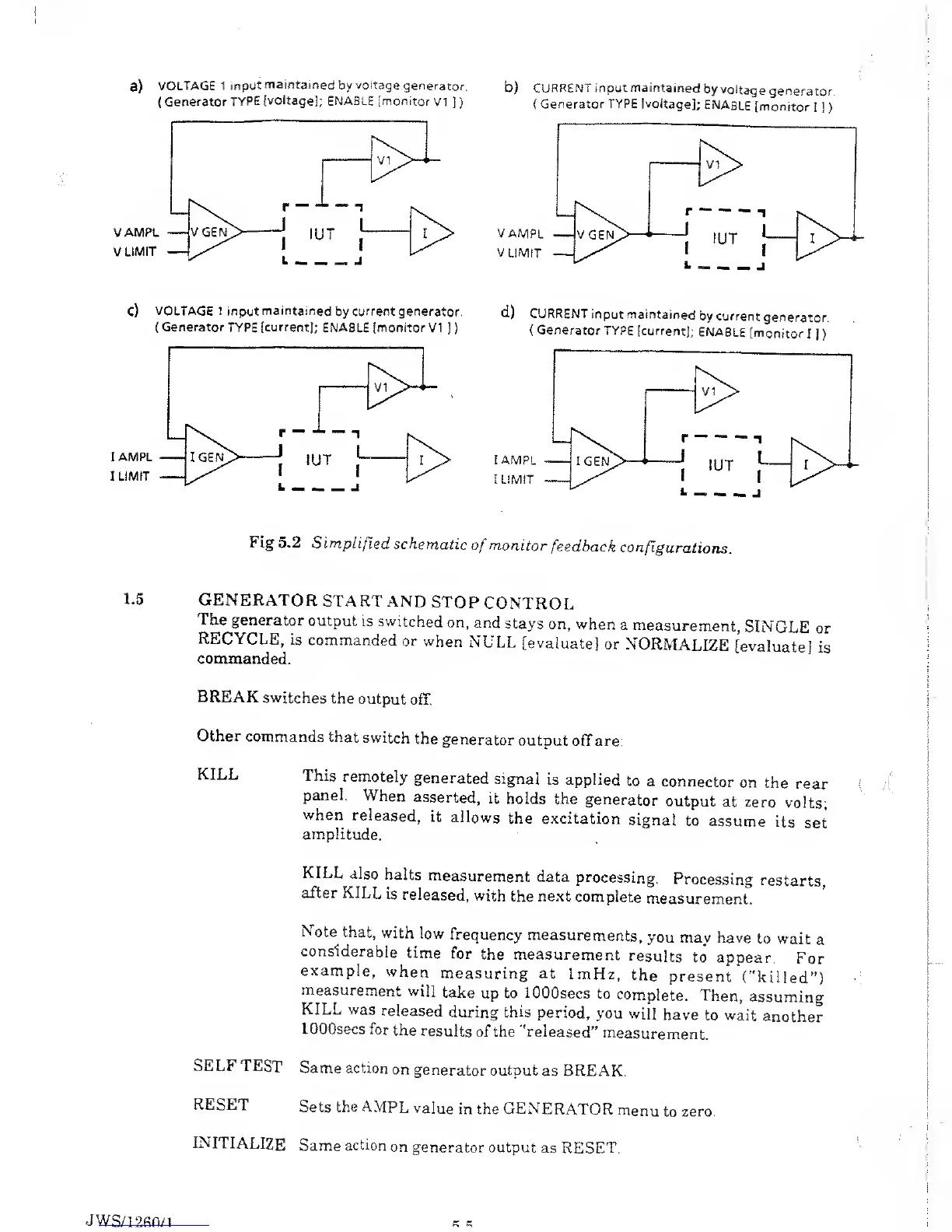
a)
VOLTAGE 1
input
maintained
by
voltage
generator.
b) CURRENT
input maintained
by
voltage
generator
(
Generator
TYPE
[voltage];
ENABLE [monitor
VI
]
) (
Generator
TYPE
[voltage];
ENABLE
[monitor
I
]
)
C)
VOLTAGE
1
input
maintained
by
current generator.
d)
CURRENT
input
maintained
by current
generator
(
Generator
TYPE
[current];
ENABLE [monitor
VI
J
) (
Generator
TYPE
[current];
ENABLE
[monitor
I
]
)
Fig 5.2
Simplified
schematic
of
monitor
feedback
configurations.
1.5
GENERATOR
START
AND
STOP
CONTROL
The generator
output
is switched
on,
and
stays
on, when
a
measurement,
SINGLE
or
RECYCLE,
is commanded
or
when
NULL
[evaluate]
or
NORMALIZE
[evaluate]
is
commanded.
BREAK
switches
the
output
off.
Other
commands
that
switch
the
generator
output
off are:
KILL
This
remotely
generated
signal
is applied
to
a connector
on
the
rear
panel.
When
asserted,
it
holds
the
generator
output
at
zero
volts;
when
released,
it
allows
the excitation
signal
to
assume
its
set
amplitude.
KILL also
halts
measurement
data
processing.
Processing
restarts,
after
KILL
is
released,
with
the
next
complete
measurement.
Note that,
with
low
frequency
measurements,
you may have
to wait
a
considerable
time
for
the measurement
results
to
appear.
For
example,
when
measuring at
ImHz,
the
present
("killed’')
measurement
will
take
up
to lOOOsecs
to
complete.
Then,
assuming
KILL was
released
during this
period,
you
will
have
to wait
another
lOOOsecs
for
the
results
of the "released”
measurement.
SELF
TEST
Same action
on
generator
output
as BREAK.
RESET
Sets the
AMPL
value
in the GENERATOR
menu
to
zero.
INITIALIZE
Same
action
on
generator output
as RESET.
JWS/1
200/1

Table of Contents

Related product manuals