EasyManua.ls Logo

Solartron 1260 - Page 88

Solartron 1260
295 pages
Print Icon
To Next Page IconTo Next Page
To Previous Page IconTo Previous Page
Loading...
5
.
3,1
nut;
Ciiiu/
,
. _
.
, c
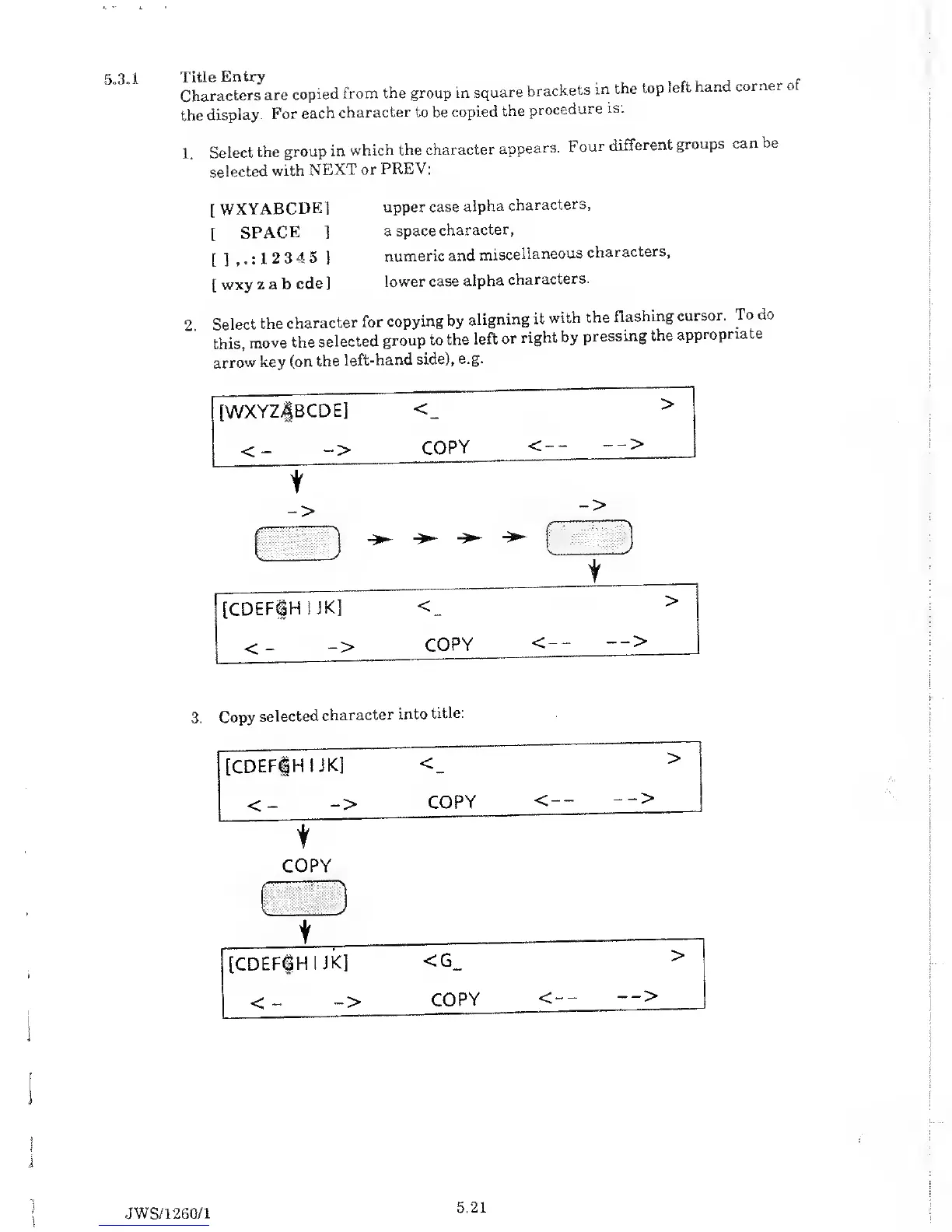
Characters
are
copied
from the group in
square
brackets
m
the
top
left hand,
corner
the
display.
For
each
character to be
copied
the
procedure
is:
1
Select
the
group
in
which the
character
appears.
Four
different
groups
can be
selected
with
NEXT
or
PREV:
[
WXYABCDE1
[
SPACE
]
[ ]
,
. : 1
2
3
4 5
]
[
wxy z
a b
cde]
upper case
alpha
characters,
a
space
character,
numeric
and
miscellaneous
characters,
lower
case
alpha
characters.
2.
Select
the
character
for
copying by
aligning
it
with
the
flashing
cursor.
To
do
this,
move
the
selected
group
to
the
left
or
right by
pressing
the
appropriate
arrow
key
(on
the
left-hand
side),
e.g.
[WXYZ|BCDE]
<_
>
<
->
COPY
<--
-->
->
_>
)
-
V
J
t
[CDEFfHIJK]
<
>
<
->
COPY
<--
Copy
selected
character
into
title:
[CDEFfHIJK]
<
>
<
->
COPY
<--
-->
t
COPY
j
t
[CDEFfHIJK]
<G_
>
<
:
-
-> COPY
<--
JWS/1260/1
5.21

Table of Contents

Related product manuals