3-41
BVW-55 P2
Removal
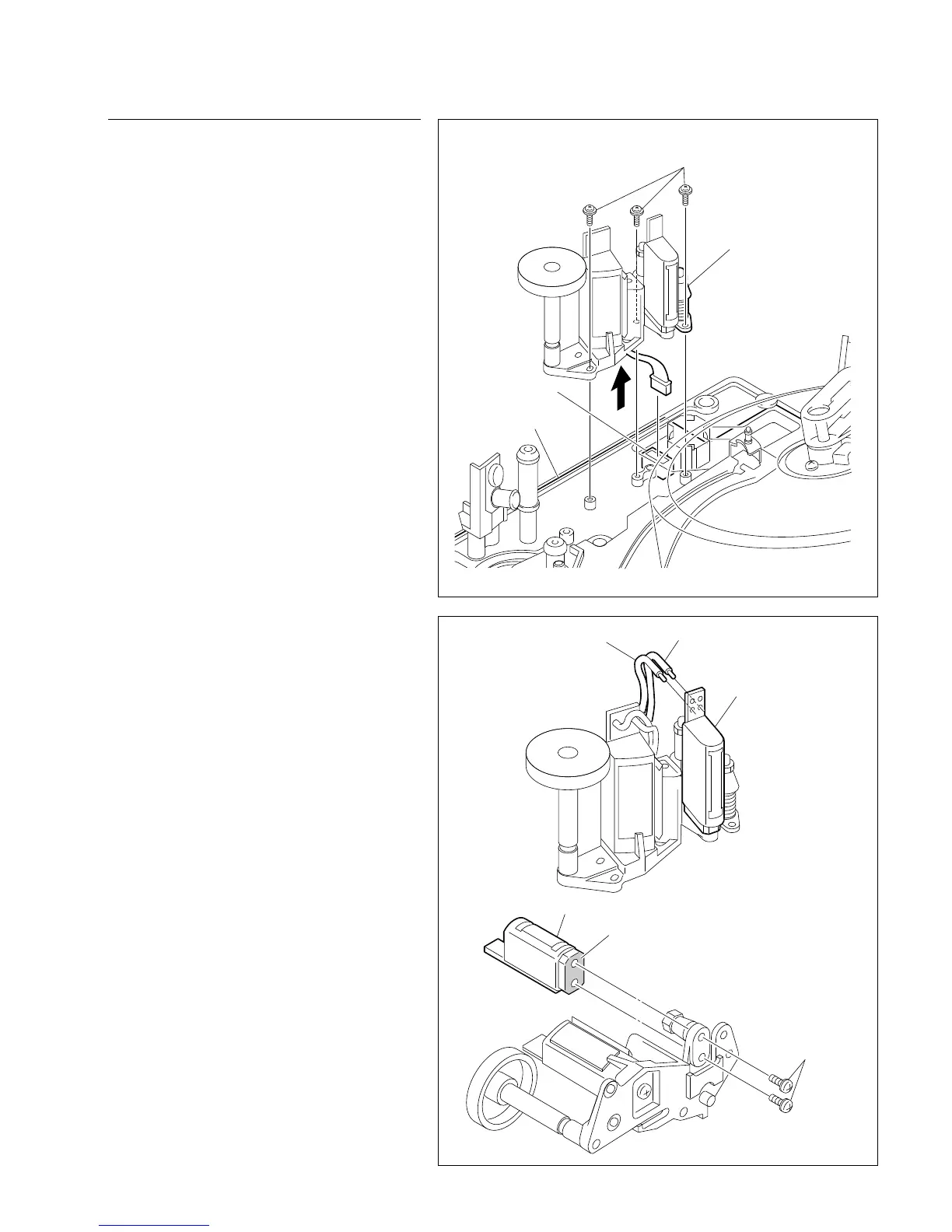
1. CTL/FE head assembly removal
(1) Disconnect connector CN401 on the SV-206
board.
(2) Remove the three screws, then remove the
CTL/FE head assembly from the mechanical
deck.
n
Be careful not to damage the video heads,
drum, full erase head, tape guide, and other
parts using a screwdriver.
2. CTL head replacement
(1) Unsolder the two wires connected to the
head.
(2) Remove the two screws at the back of the
CTL head, then remove the CTL head.
(3) Clean the contact surface and install a new
CTL head with two screws.
(4) Solder the two wires to the printed circuit
board of the CTL head.
(Refer to step (1) of procedure 2.)
n
Never make a mistake in the color and place
of the wire to be soldered. If so, a serious
trouble occurs in the compatibility of the
tape.
3-10. CTL Head Replacement
PWH1.4 x 3.5
CN401
CTL/FE head assembly
SV-206 board
PSW2 x 5
CTL head
CTL head
Harness (red)
Harness (gray)
Contact surface (cleaning)








 To Next Page