4-54
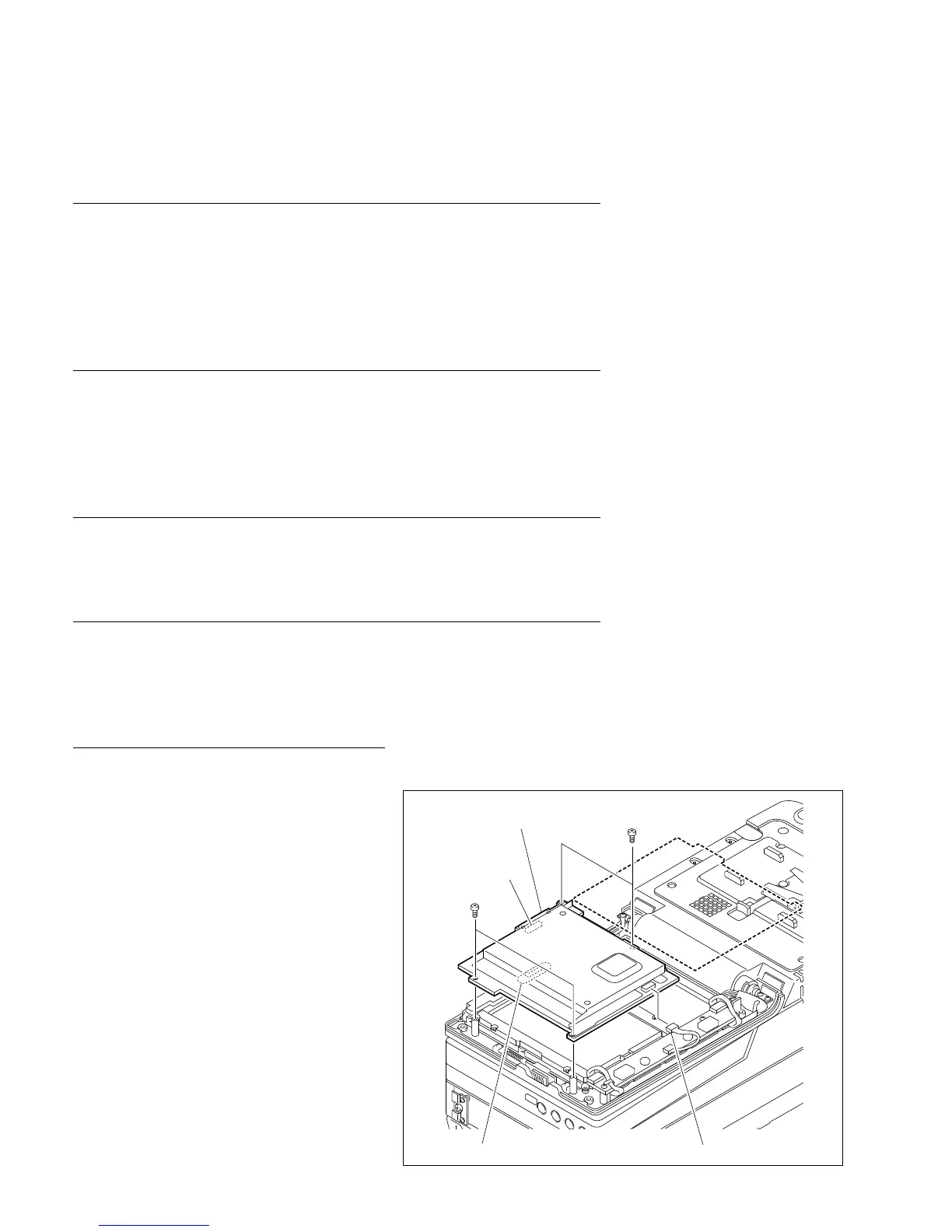
BVW-55 P2
B2 x 4
B2 x 4
CN6
CN7
CN-1541 board
DP-300 board
4-17. LCD Monitor and Backlight Replacement
4-17-1. Backlight Replacement
Outline
Replacement
DP-300 board removal
Backlights removal
Backlights installation
DP-300 board installation
Precaution
The two backlights are located on the top and bottom at the back side of the LCD
monitor. If either top or bottom of the backlight is turned off because of it reaches at
the end of its useful life, it is recommended to replace both backlights at the same
time.
Preparations
1. Turn off the power.
2. Remove the display panel cover. (Refer to Section 3-1-6.)
Tools
. Torque screwdriver (3 kg.cm): J-6325-400-A
. Torque screwdriver bit (for M1.4): J-6325-110-A
. Torque screwdriver bit (for M2): J-6325-380-A
Replacement
1. DP-300 board removal
(1) Disconnect the harness connector connected
to CN6 on the DP-300 board.
(2) Remove the four screws shown in the figure.
(3) Disconnect the connector CN7 connected to
the CN-1541 board below the DP-300 board
to lift the DP-300 board out.
4-17. LCD Monitor and Backlight Replacement
4-17-1. Backlight Replacement








 To Next Page