1-36
BVW-55
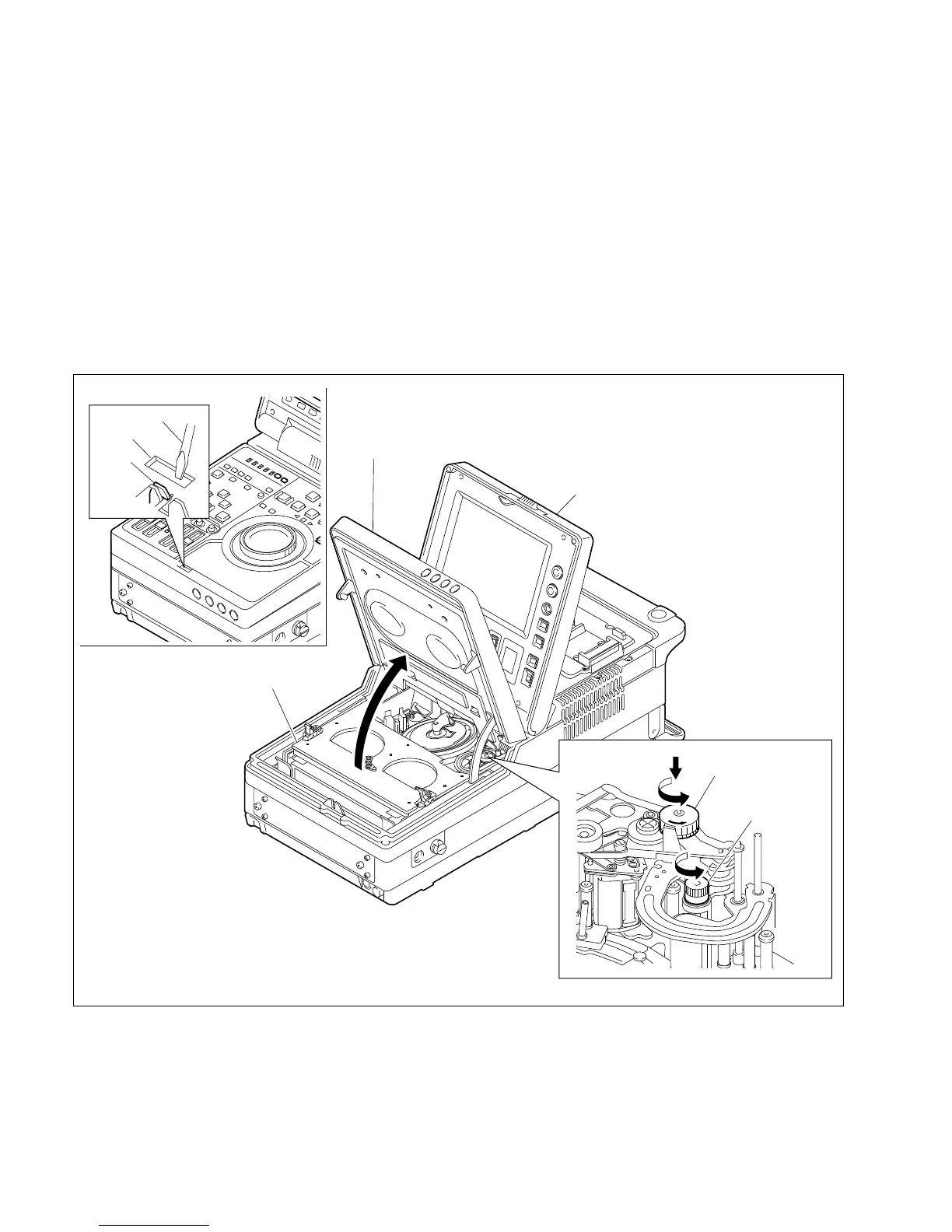
Hook
Driver
Hole
Control panel
Cassette compartment
Display panel
Manual eject
knob (red)
Turn while
pushing down
Capstan cap
portion
1-11. How to Take Out the Cassette When the Tape is Slacked
1. Open the display panel.
2. Insert a driver or similar item into the rectangular hole and unhook as shown in the figure. Open the
control panel.
3. Turn the manual eject knob (red) counterclockwise while pushing down.
4. Tape starting to slack, turn the capstan cap portion counterclockwise to take up the tape to the T reel.
5. Repeat procedures 3 and 4 until the cassette compartment is opened.
m
. Stop turning the manual eject knob just when the cassette compartment is opened.
. If the cassette compartment cannot be closed after taking the tape out by the above procedure, try to
turn the manual eject knob clockwise two or three turns while pushing down.
1-11. How to Take Out the Cassette When the Tape is Slacked








 To Next Page