4-70
BVW-55 P2
B2 x 4
B2 x 4
CN1
CN2
CN4
B2 x 4
Harness clamp
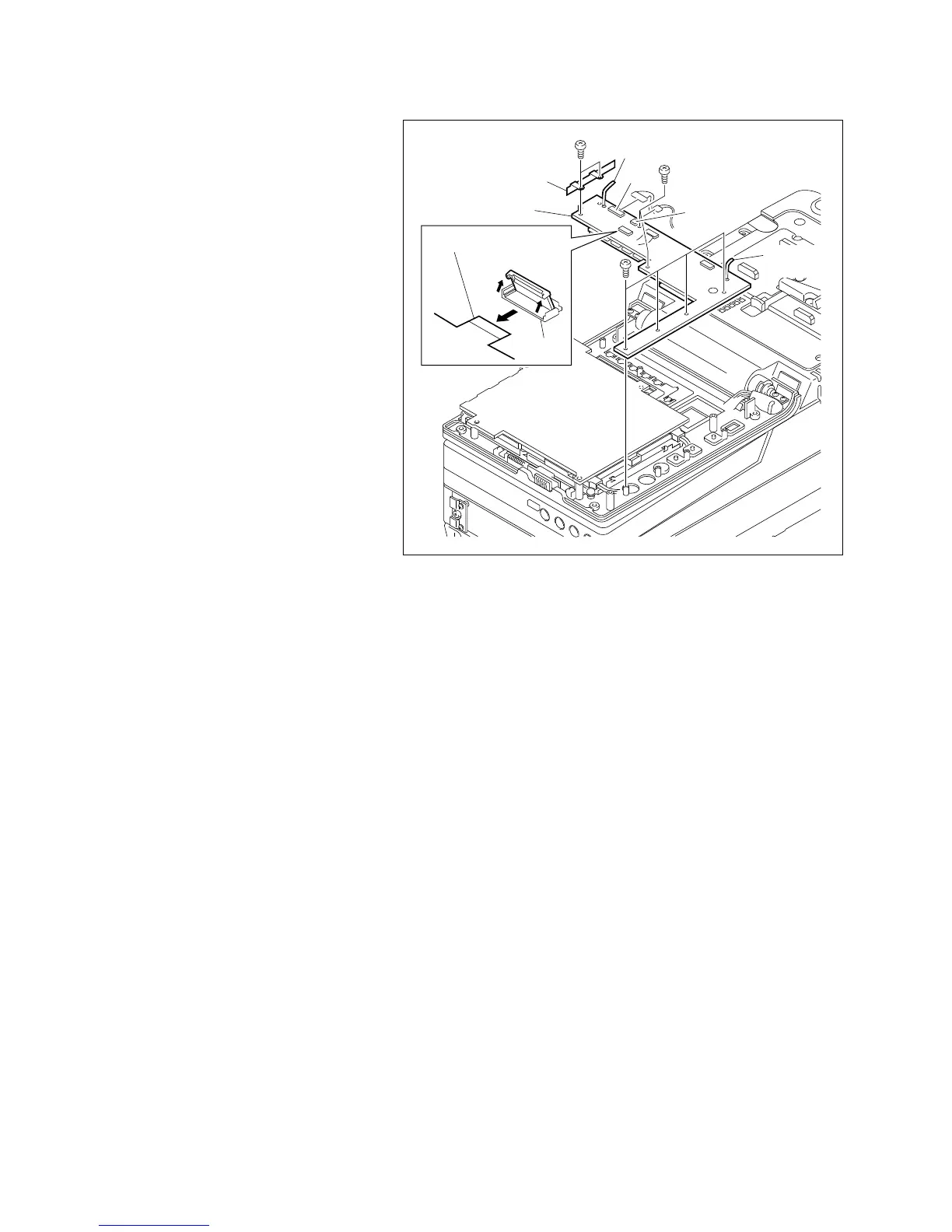
DP-264 board
Flexible card wire
Harness
clamp
Shield plate(C)
3. DP-264 board replacement
(1) Extend the two harness clamps on the DP-
264 board and release the harness bundling.
(2) Disconnect the flexible card wire from the
connector CN4 on the DP-264 board.
n
Be careful not to damage the flexible card
wire when it is disconnected.
(3) Disconnect the harness connectors connected
to connectors CN1 and CN2 on the DP-264
board.
(4) Remove the eight screws, then remove the
DP-264 board.
(5) Install a new DP-264 board in the reverse
order of steps (1) to (4).
4. Inverter board installation
Install the inverter board in the reverse order of
steps (1) to (2) in step 2.
5. Display panel cover installation
Install the display panel cover.
(Refer to Section 3-1-6.)
4-18-8. DP-264 Board Replacement








 To Next Page