5-13
BVW-55 P2
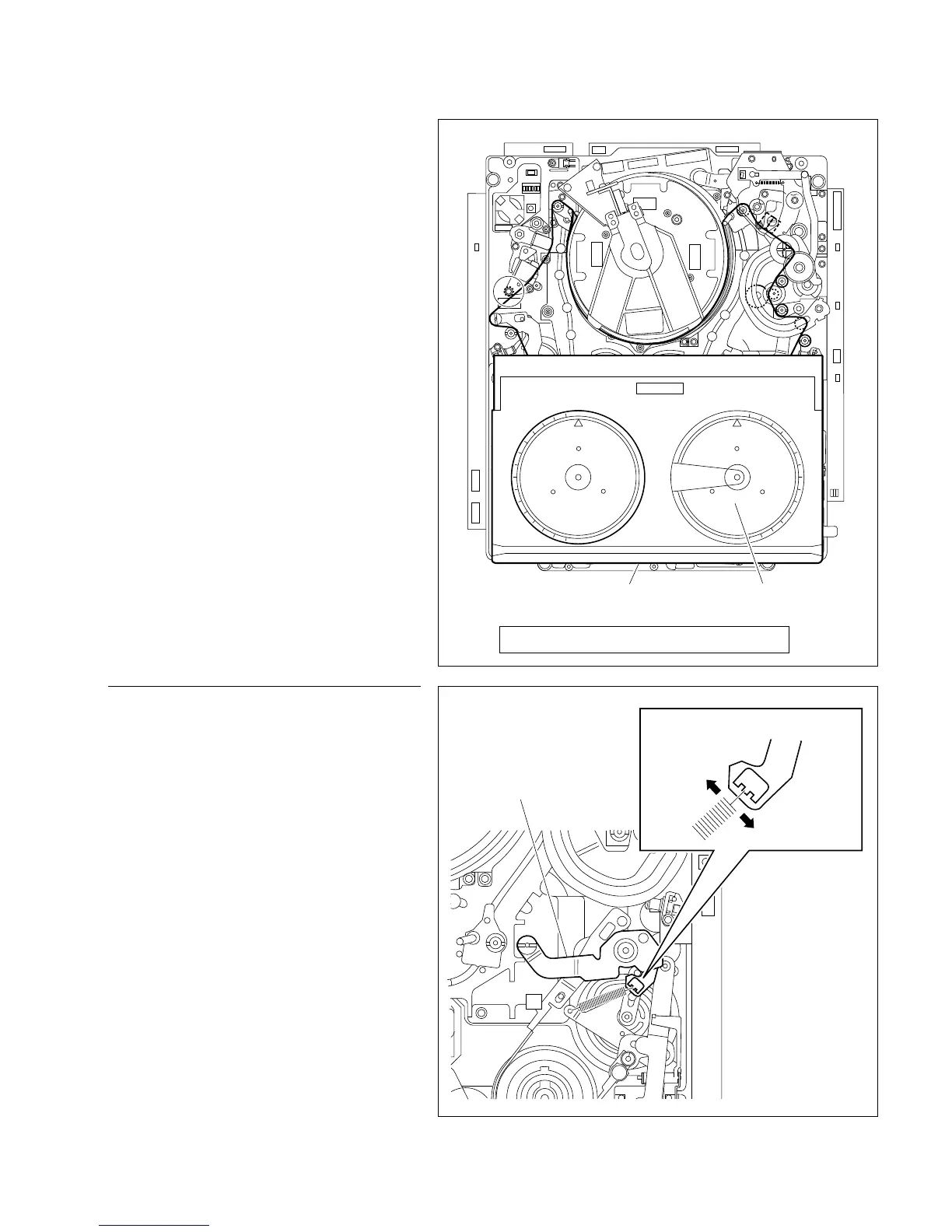
T sideFWD back tension measuring cassette tape
(Torque cassette)
Spec. : 490 x 10 ±49 x 10 N.m {50 ±5 gf.cm}
_5 _5
+
_
T tension regulator drawer arm
T tension regulator arm
2. REV back tension check
(1) Insert the torque cassette (FWD back ten.)
into the unit.
(2) Put the unit into the PLAY mode once, and
press the Search button (the unit enters the
search mode). Put the unit into REVx1 mode
by turning the Search dial.
(3) Check that the indication at T side of the
torque cassette meets the specification.
Specification:
490 x 10
_5
±49 x 10
_5
N.m {50 ±5 gf.cm}
If not to meet the specification, perform step 3.
5-3-2. REV Back Tension Check and Adjustment
Adjustment procedure
3. REV back tension adjustment
(1) Press the EJECT button, then unthreads the
tape.
(2) Take out the torque cassette.
(3) Hook the spring on other concave of the hole
of the T tension regulator drawer arm.
. When the meter readout is below the spec. :
Hook the spring on + side concave.
. When the meter readout is over the spec. :
Hook the spring on _ side concave.
(4) Recheck the REV back tension meets the
specification according to step 2.
n
After check and adjustment are completed, be
sure to set the switch S100-1 on the SV-206
board to OFF.








 To Next Page