5-28
BVW-55 P2
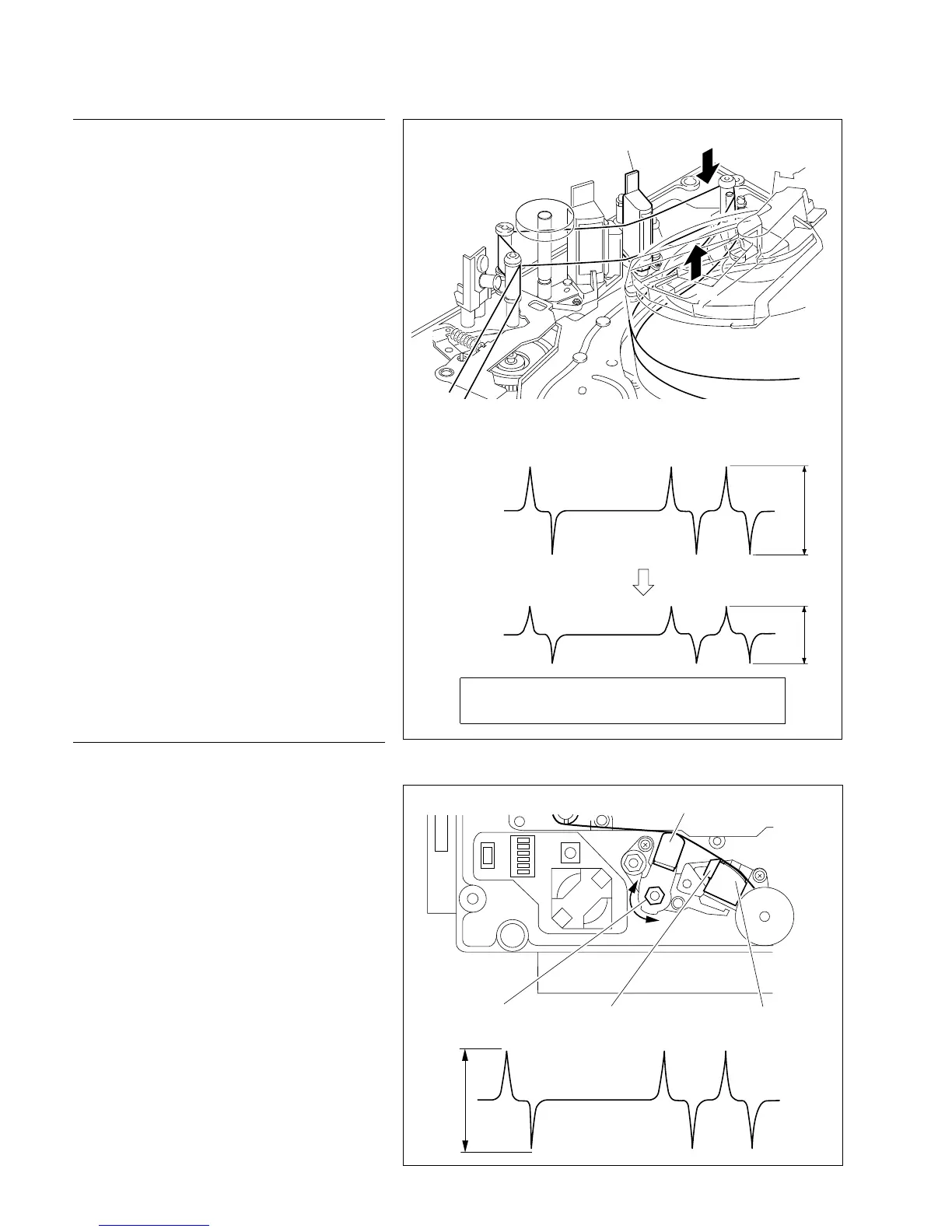
Tape cleaner
Full-erase head
Adjustment nut
Maximize
CTL head
Check procedure
5. Turn the power on
6. Play back the alignment tape
Play back the CR8-1A.
7. Check the CTL head height
(1) Check that the level decreases when portion
A of the tape shown in the figure is pressed
down.
If the level increases, perform step 8.
(2) Check that the level decreases when portion
B of the tape is pushed up.
If the level increases, perform step 9.
5-6. CTL Head Height Check and Adjustment
Spec.: The level decreases when pressing down and
pushing up the alignment tape.
Adjustment procedure
8. In case the level increases when the
tape is pressed down
Turn the adjustment nut counterclockwise and
adjust so that the output waveform is maximum.
And at that time, check the output level is 5 Vp-p or
more.
9. In case the level increases when the
tape is pushed Up
Turn the adjustment nut clockwise and adjust so
that the output waveform is maximum.
And at that time, check the output level is 5 Vp-p or
more.
n
After adjustment are completed, be sure to set
S100-1 switch to OFF position.
. Alignment tape : CR8-1A
<CTL output waveform>
A
B
CTL head








 To Next Page