1-1. DSR-2000
Location and Function of Parts
Chapter 1 Overview
26
Chapter 1 Overview
3 REC (record) INHIBIT switch
When this switch is set to ON, the REC INHIBIT
indicator in the display section lights, and recording on
tape is no longer possible. (See the description of
extended menu item 107.)
4 KEY INHIBIT switch
When this switch is set to ON, the KEY INHIBIT
indicator in the display section lights, and the buttons
in the upper control panel and lower control panel
specified by the setting of extended menu item 118 are
disabled.
5 PROCESS CONTROL switch
This selects the method of control of the internal
digital video processor.
REMOTE: Select this position to use an optional
UVR-60/60P or BVR-50/50P Remote Control
Unit for remote control of the internal digital
video processor.
MENU: Select this position to use the setup menu to
change the settings for the internal digital video
processor.
LOCAL: Select this position to use the subsidiary
control panel to change the settings for the internal
digital video processor.
6 INT/EXT–PRESET/REGEN (internal/external−
preset/regenerated) switch
This switch is used to make selections relating to the
time code and the internal time code generator.
(In this Operating Instructions, this switch may also be
called simply as the INT/EXT switch or PRESET/
REGEN switch depending on the contents of the
description in which the switch is referred to.)
Selection of internal/external time code
Selection relating to the internal time code generator
7 FREE RUN/REC RUN switch
This switch selects the time code run mode of the
internal time code generator.
FREE RUN: Regardless of the operating mode of
this unit, the time code value advances
continuously while the power is on.
REC RUN: The time code value advances only
during recording. When this mode is selected, set
the INT/EXT−PRESET/REGEN switch to INT−
PRESET.
8 DF/NDF (drop-frame/non-drop-frame) switch
(for the DSR-2000 only)
This switch selects the mode of advancing the time
code generator and time counter.
DF: Drop-frame mode
NDF: Non-drop-frame mode
Note
When the PRESET/REGEN switch is set to REGEN,
since the time code generator is synchronized to the
playback time code, this switch has no effect.
9 VITC switch
To record the time code produced by the internal time
code generator as a VITC, set this switch to ON.
When this switch is set to OFF, internally generated
time code is not recorded as VITC, but VITC present
in the input video signal is recorded unchanged.
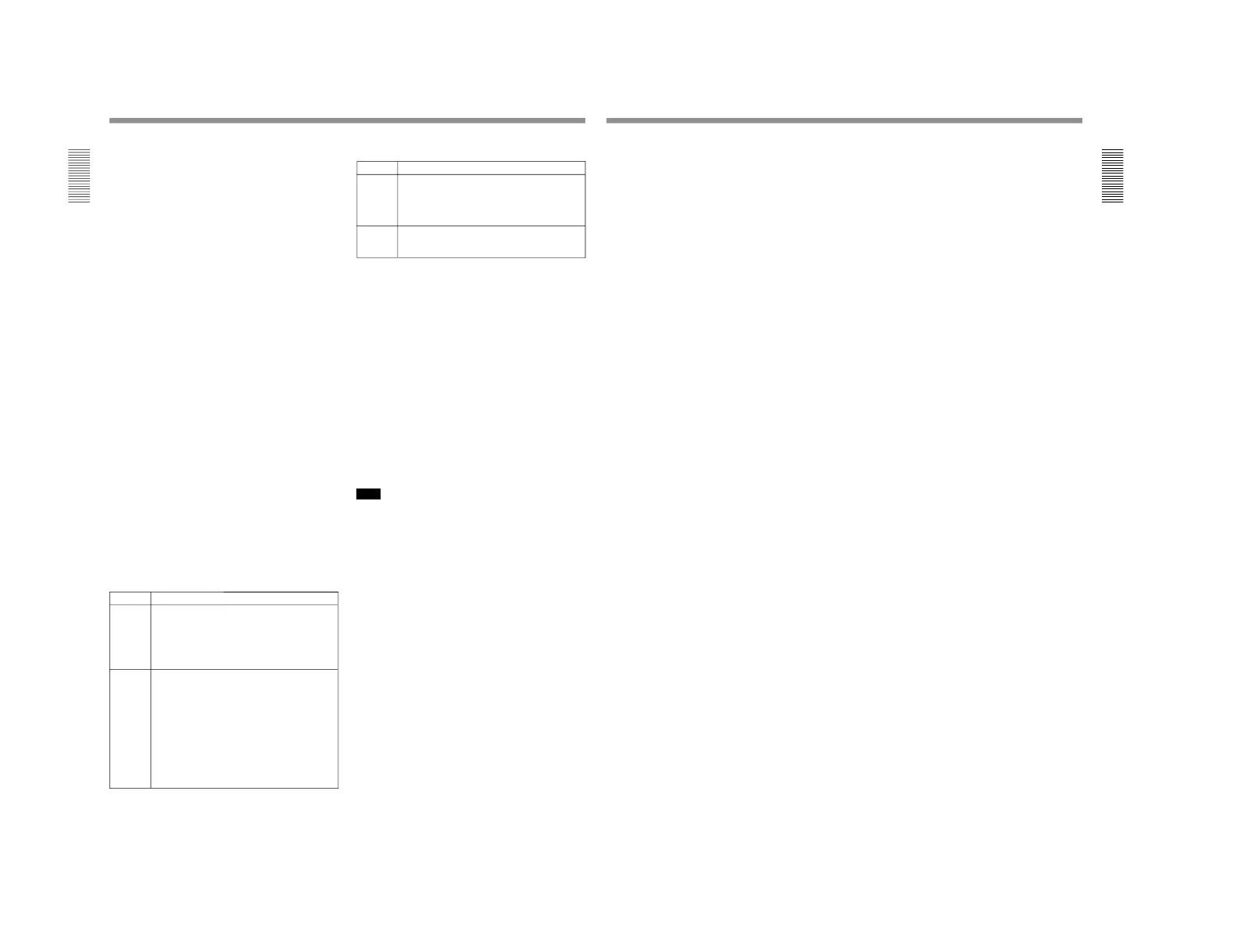
!º TC (time code) SELECT switch
This switch selects the time code, TC or VITC, shown
in the time counter display.
Setting
Operation of the internal time code generator
PRESET The initial value of the time code produced by
the internal time code generator can be preset
by a control panel operation or by remote control
from a device connected to the REMOTE-IN or
REMOTE-OUT connector.
REGEN The internal time code reader is synchronized to
the playback time code read by the internal time
code reader.
Setting
Time code used
INT
The time code produced by the internal time
code generator
By setting the switch to INT
–REGEN or INT–
PRESET, you can select
“PRESET” or “REGEN”
for the internal time code generator
(see the
next table)
.
EXT The external time code selected as follows.
• When the TC SELECT switch is set to TC
The external time code input to the TIME
CODE IN connector
• When the TC SELECT switch is set to VITC
The VITC time code included in the input
video signal
In this case, for the internal time code generator,
“REGEN” is always selected
(see the next
table)
.
Chapter 1 Overview
Chapter 1 Overview
27
!¡ VIDEO knob and PRESET/MANUAL switch
The switch makes the selection described below.
When it is set to MANUAL, you can use the knob to
adjust the video signal output level.
PRESET: Regardless of the position of the knob, the
video signal output level is set to the reference
value.
MANUAL: You can adjust the video signal output
level in the range ±3 dB.
You can change the adjustment range using
extended menu item 714.
!™ SET UP (DSR-2000)/BLACK LEVEL (DSR-
2000P) knob and PRESET/MANUAL switch
The switch makes the selection described below.
When it is set to MANUAL, you can use the knob to
adjust the (black) setup level (DSR-2000) or black
level (DSR-2000P).
PRESET: Regardless of the position of the knob, the
setup level (DSR-2000) or black level (DSR-
2000P) is set to the reference value.
MANUAL: You can adjust the setup level (DSR-
2000) in the range ±30 IRE
1)
, or the black level
(DSR-2000P) in the range ±210 mV.
!£ CHROMA (chrominance) knob and PRESET/
MANUAL switch
The switch makes the selection described below.
When it is set to MANUAL, you can use the knob to
adjust the chrominance signal output level.
PRESET: Regardless of the position of the knob, the
chrominance signal output level is set to the
reference value.
MANUAL: You can adjust the chrominance signal
output level in the range ±3 dB.
You can change the adjustment range using
extended menu item 714.
1) IRE: A unit for representing a video level laid down by
the IRE (Institute of Radio Engineers). The IRE is now
the IEEE (Institute of Electrical and Electronic
Engineers).
...............................................................................................................................
..........................................................
!¢ Y/C DELAY knob and PRESET/MANUAL
switch
The switch makes the selection described below.
When it is set to MANUAL, you can use the knob to
adjust the Y/C delay.
PRESET: Regardless of the position of the knob, the
Y/C delay is set to the reference value.
MANUAL: You can adjust the Y/C delay in the
range ±100 ns.
!∞ CHROMA PHASE (HUE) (DSR-2000)/
CHROMA PHASE (DSR-2000P) knob and
PRESET/MANUAL switch
The switch makes the selection described below.
When it is set to MANUAL, you can use the knob to
adjust the hue/chrominance phase (the phase
difference from a burst signal).
PRESET: Regardless of the position of the knob, the
hue/chrominance phase is set to the reference
value.
MANUAL: You can adjust the hue/chrominance
phase in the range ±30°.
!§ SYNC knob
This adjusts the output signal sync phase with respect
to the input reference signal to this unit in the range ±3
µs.
Use this adjustment when the output phase of this unit
is not accurately aligned with the reference signal
phase, or when carrying out special effects editing with
this unit and other VCRs connected to a switcher or
other equipment.
!¶ SC (subcarrier) knob
This adjusts the output signal subcarrier phase with
respect to the input reference signal to this unit in the
range ±180°.
For editing with composite signals, use this adjustment
when the output phase of this unit with respect to the
phase of the reference signal is not accurately aligned
with the subcarrier phase.



 To Next Page