1-1. DSR-2000
Chapter 4 Editing
84
Chapter 4 Editing
DMC Editing
You can carry out variable speed editing, controlling the player playback
speed from the recorder.
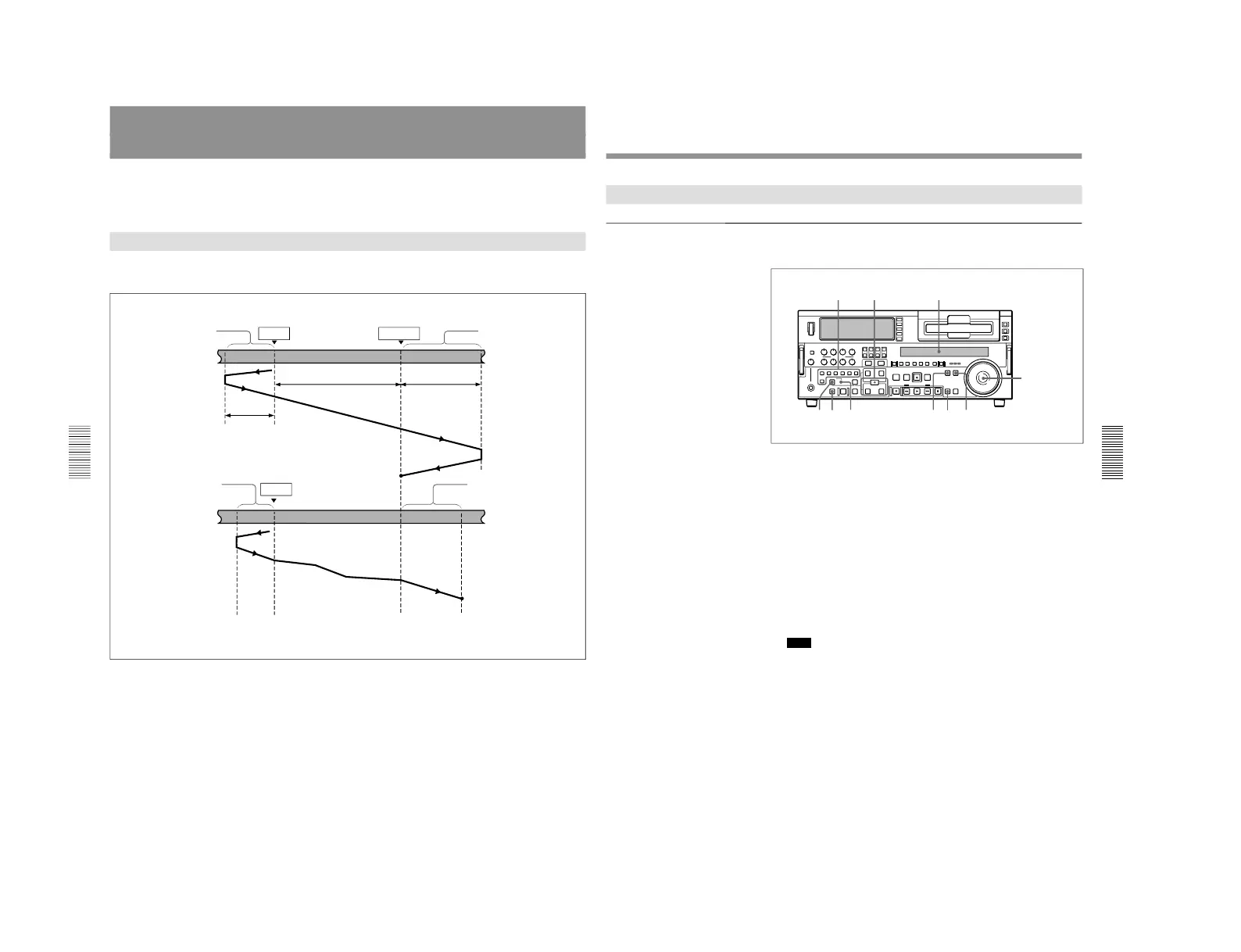
Overview of DMC Editing
The following figure illustrates how the tapes move on both the player and
recorder during DMC editing.
DMC editing can be used for insert or assemble editing, but cannot be used
for audio split editing.
DMC editing cannot be carried out using the i.LINK connector.
Preroll
Recorder
IN point
OUT point
Postroll
Playback
DMC editing
Playback
Stop
Preroll time × initial speed
Player
IN point
Postroll time × final speed
Tape
moves at
initial
speed
Playback at stored varying speed
Tape moves at
final speed
Stop
Chapter 4 Editing
Chapter 4 Editing
85
Carrying Out DMC Editing
Setting the edit points and player speed
Use the following procedure.
1
Press the RECORDER button.
2
Press the ASSEMBLE button or INSERT button to select an edit
mode.
3
Press the DMC EDIT button.
The unit switches to the DMC edit mode, and the DMC EDIT button
lights.
4
Holding down the ENTRY/SHIFT button, press the IN or OUT button
to set an edit point.
5
Press the PLAYER button, to set the player IN point.
Note
It is not possible to set the player OUT point.
6
Press the SEARCH button or search dial so that the SHUTTLE
indicator in the display section is lit.
7
Holding down the DMC EDIT button, turn the search dial to set the
initial speed.
To select normal speed as the initial speed, press the PLAY button.
The speed you set appears in the display section.
8
When the initial speed setting is complete, release the DMC EDIT
button.
MEMORY indicator



 To Next Page