Other Information
87
Other Information
D:\WINNT\Profiles\fujii\Desktop\Troy book source\2597544111c20_TROY
Source data\01US08OTH.fm
masterpage:3 columns Right
KDF-E42A10/KDF-E50A10
2-597-544-11(1)
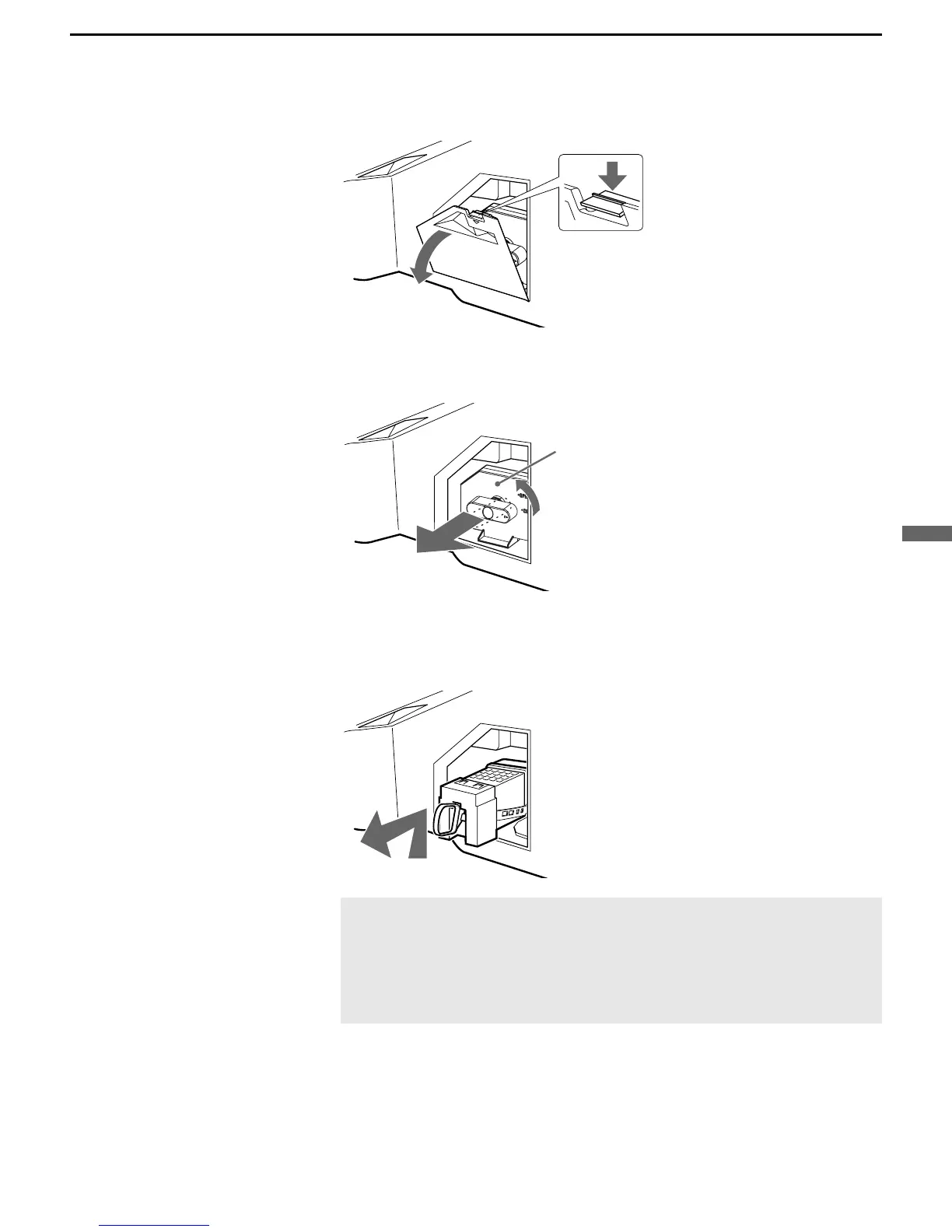
4 Remove the outside lamp cover.
5 Remove the lamp door.
Turn the knob counterclockwise to OPEN and pull out the cover.
6 Pull out the lamp.
Hook a finger through the loop of the lamp handle and pull the handle
upwards. Then pull the lamp straight out.
✍ The lamp is very hot immediately after use. Never touch the
glass portion of the lamp or the surrounding parts.
✍ After the used lamp has cooled, place it into the empty box of
the replacement lamp. Never put the used lamp into a plastic
bag.
Lamp door
(Continued)



 To Next Page