RB1G CHASSIS
W600A/ W603A/ W605A/ W607A/ W650A/ W651A/ W653A/
W654A/ W655A/ W656A/W657A/ W658A/ W670A/ W674A
Service Adjustment
220
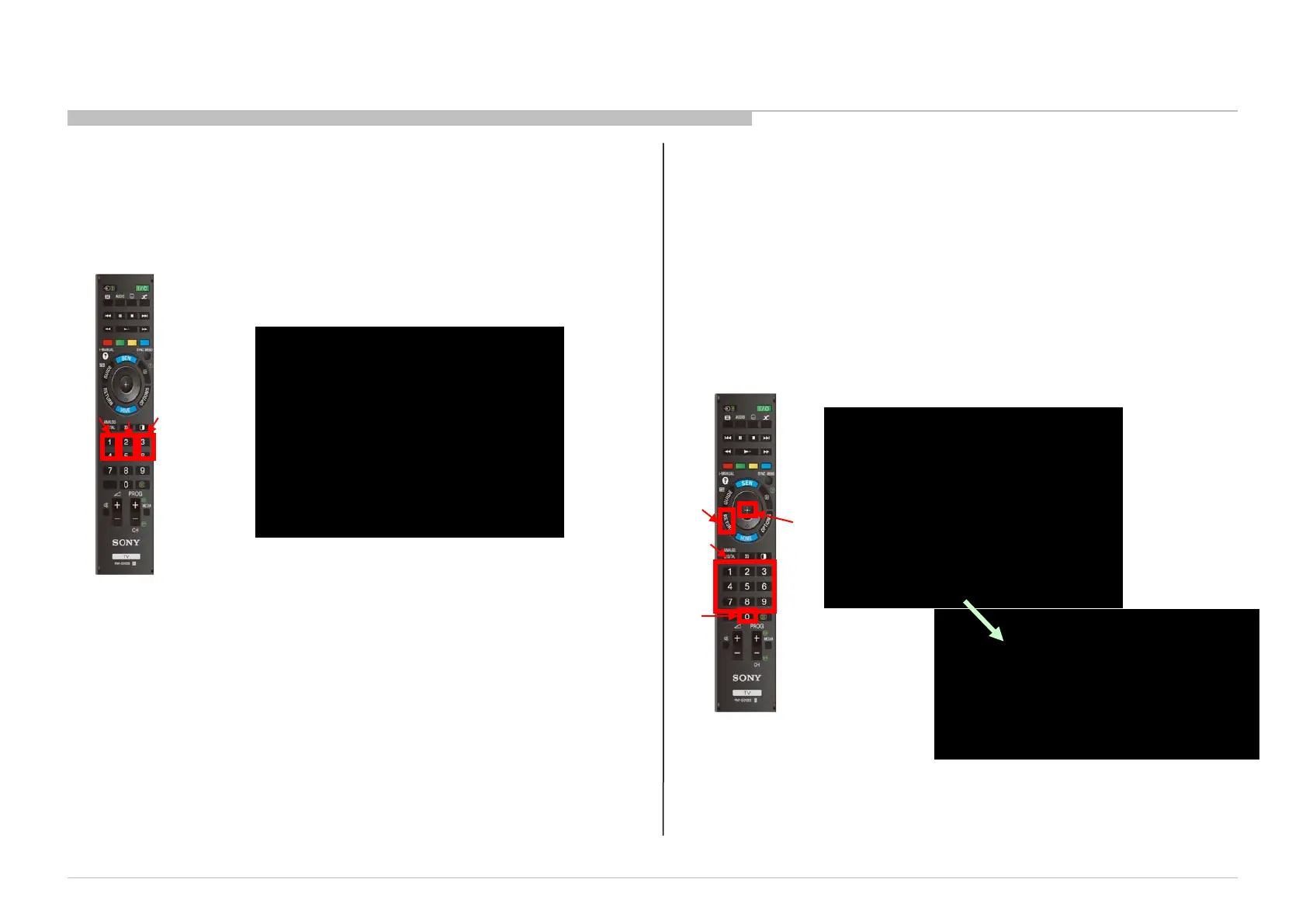
1. Change Data of “Digital” service mode (except “003 DIG_SRV_MODE”
category)
a. Press “2 / 5” on remote to select (up / down) category.
b. Press “1 / 4” on remote to select (up / down) Item.
c. Press “3 / 6” on remote to change (up / down) data.
4-5. Change Data by Service Mode 2
Remote Commander
a
b
c
DIGITAL Service menu
“Digital” service mode don’t have to Save. (except “002 MODEL”)
DIGITAL SERVICE
004 TUNER
000 !A_NOSIG_DET 001
VIDEO:STANDARD AUDIO:STANDARD
PSAVE:STANDARD
MAIN: SUB:
TUNER/----/---- ----/----/NTSCU
----X----/----- ----X----/-----
-----/--- -----/---
Remote Commander
DIGITAL SERVICE
003 DIG_SRV_MODE
000 TEST_PATTERN ---
VIDEO:STANDARD AUDIO:STANDARD
PSAVE:STANDARD
MAIN: SUB:
TUNER/----/---- ----/----/NTSCU
----X----/----- ----X----/-----
-----/--- -----/---
DIGITAL Service menu
DIGITAL(DIG_SRV_MODE) SERVICE
TEST_PATTERN
*1 Video
2 Audio
e
d
c
e
2. Change Data of “Digital” service mode ( “003 DIG_SRV_MODE”
category). “003 DIG_SRV_MODE” is one category of “Digital” service
mode. Please note because this operation is special.
a. Press “2 / 5” on remote to select “003 DIG_SRV_MODE”.
b. Press “1 / 4” on remote to select (up / down) Item.
c. Press “0 / 10” on remote to select item.
d. Press number key “1”~”9” directly. “*” stamp move.
e. Press “12 / enter / select” to decide and advance to the next
step. Press “return”, to return to the previous page.



 To Next Page