15
Hookups and Settings
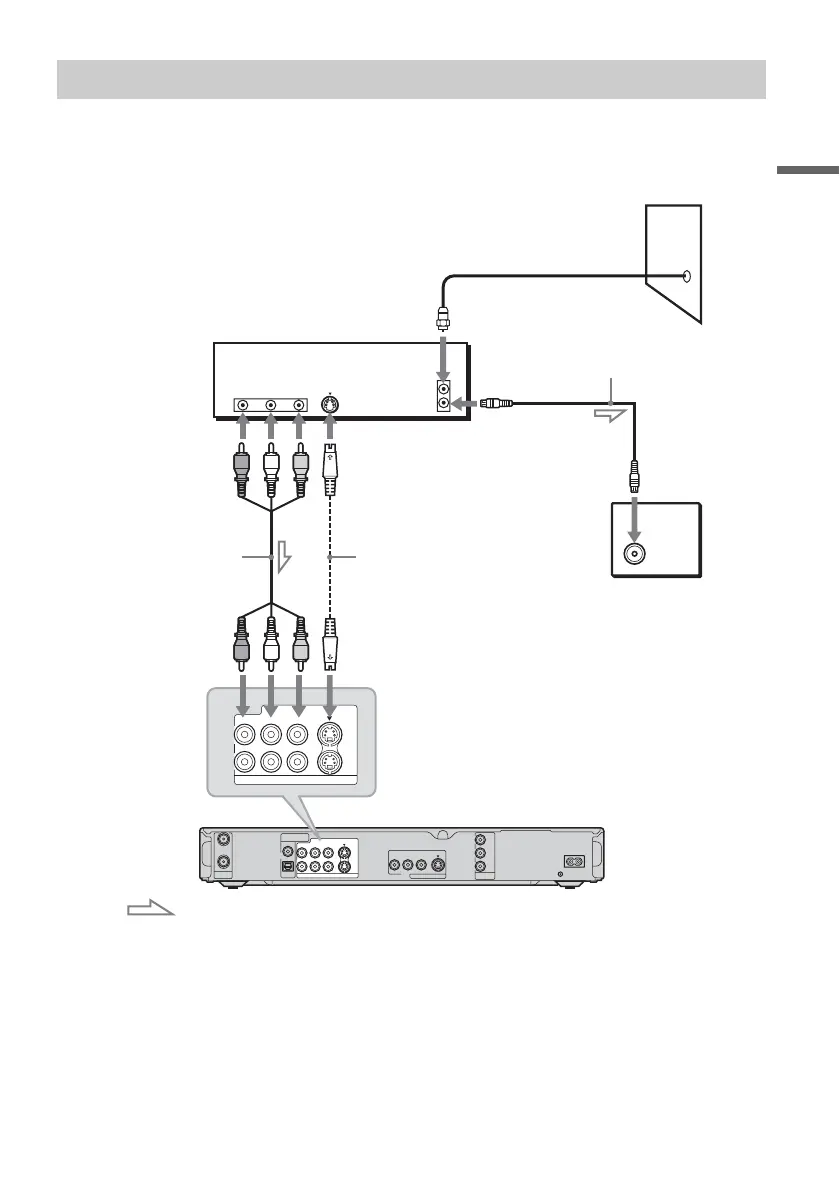
With this hookup, you can record any channel on the cable box or satellite receiver. Be sure that the
satellite receiver or cable box is turned on.
To watch cable or satellite programs, you need to match the channel on the recorder (L1 (line1) or L3
(line3)) to the input jack connected to the cable box or satellite receiver (LINE IN (line in) 1 or 3).
z Hints
• If your cable box or satellite receiver has an S-video jack, you can use an S-video cord (not supplied) instead of the
audio/video cord.
• If you connect an S-video cord to the LINE IN (line in) 1 jack, set “Line1 Input” in “Video” setup to “S Video”
(page 85). If you connect an S-video cord to the LINE IN (line in) 3 jack, set “Line3 Input” in “Video” setup to
“S Video” (page 86).
A: Cable box or satellite receiver with a video/audio output
ANT IN
RL
S VIDEO
AUDIO
OUT
VIDEO
OUT
TO TV
COAXIAL
DIGITAL OUT
OPTICAL
PCM/DTS/DOLBY DIGITAL
VHF/UHF
IN
COMPONENT
VIDEO OUT
LINE OUT
VIDEO
S VIDEO
R-AUDIO-L
PB
Y
P
R
~ AC IN
OUT
1
3
VIDEO
S VIDEO
R-AUDIO-L
LINE IN
1
3
VIDEO
S VIDEO
R-AUDIO-L
LINE IN
to LINE IN (line in) 1 or 3
DVD (digital video
disc) recorder
Audio/video cord
(not supplied)
: Signal flow
Cable box/satellite receiver
Antenna cable
(supplied)
to antenna input
S-video cord
(not supplied)
Wall
TV
,continued



 To Next Page