104
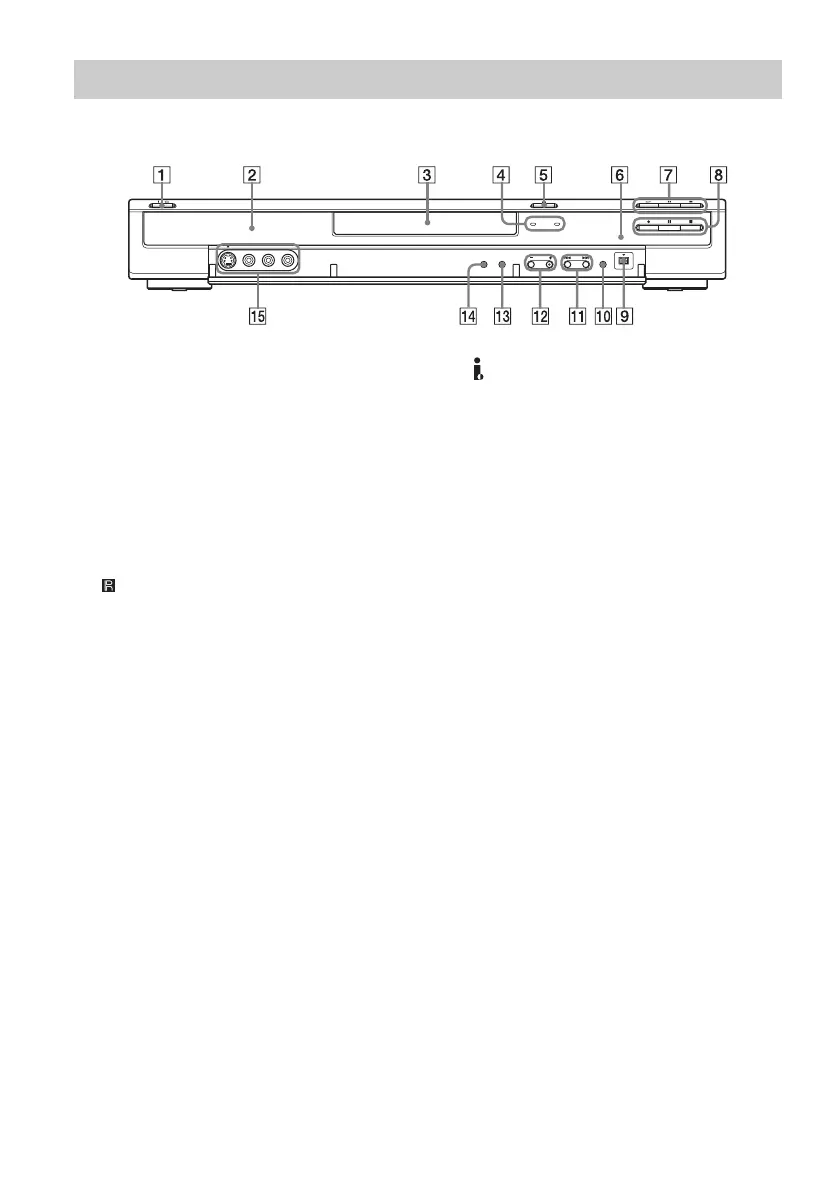
A ?/1 (on/standby) button (25)
B Front panel display (38, 105)
C Disc tray (31)
D TIMER REC (timer recording) indicator
(45)
SYNCHRO REC (synchro recording)
indicator (52)
E A (open/close) button (31)
F (remote sensor) (22)
G H (play) button (55)
X (pause) button (57)
x (stop) button (55)
H z REC (recording) button (33)
X REC PAUSE (recording pause) button
(33)
x REC STOP (recording stop) button (33)
I DV IN (digital video in) jack (77)
J ONE-TOUCH DUB (one-touch dubbing)
button (79)
K . (previous)/> (next) buttons (57)
L CHANNEL (channel) +/–
buttons (33)
The + button has a tactile dot*.
M INPUT SELECT (input select) button (53,
77)
N REC MODE (recording mode) button (43)
O LINE 2 IN (line 2 in) (S VIDEO (S video)/
VIDEO (video)/AUDIO L (MONO)/R
(audio left (mono)/right)) jacks (29)
* Use the tactile dot as a reference when operating the
recorder.
Front panel



 To Next Page