29
Hookups and Settings
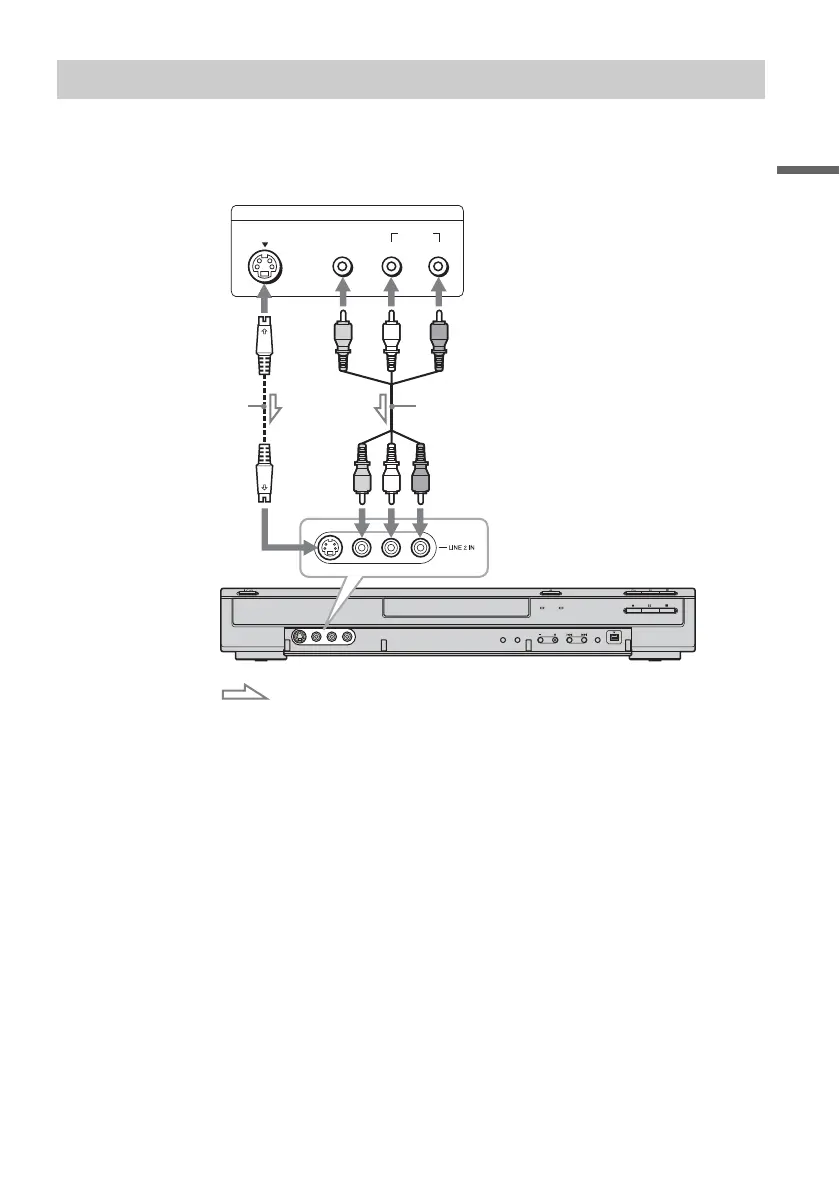
Connect a VCR (video cassette recorder) or similar recording device to the LINE 2 IN (line 2 in) jacks of
this recorder. If the equipment has an S-video jack, you can use an S-video cord instead of an audio/video
cord.
z Hint
When the connected equipment outputs only monaural sound, connect to just the L (MONO) (left (mono)) and VIDEO
(video) input jacks on the front of the recorder. Do not connect the R (right) input jack.
b Notes
• Do not connect the yellow LINE IN (line in) (VIDEO (video)) jack when using an S-video cord.
• Do not connect the output jack of this recorder to another equipment’s input jack with the other equipment’s output
jack connected to the input jack of this recorder. Noise (feedback) may result.
• Do not connect more than one type of video cord between the recorder and your TV at the same time.
Connecting to the LINE 2 IN (line 2 in) jacks on the front panel
OUTPUT
S VIDEO
AUDIO
LR
VIDEO
S VIDEO VIDEO AUDIO RL (MONO)
VCR (video cassette recorder), etc.
Audio/video cord
(not supplied)
S-video cord
(not supplied)
to LINE 2 IN (line 2 in)
DVD (digital video disc) recorder
: Signal flow



 To Next Page