28
Connecting a VCR (video cassette recorder) or Similar
Device
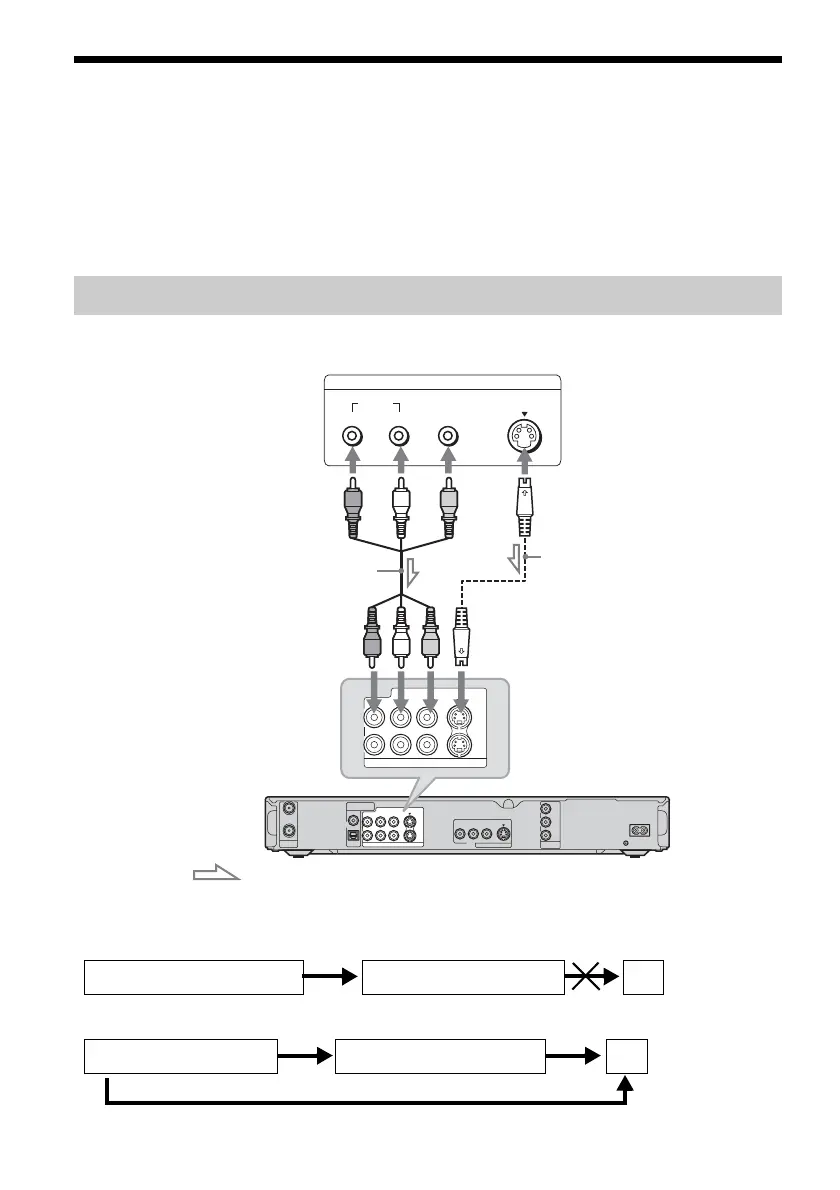
After disconnecting the recorder’s power cord from an AC outlet, connect a VCR (video cassette
recorder) or similar recording device to the LINE IN (line in) jacks of this recorder.
Use the DV IN (digital video in) jack on the front panel if the equipment has a DV (digital video) output
jack (i.LINK jack) (page 77).
See also the instruction manual supplied with the connected equipment.
To record on this recorder, see “Recording from connected equipment without a timer” on page 53.
Connect a VCR or similar recording device to the LINE IN 1 or 3 of this recorder. If the equipment has
an S-video jack, you can use an S-video cord instead of an audio/video cord.
b Notes
• Pictures containing copy protection signals that prohibit any copying cannot be recorded.
• If you pass the recorder signals via the VCR (video cassette recorder), you may not receive a clear image on your TV
screen.
Be sure to connect your VCR (video cassette recorder) to the DVD (digital video disc) recorder and your TV in the
order shown below. To watch video tapes, watch the tapes through a second line input on your TV.
• If you disconnect the recorder’s power cord, you will not be able to view the signals from the connected VCR (video
cassette recorder).
Connecting to the LINE IN (line in) 1 or 3 jacks
COAXIAL
DIGITAL OUT
OPTICAL
PCM/DTS/DOLBY DIGITAL
VHF/UHF
IN
LINE IN
COMPONENT
VIDEO OUT
LINE OUT
VIDEO
S VIDEO
R-AUDIO-L
PB
Y
P
R
~ AC IN
OUT
1
3
VIDEO
S VIDEO
R-AUDIO-L
1
3
VIDEO
S VIDEO
R-AUDIO-L
LINE IN
LINE OUTPUT
S Video
AUDIO
RL
VIDEO
VCR (video cassette recorder),
etc.
DVD (digital video disc) recorder
Audio/video cord
(not supplied)
S-video cord
(not supplied)
: Signal flow
to LINE IN (line in) 1 or 3
VCR (video cassette recorder)
DVD (digital video disc) recorder
TV
VCR (videocasette recorder) TV
Line input 1
Line input 2
DVD (digital video disc) recorder



 To Next Page