51
Timer Recording
If the timer settings overlap, the program that was
set last has priority and will be recorded. A timer
recording of lower priority may be canceled, start
from the middle or stop midway through the
program.
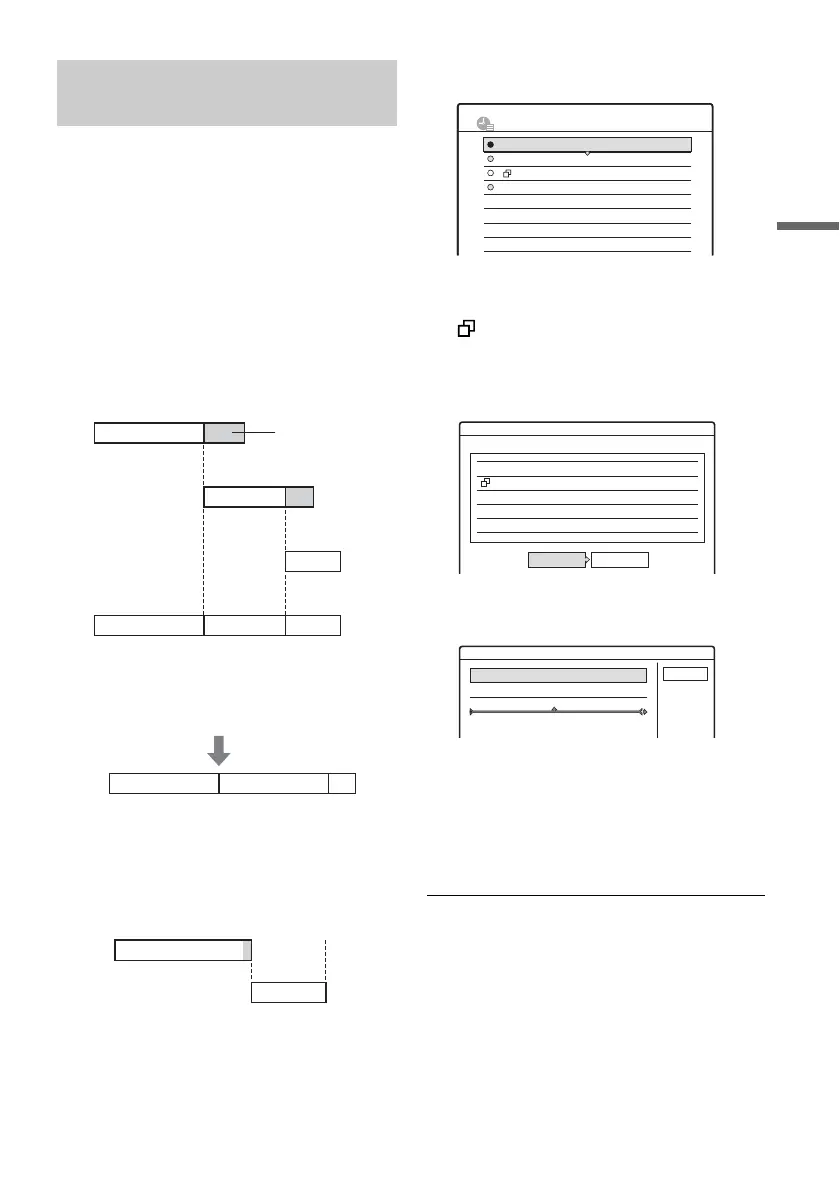
You can change the priority of a program if
necessary.
When the timer settings overlap
The program set last has priority.
Example: You set the timer in order of A, B, and
C (setting C has first priority)
If you give setting B priority over setting C, all of
program B will be recorded and program C is
recorded only after program B has ended.
If the end time of one recording and the start
time of another are the same
The end of program A will be cut.
1 Press TIMER LIST (timer list).
The Timer List appears.
2 Select an overlapped timer setting, and
press ENTER (enter).
indicates that the timer setting is
overlapped by another timer setting.
3 Select “Check Overlap,” and press ENTER
(enter).
4 Select “Change,” and press ENTER
(enter).
5 Press M/m to change the timer setting’s
priority, and press ENTER (enter).
The setting moves to its new location in the
list. A timer setting higher up in the list has
higher priority.
To return to the Timer List, select “Cancel.”
z Hint
You can change the priority of a timer setting while
recording.
Changing the priority of
overlapped settings
7:00
7:00 9:00 10:30
A
9:00 11:00
ABC
C
10:30
B
will be cut off
Actual recording
7:00 9:00 11:00
ABC
7:00 9:00 10:00
A
B
10:30PM
TIMER LIST
10:00PM -10:15PM
SP
SP
SLP
SLP
4:00PM - 5:00PM
9:00PM -10:00PM
8:30PM - 9:30PM
Mon-Sat
Fri 10/29
Fri 10/29
Sat 10/30
4ch
25ch
3ch
125ch
Check Overlap
These timer settings overlap.
10/29 8:30PM - 9:30PM 25ch SP
10/29 9:00PM -10:00PM 3ch
Fri
Fri SLP
Change Close
Fri
10/29 9:00AM - 10:15AM 3ch SLP
Where do you want to move this timer setting?
Mon-Sat 10:00AM - 10:30AM 25ch SP
Change priority
Cancel



 To Next Page