83
Settings and Adjustments
3 Select the channel you want to preset using
the number buttons and the SET (set) button.
To disable a channel, select the channel using
CH (channel) +/–.
4 Select “Manual Set,” and press ENTER
(enter).
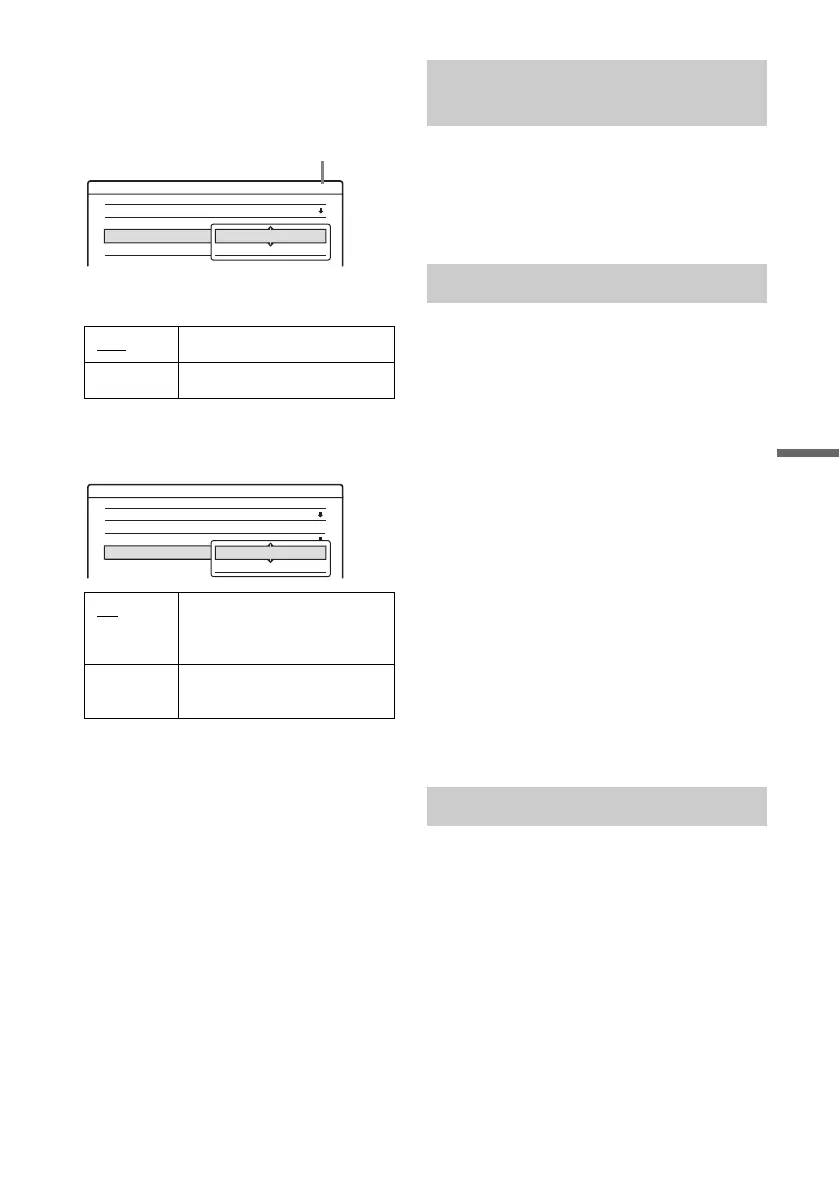
5 Select “Add” to preset the channel, and press
ENTER (enter).
6 Select “AFT” and press ENTER (enter).
7 Select “On” to turn on AFT (Auto Fine
Tuning), and press ENTER (enter).
To preset or disable another channel, repeat
from step 2.
• If the Auto Fine Tuning function does not
work effectively, select “Off” in step 6 and
press ENTER (enter). When the fine tuning
bar appears, press </, to obtain a clearer
picture, and press ENTER (enter).
8 To preset or disable another channel, repeat
steps 3 to 7.
Sets up the guide channel number assigned to each
channel.
You need to set this correctly to make timer
recordings with the VCR Plus+ (video cassette
recording plus) function. For details, see page 26.
Auto (Auto Clock Set)
This function cannot be used in your area.
Manual (Manual Clock Set)
If the Auto Clock Set function did not set the clock
correctly for your local area, set the clock
manually.
1 Select “Clock” in “Settings,” and press
ENTER (enter).
2 Select “Manual,” and press ENTER (enter).
3 Press M/m to set the month, and press ,.
Set the day, year, hour, and minutes in
sequence. Press </, to select the item to be
set, then press M/m to set the numbers. The
day of the week is set automatically.
4 Press ENTER (enter) to start the clock.
z Hint
To change the numbers in step 3, press < to return to the
item to be changed, and select the numbers by pressing
M/m.
OSD (On-Screen Display)
Switches the display language on the screen.
DVD Menu (DVD VIDEO (digital video disc,
video) only)
Switches the language for the DVD (digital video
disc) menu.
Audio (DVD VIDEO (digital video disc, video)
only)
Switches the language of the sound track.
When you select “Original,” the language given
priority in the disc is selected.
Add Presets the channels.
Erase Disables the channels.
On
Turns on the Auto Fine
Tuning function. Normally,
select this.
Off Allows you to adjust the
picture manually.
Settings - Tuner Preset Ch34
Antenna / Cable :
Auto Preset
Manual Set :
AFT :
Cable
Add
On
Add
Erase
Channel to be preset/disabled
Settings - Tuner Preset Ch34
Antenna / Cable :
Auto Preset
Manual Set :
AFT :
Cable
Add
On
On
Off
Set VCR Plus+ Channels (video
cassette recording plus)
Clock
Language
,continued



 To Next Page