67
Playback
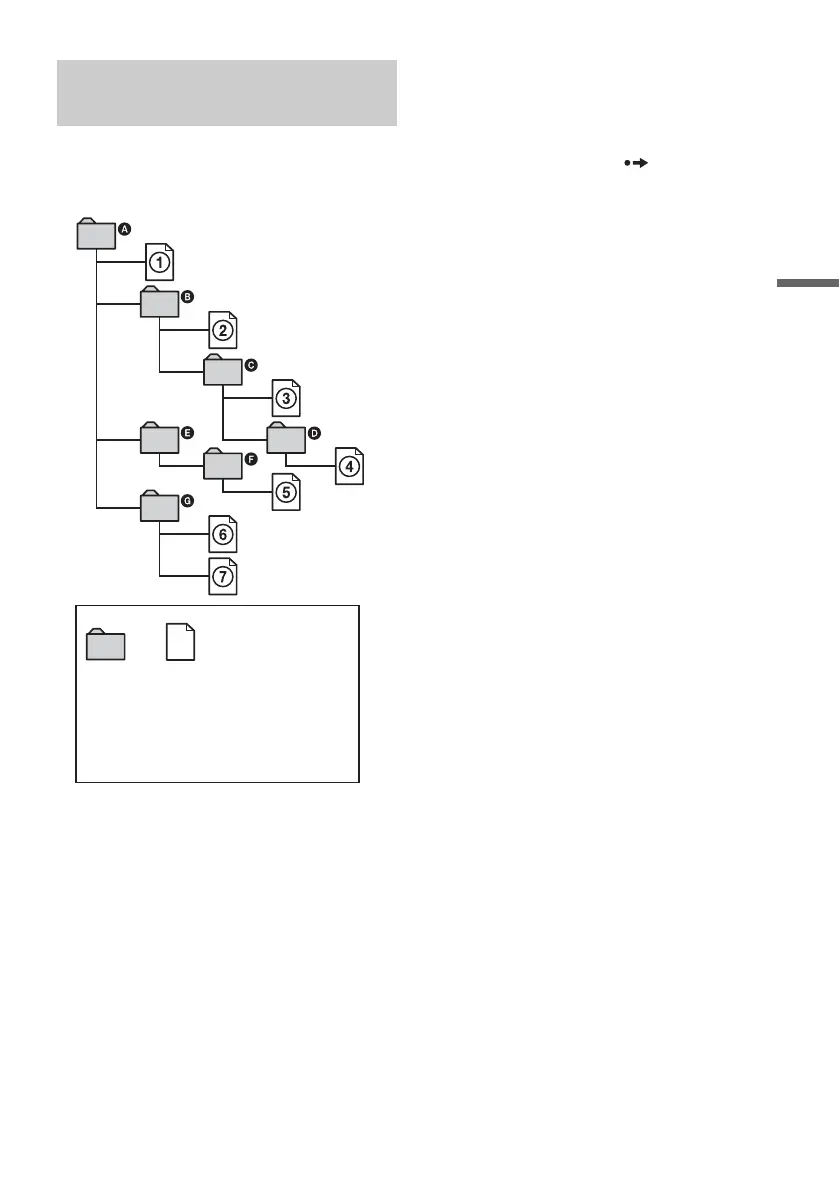
Albums play in the following order:
Structure of disc contents
When you insert a DATA CD/DATA DVD (data
compact disc/data digital video disc) and press
H PLAY (play), the numbered files are played
sequentially, from 1 through 7. For JPEG (joint
photographic coding experts group) image files,
press ADVANCE (advance) to go to the next
album. (For instance, when you want to go from
1 to 2.) Any sub-albums/tracks (or files)
contained within a currently selected album take
priority over the next album in the same tree.
(Example: C contains D so 4 is played before
5.) When you press TITLE LIST (title list) and
the list of album names appears (page 34), the
album names are arranged in the following order:
A t B t C t D t F t G. Albums that
do not contain tracks (or files) (such as album E)
do not appear in the list.
z Hints
• If you add numbers (01, 02, 03, etc.) to the front of the
track/file names when you store the tracks (or files) in
a disc, the tracks and files will be played in that order.
• Since a disc with many trees takes longer to start
playback, it is recommended that you create albums
with no more than two trees.
b Notes
• Depending on the software you use to create the DATA
DVD/DATA CD (data digital video disc/data compact
disc), the playback order may differ from the above
illustration.
• No more than a total of 199 individual folders can be
played. (Folders that do not contain JPEG/MP3 (joint
photographic coding experts group/audio layer 3 of
moving picture experts group) files are counted as
well.)
• No more than a total of 999 folders and files can be
played. (Files other than JPEG/MP3 (joint
photographic coding experts group/audio layer 3 of
moving picture experts group) files, and folders that do
not contain JPEG/MP3 (joint photographic coding
experts group/audio layer 3 of moving picture experts
group) files are counted as well.)
• No more than 200 folders and files can be recognized
in a single folder. (Folders that do not contain JPEG/
MP3 (joint photographic coding experts group/audio
layer 3 of moving picture experts group) files are
counted as well.)
• Proceeding to the next or another album may take some
time.
• This recorder supports MP3 (audio layer 3 of moving
picture experts group) audio bit rates up to 160 kbps.
About playback order of albums,
tracks, and files
ROOT
Tree 1 Tree 2 Tree 3 Tree 4 Tree 5
Album MP3 (audio layer 3 of
moving picture experts
group) audio track/JPEG
(joint photographic coding
experts group) image file



 To Next Page