32
The TOOLS (tools) menu displays options
applicable to the entire disc (e.g. disc
protection), recorder (e.g. audio settings
during recording), or multiple items on a list
menu (e.g. erasing multiple titles). The
displayed options differ depending on the
situation and disc type.
3 Move the cursor down the TOOLS (tools)
menu until “Disc Info” is selected, and
press ENTER (enter).
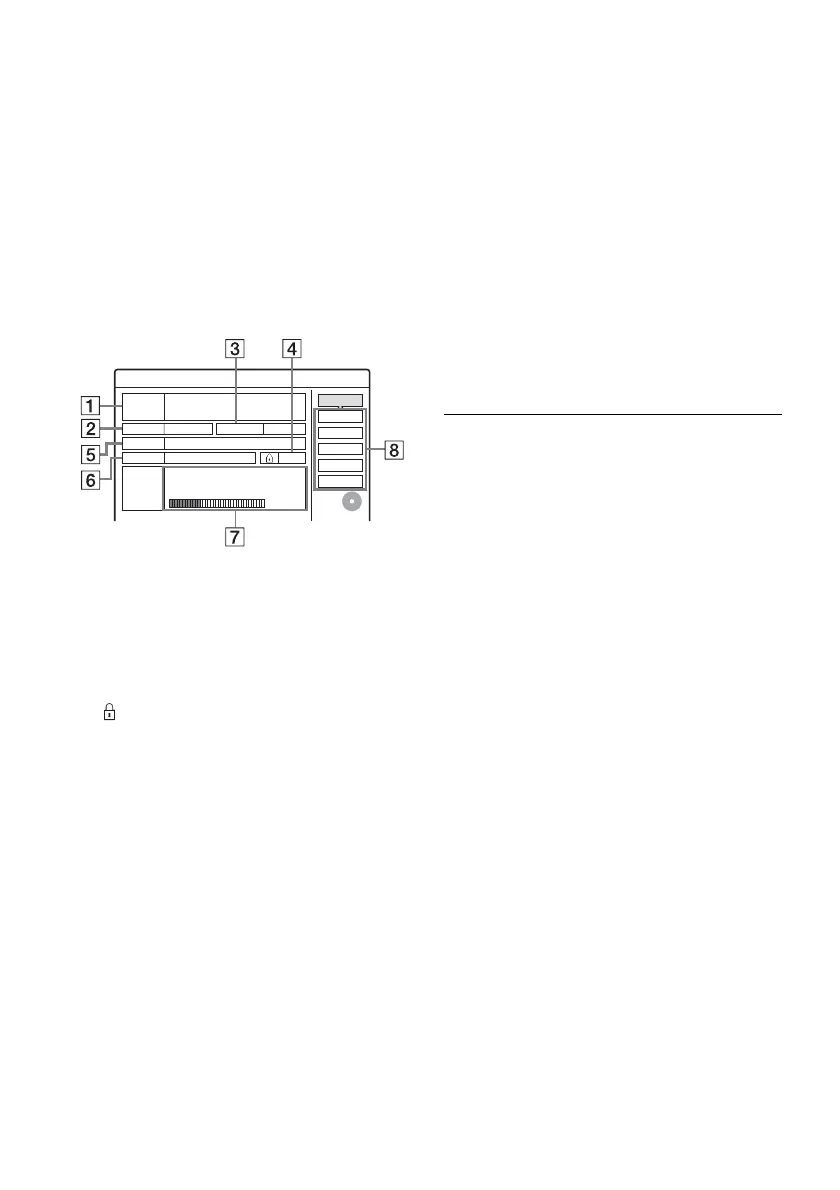
Example: When a DVD-RW (VR mode)
(digital video disc-rewritable, minus RW
(Video Recording mode)) is inserted.
1 “Disc Name” (DVD (digital video disc)
only)
2 “Media”: Disc type
3 “Format”: Recording format type (DVD-
RW (digital video disc-rewritable, minus
RW) only)
4
“On”/“Off”: Indicates whether
protection is set (DVD-RW (digital video
disc-rewritable, minus RW) in VR (Video
Recording) mode only)
5 “Title no.”: Total number of titles
6 “Date”: Dates of when the oldest and the
most recent titles were recorded (DVD
(digital video disc) only)
7 “Continuous Rem. Time”/“Remainder”
(approximate)
• The remaining recording time in each of the
recording modes
• Disc space bar
• Remaining disc space/total disc space
8 Disc setting buttons
“Disc Name” (page 40)
“Protect Disc” (page 40)
“Finalize”/“Unfinalize” (page 41)
“Erase All” (page 72)
“Format”
Available settings differ depending on the
disc type.
4 Select “Format,” and press ENTER
(enter).
5 Select “OK,” and press ENTER (enter).
For DVD-RWs (digital video disc-rewritable,
minus RW), select “VR” or “Video,” and
press ENTER (enter).
All contents on the disc are erased.
z Hints
• By reformatting, you can change the recording format
on DVD-RWs (digital video disc-rewritable, minus
RW), or record again on DVD-RWs (digital video disc-
rewritable, minus RW) that have been finalized.
• For DVD+RWs (digital video disc-rewritable, plus
RW) and DVD-RWs (Video mode) (digital video disc-
rewritable, minus RW (Video mode)), you can check
free space and title location on the disc using the Disc
Map display (page 72).
b Note
On this model, 1 GB (read “gigabyte”) is equivalent to 1
billion bytes. The larger the number, the larger the disc
space.
Format
Disc Name
Disc Information
DiscName Movie
Media DVD-RW Format VR
Title no. 2
Date Off
10/13/2005 ~ 10/28/2005
HQ : 0H30M HSP : 0H45M SP : 1H00M
LSP : 1H15M LP : 1H30M EP : 2H00M
SLP : 3H00M SEP : 4H00M
2. 3 / 4. 7
Remainder
Close
Erase All
Finalize
Protect Disc
Original 3 / Playlist
GB



 To Next Page