STR-DA2800ES
28
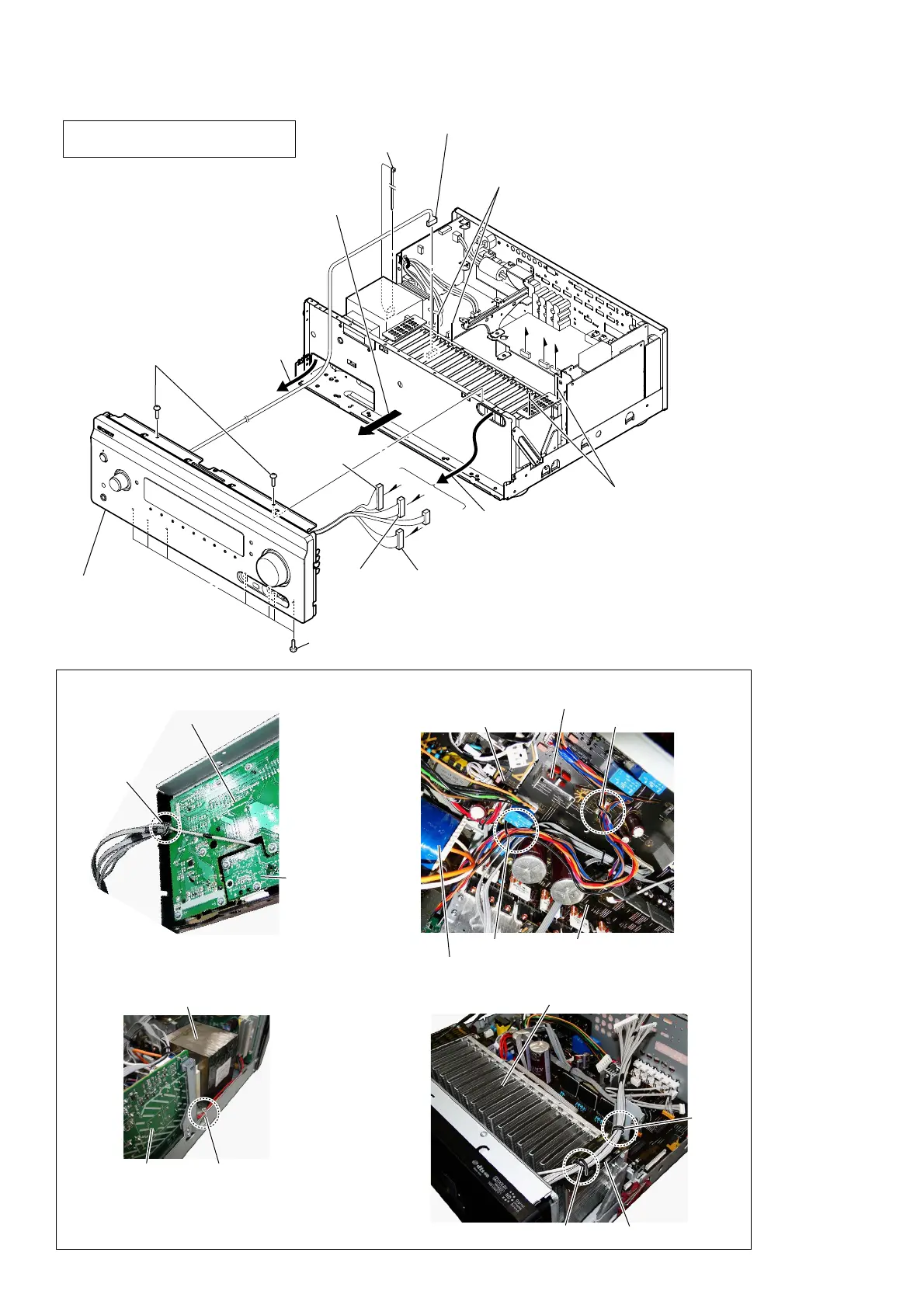
2-20. FRONT PANEL BLOCK
8
Remove the front panel block
in the direction of an arrow.
0
front panel block
(See Fig. O)
9
Pull out wire.
9
Pull out wire.
DISPLAY board
USB board
STBY board
– Ftont panel block inner view –
7
seven screws
(BVTP3
u
8)
7
two screws
(BVTP3
u
8)
lead pin
< Fig. R >
< Fig. Q >< Fig. O >
< Fig. P >
Wire setting
Note 3:
The wire must not touch heat sink.
Note 3:
The wire must not touch heat sink.
Note 2:
The wire must not touch power transformer.
Note 2:
The wire must not touch power transformer.
2 Remove wire from two lead pins.
(See Fig. Q)
2 Remove wire from two lead pins.
(See Fig. R)
lead pin
lead pin
lead pin
lead pin
MAIN board
ACDC board
GUIDE_A board
Note 1:
In reassembling, use new cable tie
to fasten the clamp same as before.
1 Cut the cable tie.
(See Fig. P)
cable tie
F
E
E
F
D
D
6
connector
(CN308)
5
connector
(CN6505)
4
connector
(CN6203)
3
connector
(CN6204)















 To Next Page