SPACE s.r.l.
Soc.a socio unico
PFB035 SERIES – PFB040 SERIES
PFB045 SERIES – PFB060 SERIES
SPRT102/4 SERIES – SPRT102/5 SERIES
SPRT102/6 SERIES – SPRT102/7 SERIES
Code M0247 - Ver.1.4
(09/2016)
SPACE s.r.l. – 10090 TRANA (TO) Via Sangano, 48
Tel. (+39) 011/ 934 40 300 – Fax (+39) 011/ 933 88 64
e-mail: info@spacetest.it - www.spacetest.com
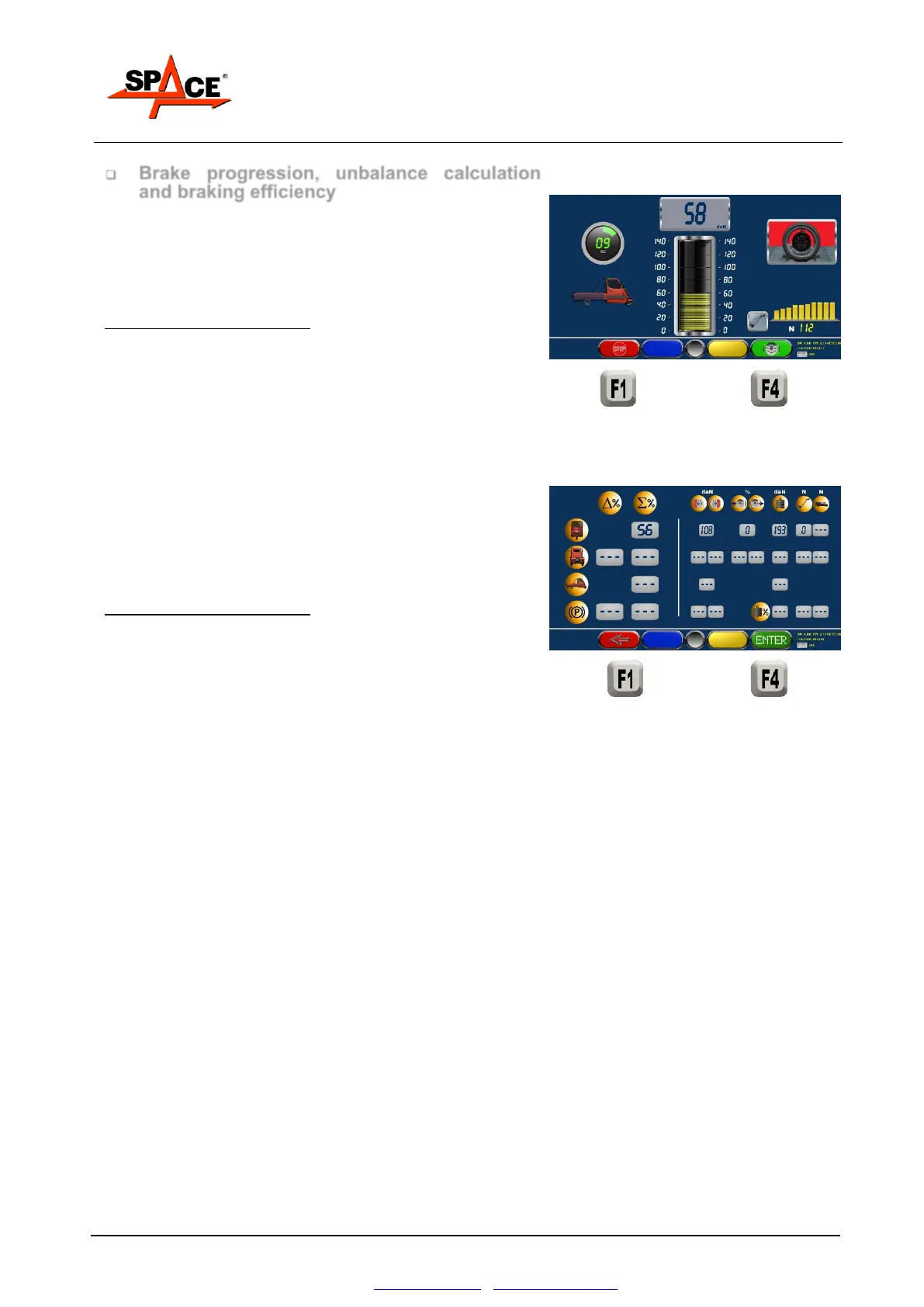
Brake progression, unbalance calculation
and braking efficiency
Slowly and gradually operate the brake pedal, observe
the braking effort and the pedal pressure readings on
the analog and digital indicators and assess their
simultaneous progression.
POSSIBLE SELECTION:
Press “STOP/F1” if it’s needed to stop the roller
Press “F4” to select the ovality test again.
Continue to slowly and gradually operate the brake
pedal until the lock. At the locking, the program will
show the summary page (see Figure 77).
Value the test and press “ENTER/F4” to save it and
proceed.
POSSIBLE SELECTION:
Press “STOP/F1” to come back to Figure 66 and in case
abort the test or repeat it.



 To Next Page