3.6 Programming the device
The device can be programmed in three ways – by changing the register values directly in the GUI, by using a
Header file, which loads both Configuration and Patch files at once, or by loading the two memh files separately
using the GUI.
The Configuration and Patch files directly modify values stored in the NVM. Therefore, any changes written by
Configuration and Patch files will be retained even after reset. On the contrary, changes made by the GUI (Write
Tx button) are written into the I2C registers, which are cleared upon reset.
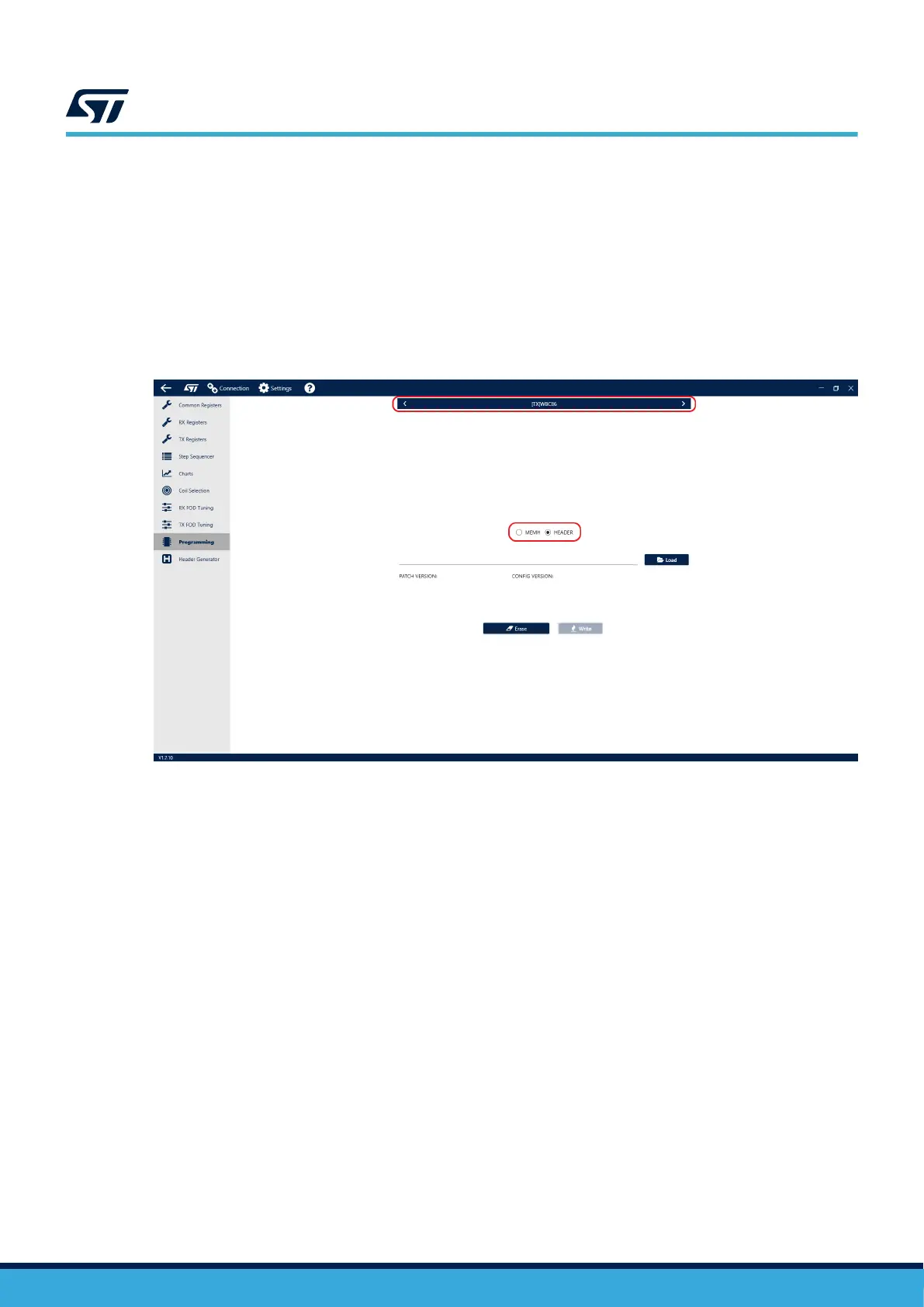
To load the Header file using the GUI, navigate to the Programming tab in the side menu. Select WBC86 in the
top menu and “HEADER” in the toggle selector.
Figure 12. Programming the device by header file
Select the .h file that is to be written. The GUI automatically identifies the Patch and Configuration files included in
the Header file. Press the “Write” button to load the Header file into the device.
To load the memh files (Patch and Configuration) using the GUI, navigate to the Programming tab in the side
menu. Select WBC86 in the top menu and “MEMH” in the toggle selector.
UM3161
Programming the device
UM3161 - Rev 1
page 13/78



 To Next Page