4.9 Foreign object detection (FOD)
A foreign object is any object placed either on or near the transmitting coil, which is not considered a valid
wireless power receiver and is magnetically active. Presence of the magnetic field generated by the transmitting
coil may cause eddy currents to form in the foreign object (such as coins, keys etc.), which in turn would heat the
object to potentially dangerous temperatures. To avoid possible damage to the device or even injury to the user,
the power transmitter must be able to detect the presence of a foreign object. This detection can be implemented
in several different ways.
One of the most common ways is estimating the amount of power lost in the system. The power receiver indicates
the total amount of received power from the power transmitter. This power consists of power available to the load
and power loss, which occurs on the supporting circuitry.
A high power loss value could indicate the presence of a foreign object.
The STWBC86 uses precise AD converters and 32-bit arithmetic to monitor input power and can therefore
estimate the amount of power lost beyond the power transmission interface using a mathematical model of the
system.
4.9.1 FOD tuning
The default FOD parameters are optimized for STEVAL-STWBC86TX. Any change to the topology might require
adjustments to the FOD parameters too. The user can record these parameters using the GUI to properly trigger
FOD when required, as well as avoid false triggers.
The most common use conditions include:
1. Aligned position without any FO.
2. Misaligned position without any FO. Parameters should be recorded in a few various misalignments,
including the maximum expected one - usually 5mm misalignment in all x, y, and z axis respectively
(excluding their combinations).
3. Aligned position with FO - reference foreign objects prescribed by the Qi specification, coins, keys etc. Each
FO requires a separate measurement.
4. Misaligned position with FO.
The FOD parameters should be recorded for the whole range of Rx loads.
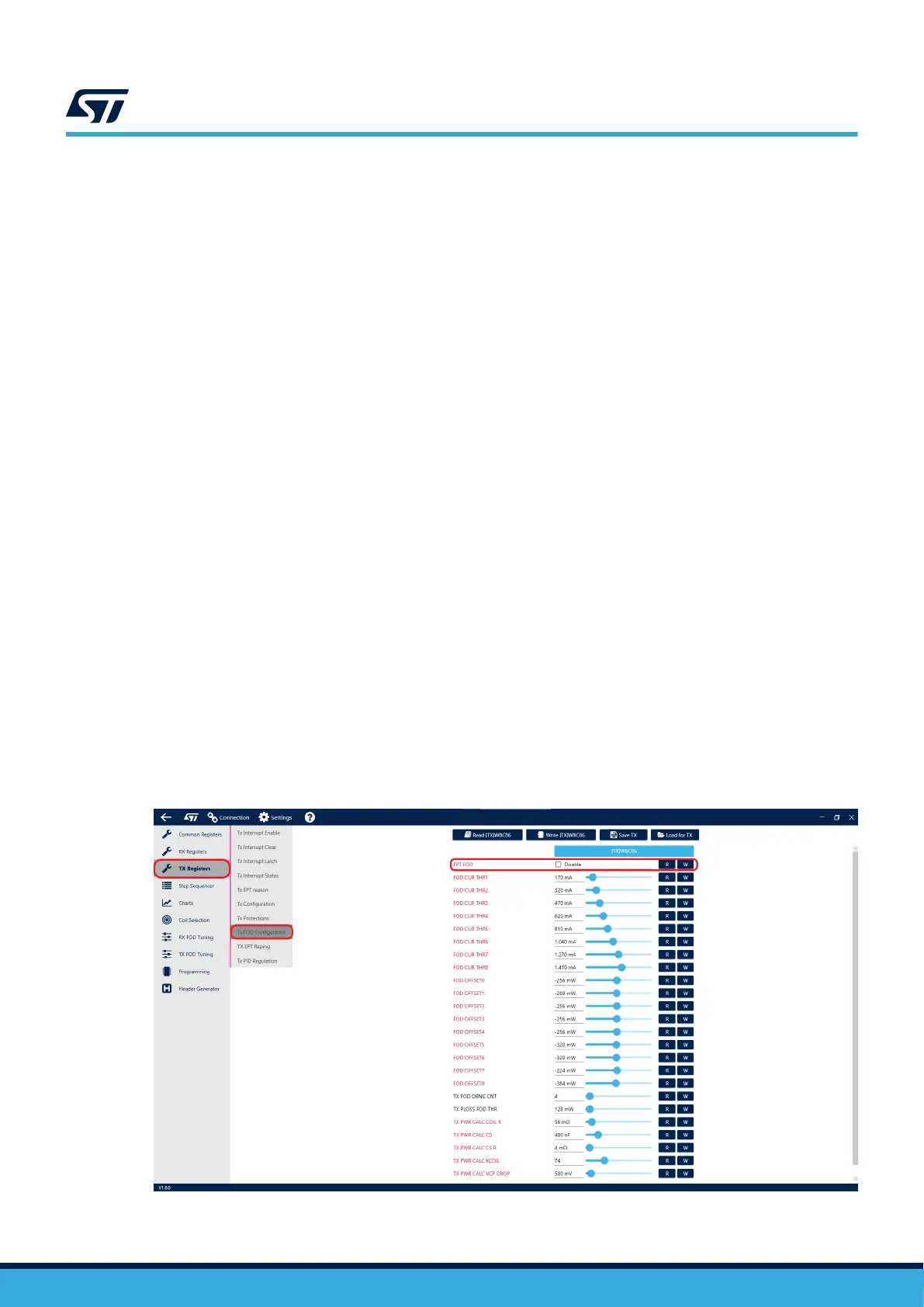
Before the actual tuning, please disable the EPT FOD function of STWBC86TX in the TX registers tab. Leaving
the function enabled would result in termination of the power transfer during parameter logging, caused by the
presence of FO. However, for the change to take an effect, you will have to generate and load a new CFG file with
the feature disabled, as this setting cannot be changed while the device is running.
Figure 22. Disable FO detection
UM3161
Foreign object detection (FOD)
UM3161 - Rev 1
page 21/78



 To Next Page