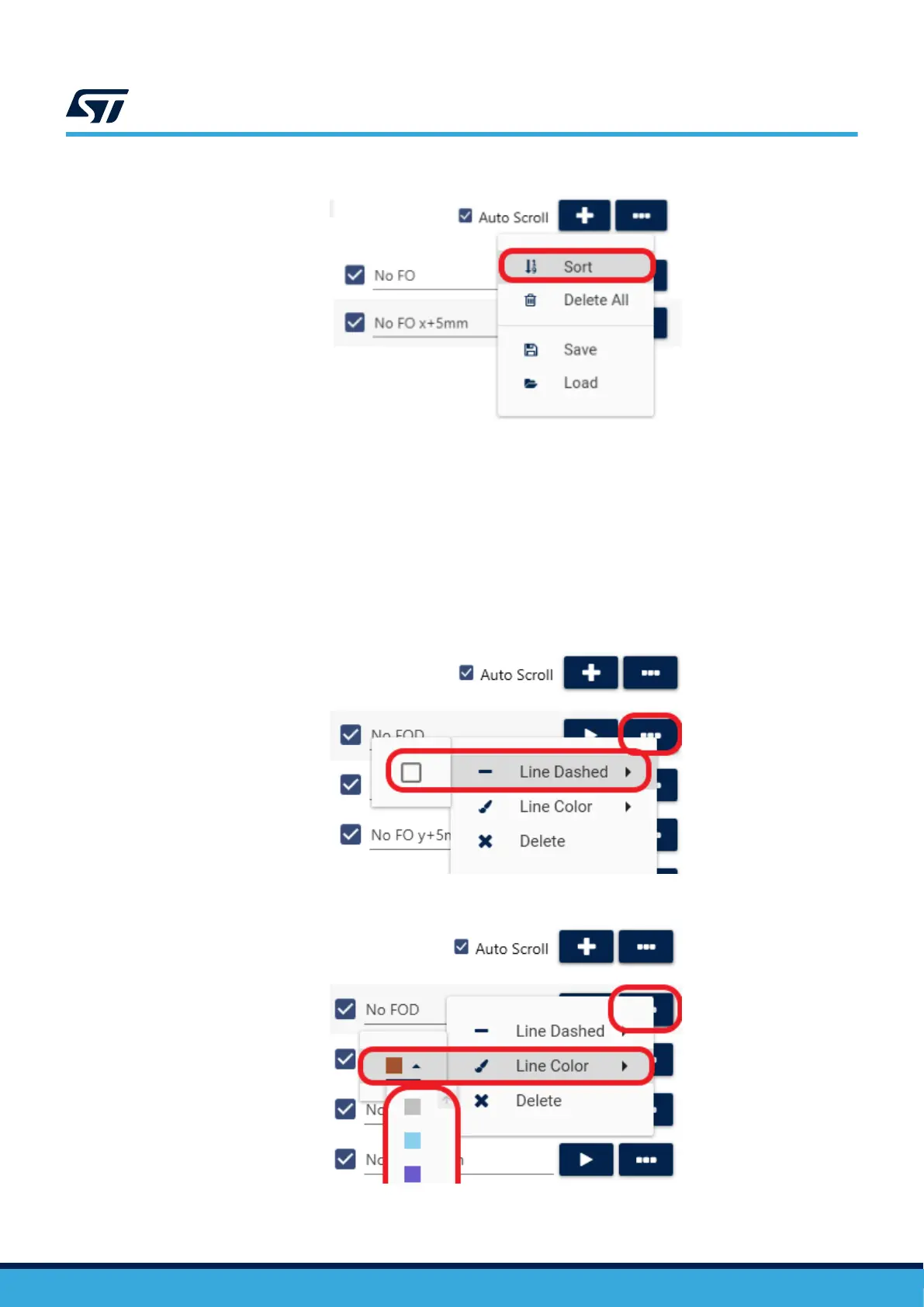
Figure 26. Additional dataset options
The first button in the drop-down menu will sort the captured data by input current. Always sort the data after the
capturing is finished. Otherwise, the load curve might not display correctly on the second page of the tool.
The second button will delete all data. The third will enable you to save the data in a .txt file format and the last
lets you import any previously captured data. The loaded data will be appended to the end of the list.
Click the '…' button next to any data set to access its properties. Here, you can adjust the line style used in the
plot and the display colour for the data set. A solid line is used by default for each data set but can be switched to
a dashed line by ticking the line style box. This can be used to distinguish different conditions, such as sets with
and without a foreign object.
Figure 27. Line properties - dashed/solid
Figure 28. Line properties - color
UM3161
Foreign object detection (FOD)
UM3161 - Rev 1
page 23/78



 To Next Page