Data collection
To collect accurate data, the ring node voltage divider must be set accordingly, please refer to chapter 6.2 Ring
node voltage sensing for more information.
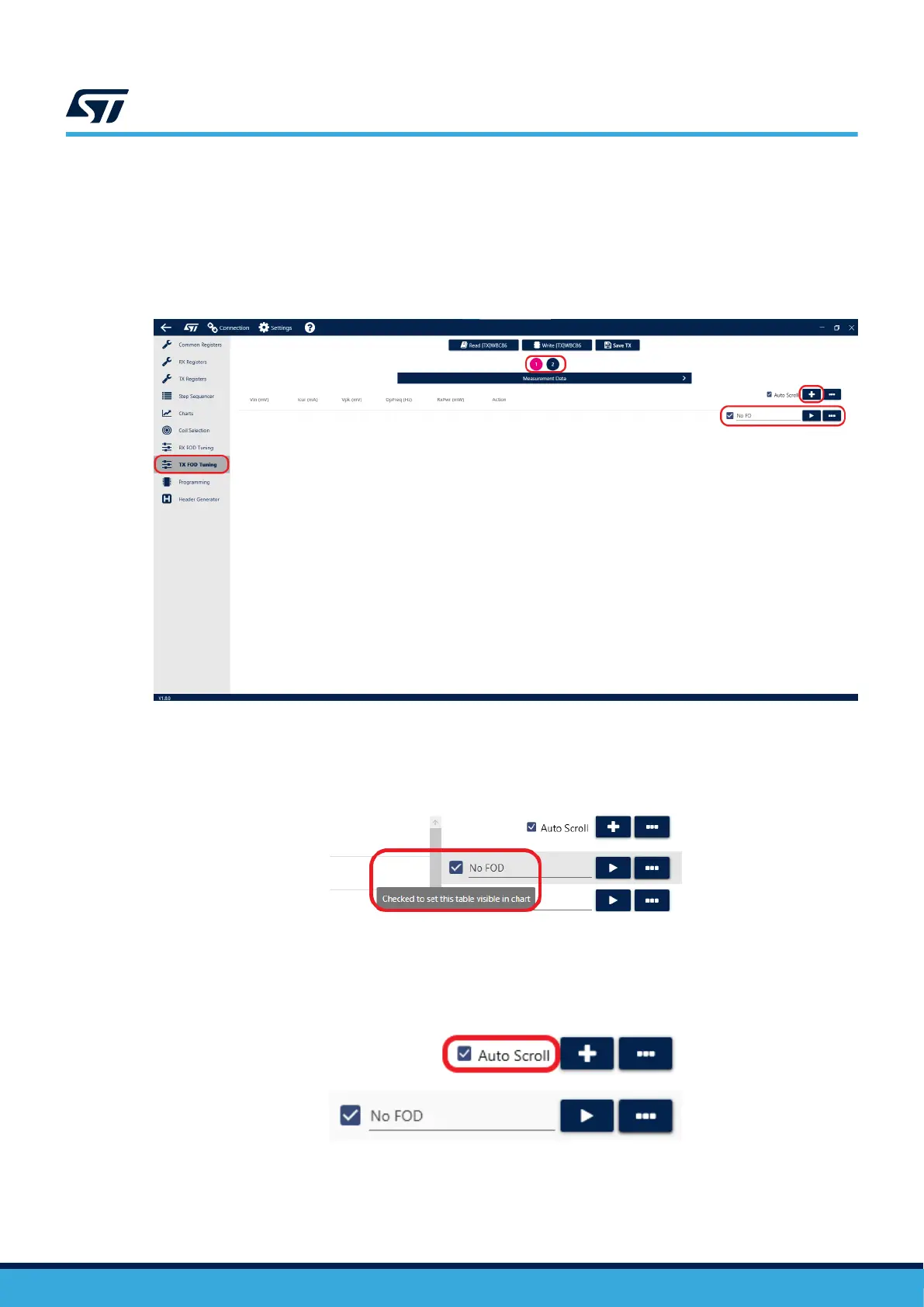
To start the tuning process, head to the TX FOD tuning tab of the GUI. To add a new data set, press the '+' button
on the right side of the screen. The data set can be labelled using the name line below to help better distinguish it
later.
Figure 23. Add a new dataset
Ticking the check box next to a data set will toggle its display it in the plot on the next page of the tool. If you want
to hide a particular data set, simply untick the corresponding check box.
Figure 24. Display dataset in plot
The newest data is always added to the bottom of the set. When enabled, the Auto Scroll function will
automatically take you to the end of the list after logging a new set.
Figure 25. Enable auto scroll
Additional options can be found by clicking the '…' button next to the Auto scroll box.
UM3161
Foreign object detection (FOD)
UM3161 - Rev 1
page 22/78



 To Next Page