Stonex R20 – User Manual 27
Press [ ] in the measurement interface to enter the angle measurement
mode.
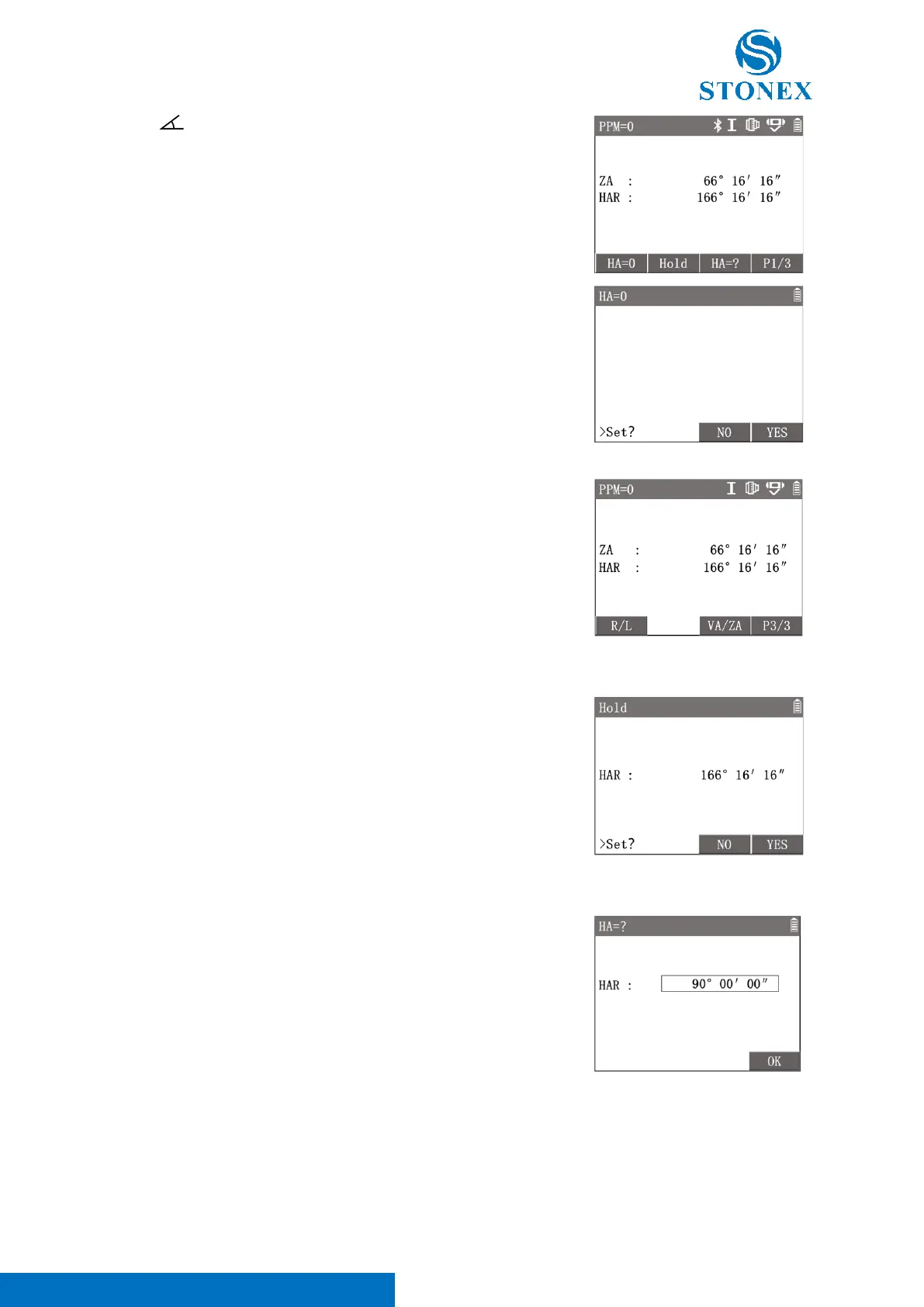
1. Aim at target A. The workspace displays current 〈HAR〉 and
〈ZA〉.
2. Press [F1]【HA=0】 enter {HA=0}, Press [F4]【YES】, set
〈HAR〉 to 〈0°00′00″〉.
3. Aim at target B. The workspace displays the 〈HAR〉 between A
and B. Also displays the 〈ZA〉 of B.
[F3]【NO】: return to the previous interface.
Convert HA incrementation between right and left, i.e. HAR and HAL:
Press [F4] twice to 3
rd
page of softkeys, press [F1]【R/L】to toggle between
〈HAR〉 and 〈HAL〉.
Hold the HA:
Set the HA by locking current HA value.
1. Rotate the instrument, use the horizontal drive to adjust to the
required HA value.
2. Press [F2]【Hold】enter {Hold}, the HA will be locked and not
changed with the rotation of the instrument.
3. Aim at the target, press [F4]【YES】 back to angle measurement
interface , the HA will remain the locked value.
Input Custom HA:
Horizontal angle setting via keyboard input.
1. Aim at the target.
2. Press [F3]【HA=?】enter {HA=?}.
3. Input the HA value needed, e.g. 90°00′00″, Press [F4]【YES】 to
confirm setting.
When {Unit Setting} 〈AngleUnit〉is set to 〈°′″〉, the integer part of the inputted angle value is degrees, the
first two decimal places are minutes, three and four decimal places are seconds, and five decimal places and
subsequent numbers will be rounded off.
Switch ZA/VA in Percentage Slope Mode



 To Next Page