3-80 Sun Fire X4100/X4100 M2 and X4200/X4200 M2 Servers Service Manual • August 2009
12. Unfasten the spring-loaded thumbscrew that secures the flex cable retainer and
remove this retainer from the chassis. See
FIGURE 3-46 on page 58.
13. Remove the upper cable retainer from the chassis. Push the retainer toward the
rear of the chassis to free it from the keyed openings in the chassis midwall. See
FIGURE 3-47 on page 59.
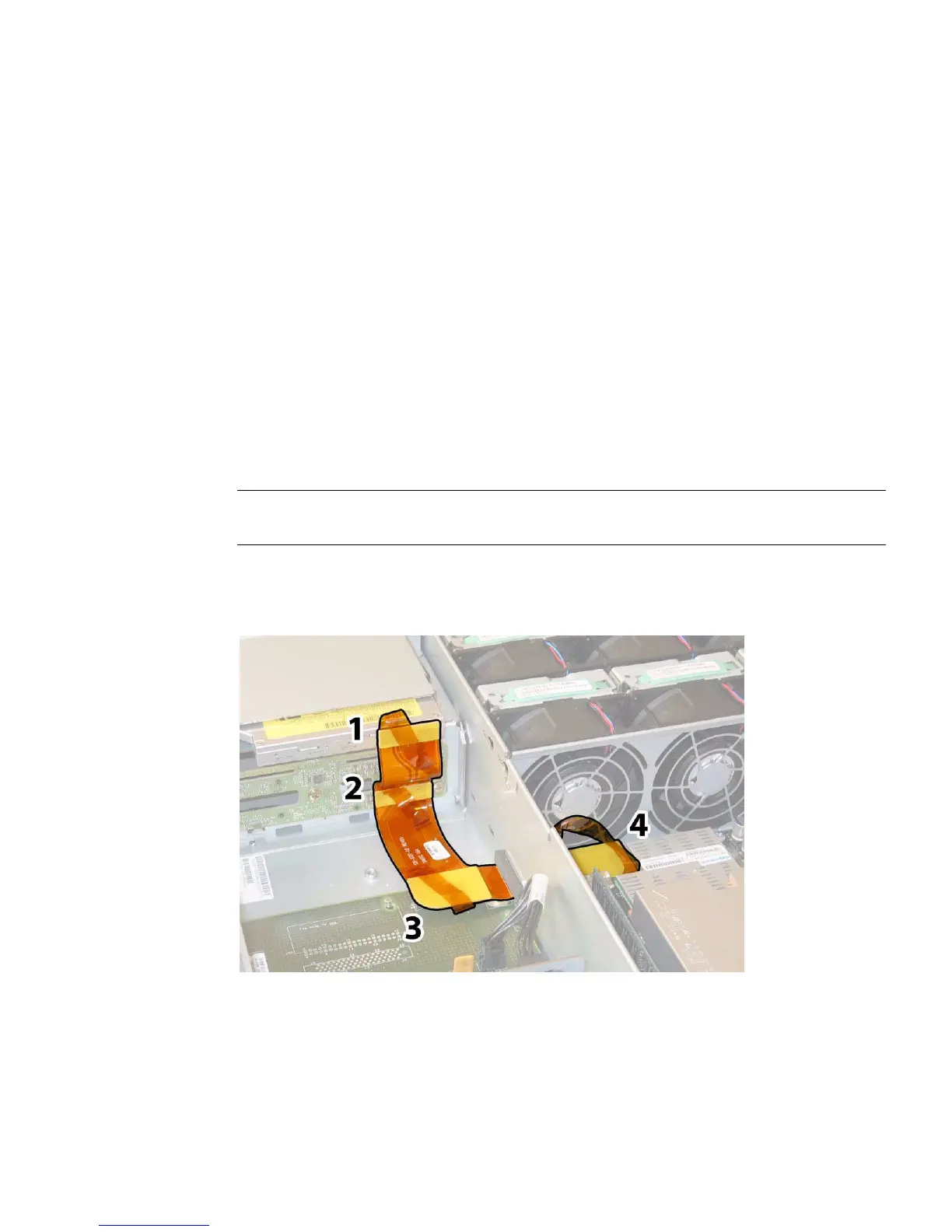
14. Remove the flex cable and its attached foam rubber gasket from the chassis
inner wall by disconnecting the cable’s four connectors from the following four
locations. See
FIGURE 3-64.
a. DVD-ROM drive
b. Hard disk drive backplane
c. Power distribution board
d. Motherboard
Note – When reinstalling the flex cable, attach the connector to the power
distribution board (3) first. Then attach the remaining three connectors in any order.
FIGURE 3-64 Disconnecting the Flex Cable’s Four Connectors (Sun Fire X4200/X4200 M2
Server Shown)
15. Unfasten and remove the eight screws that secure the motherboard to the
chassis floor. See
FIGURE 3-65 for the location of the eight screws.














 To Next Page