Chapter 3 Maintaining the Sun Fire Servers 3-81
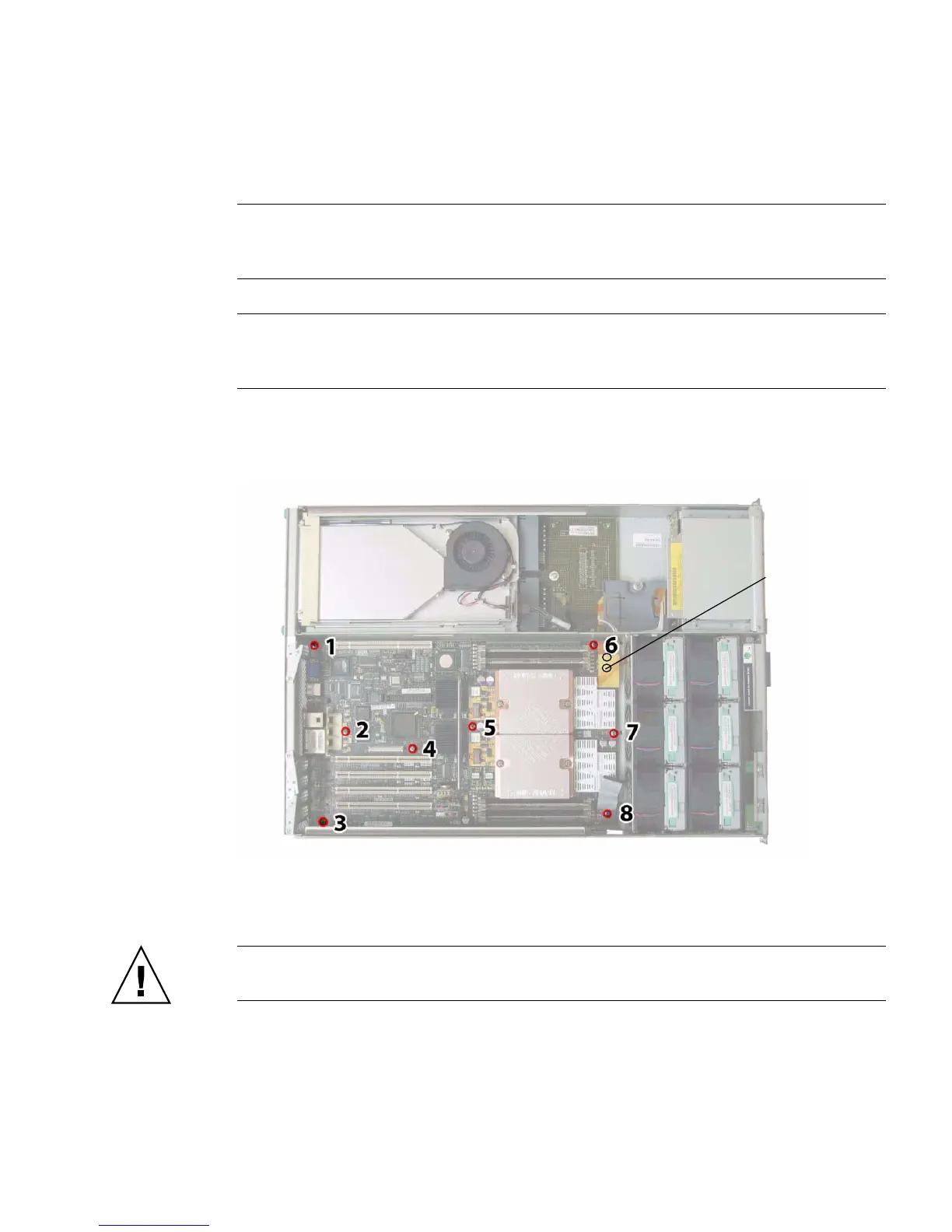
16. Use an 8-mm nut-driver to remove the two bus-bar nuts from the motherboard.
See
FIGURE 3-65.
Note – When you install the new motherboard, you must replace these old cap-style
bus bar nuts with new M5 flange-nuts that are included with your replacement
motherboard. For more details, refer to the notes at the end of this procedure.
Note – If you remove the drives from the server for any reason during this
procedure, you must return each drive to the bay from which it was removed.
Therefore, temporarily label the drives after you remove them.
FIGURE 3-65 Motherboard Securing Screw and Bus-Bar Nut Locations (Sun Fire
X4200/X4200 M2 Server Shown)
17. Use the lifting handle to raise the forward edge of the board until it has cleared
the bus bar studs.
Caution – When lifting the board, use caution to avoid damaging the light pipes
and connectors on the rear edge of the motherboard.
18. Slide the board toward the front of the chassis until the connectors and light
pipes are clear of the chassis back panel. Then raise the motherboard and
remove it from the chassis.
The bus-bar
nuts are located
here (not
visible under the
cable in this
view)














 To Next Page