EasyManua.ls Logo

Sunrise Internet Box - Page 120

Sunrise Internet Box
156 pages
Print Icon
To Next Page IconTo Next Page
To Previous Page IconTo Previous Page
Loading...
Page 120
Sunrise Internet Box User Manual
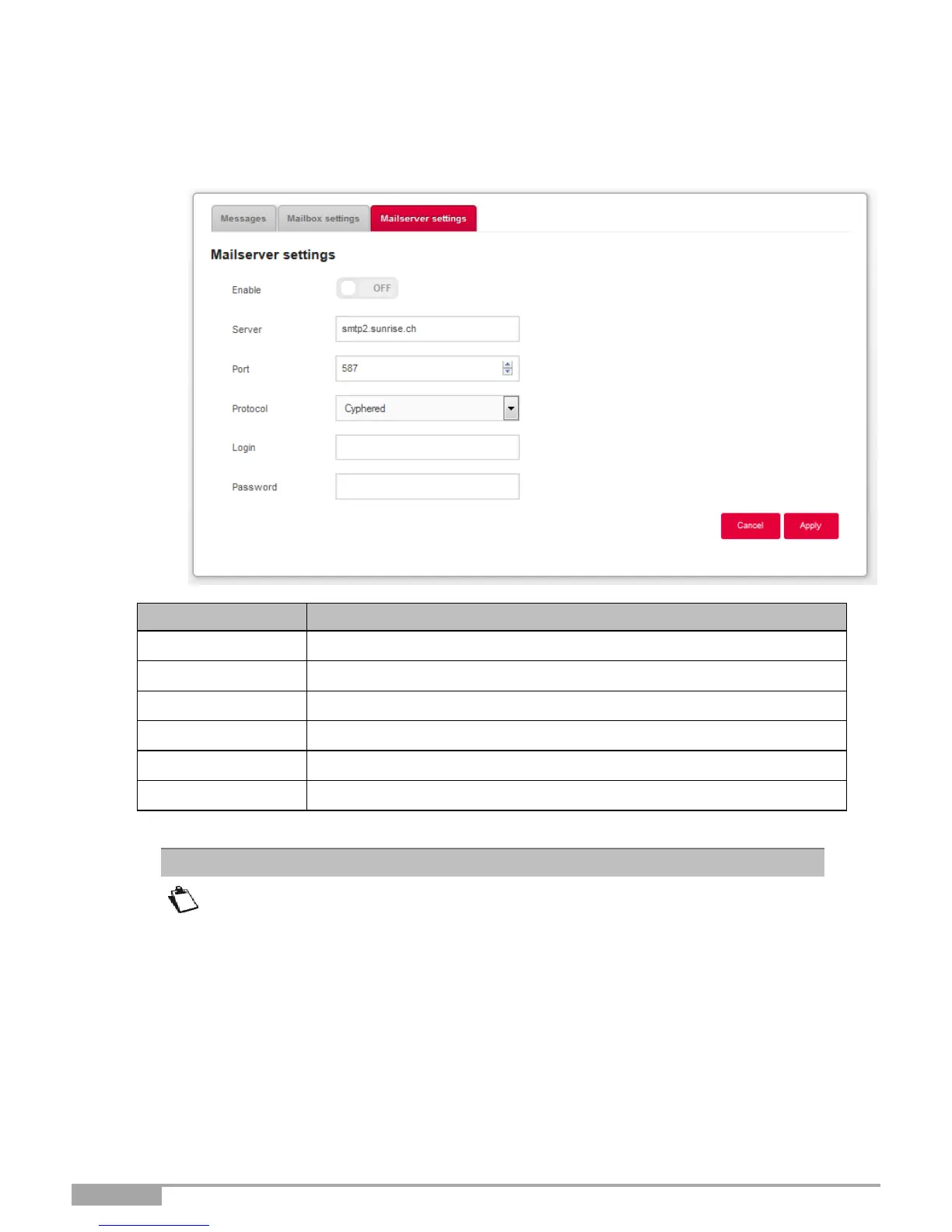
3.10.1.3 Mail server settings
Objective: This menu is used to set up the email address to which notifications will be sent in case of
receipt of voice mail messages.
Field
Meaning/Action
1. Enable
Select if you want the feature to be on/off
2. Server
Enter the SMTP server to address here.
3. Port
Select the port to address.
4. Protocol
Select the protocol you want to use (SSL / SMTP / Cyphered)
5. Login
Enter a login here
6. Protocol
Select the protocol you want to use (SSL / SMTP / Cyphered)
You must enter your email address in the “Mailbox settings” menu.
Note

Table of Contents