3.8 Voice service
3.8.1 “Voice settings
3.8.1.1 Telephone Matrix
Objective: Your Sunrise Internet Box can support up to 5 voice phone lines (5 SIP accounts) provided
by Sunrise. Each phone set connected to your Sunrise Internet Box (either DECT handset or
phone set connected to TEL1 or TEL2 connector) can be associated with one or more phone
lines. This menu allows you to select which phone set is associated with each phone line for
incoming and outgoing calls.
•
Click on the Expert Mode in the Top Menu to activate the Expert Mode for calling.
•
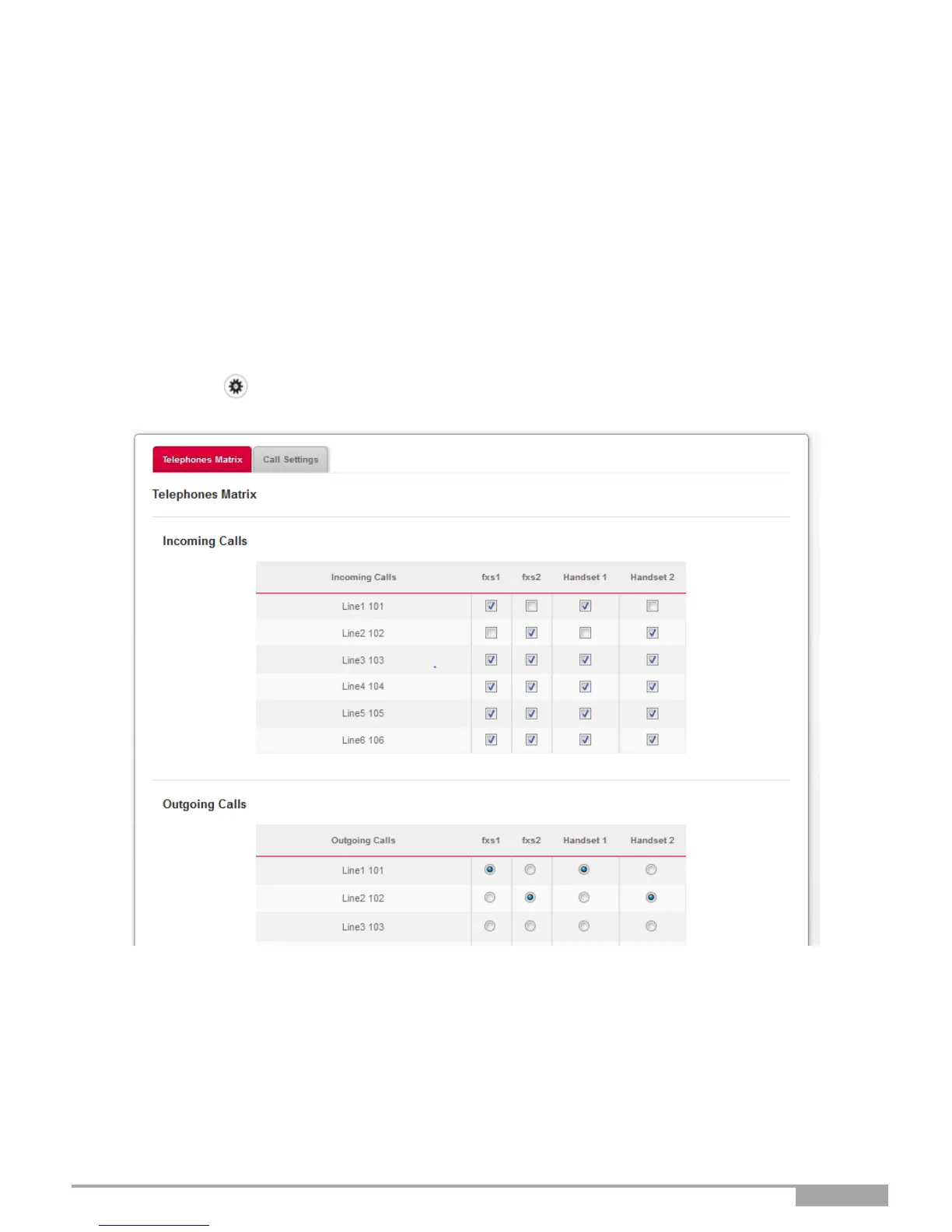
Click on the button to access the Voice Ports settings, then select Telephones
Matrix. The following screen opens:
You can associate each phone set with each phone line and click Apply to validate your settings.
•
FXS1 corresponds to the phone set connected to the TEL1 connector on the Sunrise Internet Box.
•
FXS2 corresponds to the phone set connected to the TEL2 connector.
•
Handset1 to 5 corresponds to the respective DECT handset paired to the Sunrise Internet Box.
•
Incoming calls are calls received by the Sunrise Internet Box.
•
Outgoing calls are calls sent out by the Sunrise Internet Box.
In the above example, line 1 will be used for incoming and outgoing calls with DECT Handset1.



 To Next Page