Sunrise Internet Box User Manual
Name you want to allocate to the service when you choose Other in the
field Service.
Select a Service: Service available over Internet (such as, for example
FTP, HTTP, SMTP, etc.).
You can select Other to define a customized service. In this case, you
must fill in manually all fields.
Name you want to allocate to the service when you choose Other in the
field Service.
Select the transport protocol (TCP, UDP, etc.).
IP address of the device on your local network.
IP address of the remote device on the public network.
Communication port of the device on your local network.
Communication port of the remote device on the public network.
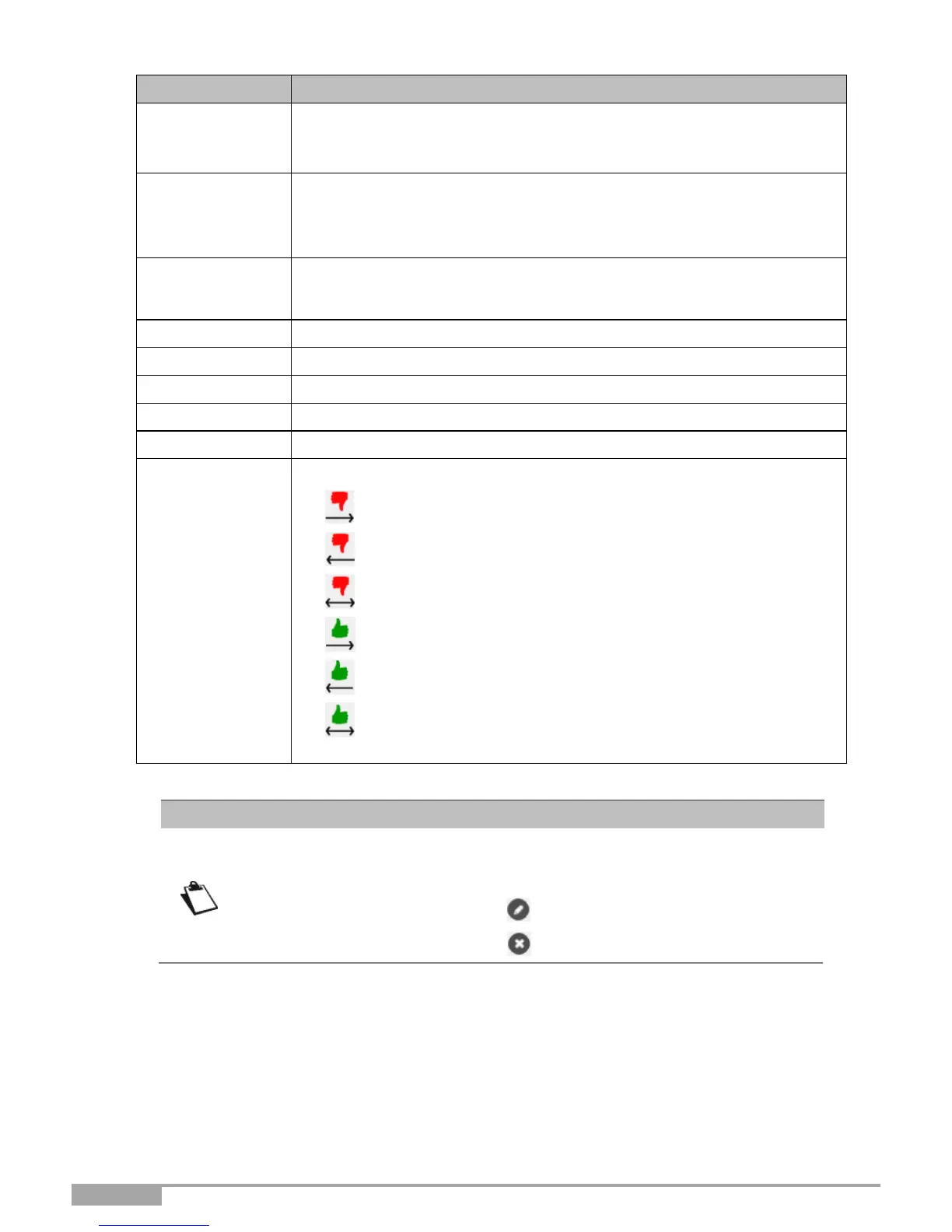
Select the action for the current service from the scroll down list:
• Reject From local: Blocks all outgoing services.
• Reject From Remote: Blocks all incoming services.
• Reject In Both Ways: Blocks all incoming and outgoing services.
• Accept From local: Authorizes all outgoing services.
• Accept From Remote: Authorizes all incoming services.
• Accept In Both Ways: Authorizes all incoming and outgoing
services.
From the list, you can perform the following actions:
• Activate or deactivate the rule using the ON/OFF button,
• Modify the rule by clicking on the button.
• Delete the rule by clicking on the button.



 To Next Page