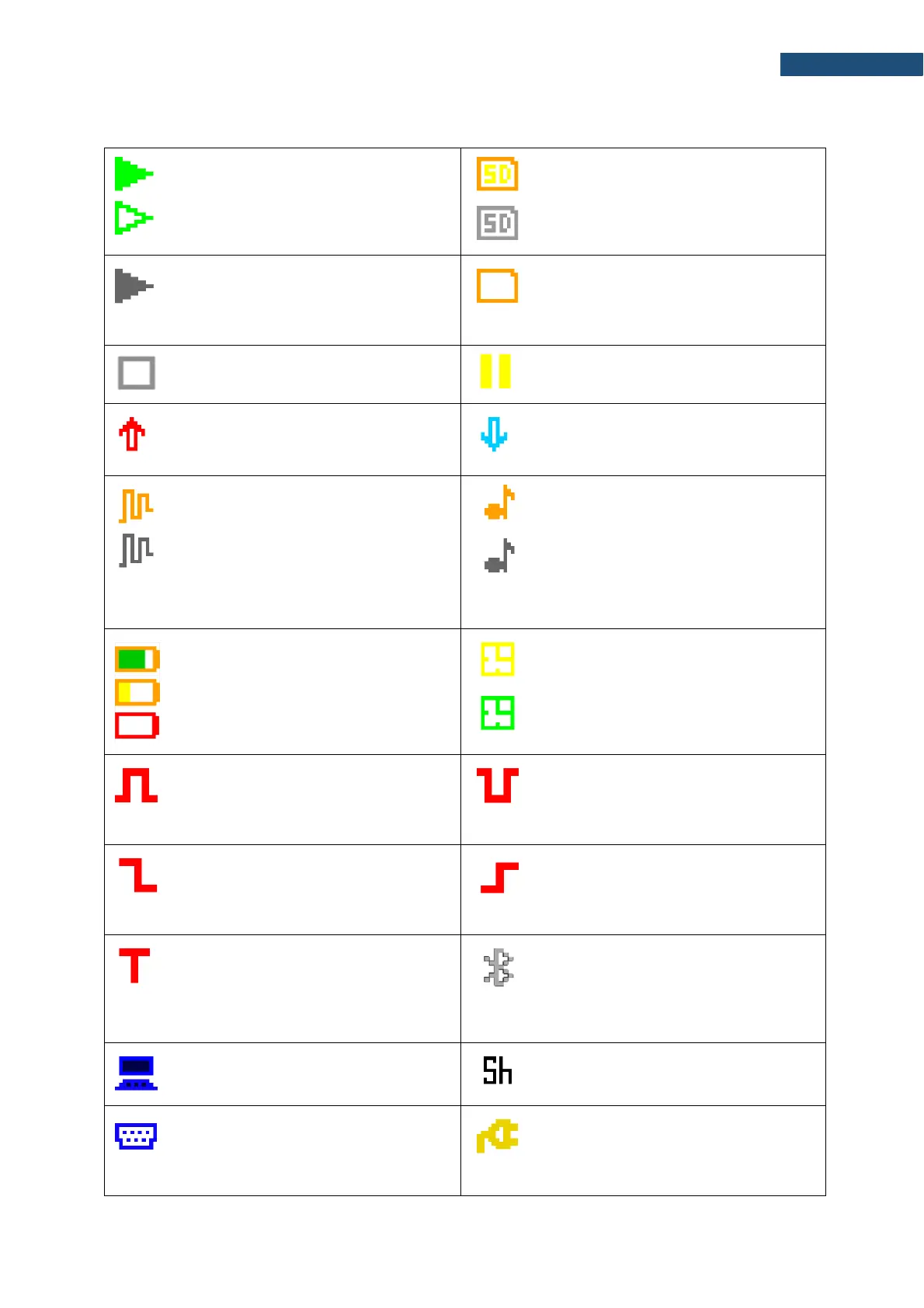
Meanings of icons are as follows:
“run” icon is displayed when the
measurement is running, and the icon
shape is changing from self to contoured.
“SD card” icon is displayed when the SD-
card memory is in operation and has free
space. Grey colour of the icon means
that the card memory is full.
“wait” icon is displayed when the
instrument waits for the measurement
start after pressing <Start> key due to a
start delay or a delay caused by a trigger.
“no card” icon is displayed when the SD
memory card has malfunction.
“stop” icon is displayed when the
measurement is stopped.
“pause” icon is displayed when the
measurement is paused.
“overload” icon is displayed when during
the measurement the overload was
registered.
“underrange” icon is displayed when
during the measurement the underrange
was registered.
“logger” icon is displayed when the
current measurement results are logged
into the instrument’s logger file.
Grey colour of the icon means that the
instrument waits for the logging start after
pressing <Start> key due to a start delay
or a delay caused by a trigger.
“signal” icon is displayed during wave
recording.
Grey colour of the icon means that the
instrument waits for the wave recording
start after pressing <Start> key due to a
start delay or a delay caused by a trigger.
“battery” icon is displayed when the
instrument is powered from the internal
batteries. Icon colour corresponds to the
charging status of the batteries (green -
30÷100%, yellow – 10÷30%, red – less
than 10%).
“clock” icon is displayed when the timer
is On. It is active when the instrument is
waiting for the measurement start to
occur. When the measurement start is
close, the icon changes its colour to
green and start blinking.
“level +“ icon is displayed when the
trigger condition is set to „Level +”. The
icon appears alternately with the „wait”,
“logger” or “wave” icons.
“level -” icon is displayed when the
trigger condition is set to „Level -”. The
icon appears alternately with the „play”,
“logger” or “wave” icons.
“slope –” icon is displayed when the
trigger condition is set to „Slope-”. The
icon appears alternately with the “wave”
icons.
“slope +” icon is displayed when the
trigger condition is set to „Slope+”. The
icon appears alternately with the “wave”
icons.
“trigger” icon is displayed when other
than Level or Slope trigger is waiting for
condition fulfilment. The icon appears
alternately with the “play”, “logger” or
“wave” icons.
“Bluetooth” icon is displayed when the
Bluetooth
®
is switched on. Color of the
icon defines state of the connection:
green – connected, grey – disconnected.
“USB” icon is displayed when there is
USB connection with the PC.
“Shift” icon is displayed when the
<Shift> key is pressed.
“RS232” icon is displayed when the
RS232 port is activated.
“plug” icon is displayed when the
instrument is powered through the
USB-C socket without using USB
interface.



 To Next Page