Options and accessories User Guide
Selecting the LC display language
This section describes how to make settings in the menu, using the selection of
the national language as an example.
In this user guide all LC display messages are shown in English language. Your
printer offers also the possibility to show the display messages in German,
French, Italian or Spanish language. This example shows how to change from
the English language to the German language. The same procedure applies to
the other languages (French, Italian and Spanish).
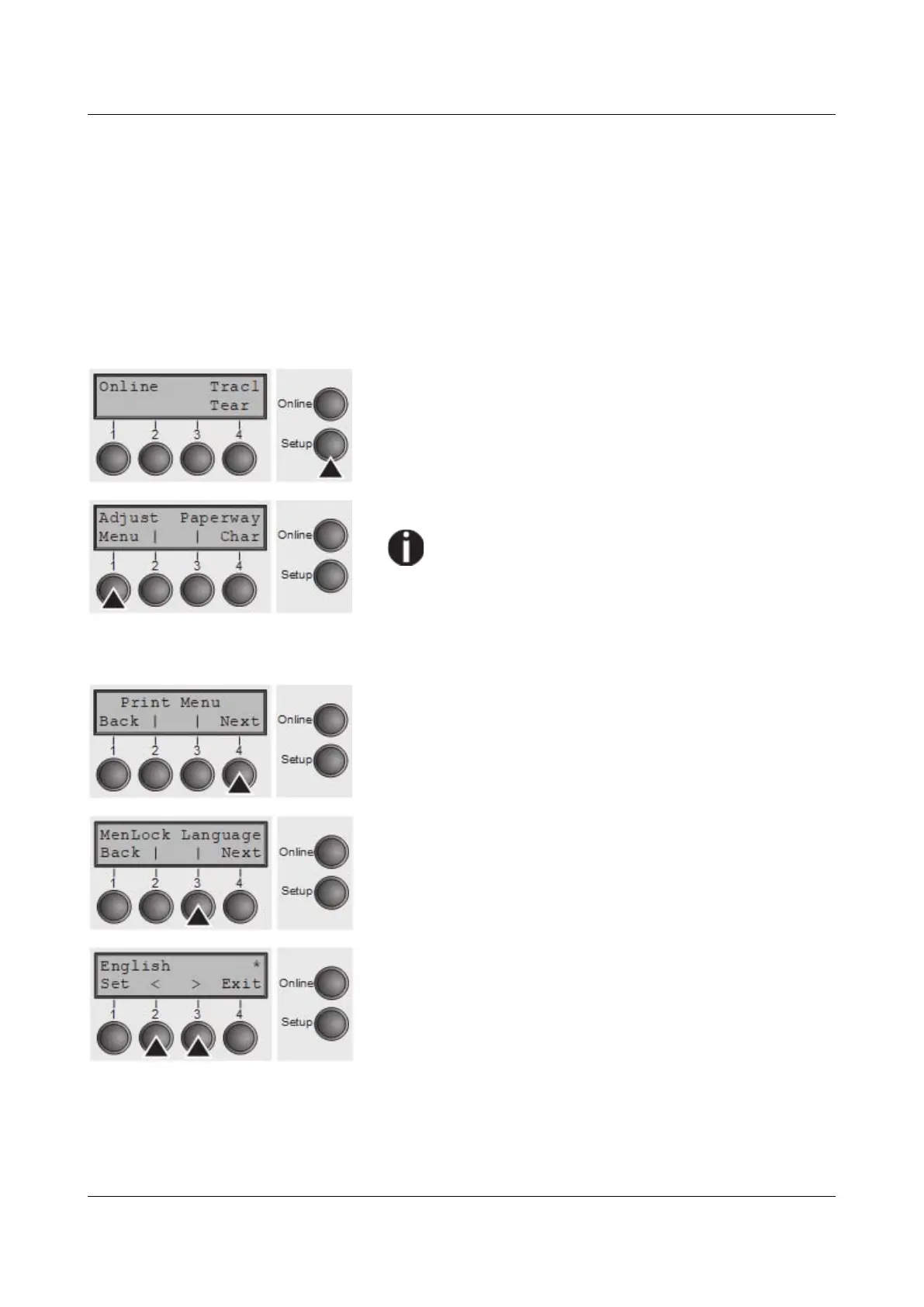
Select the Setup mode by pressing the Setup key.
Press the Menu key (1).
Setup mode and Menu mode may be disabled.
Hold down the Setup key while switching on the
printer to enable menu mode. If you want to
enable access to this mode permanently, you
need to change the appropriate setting in the
menu; see Menu lock (MenLock).
Press the Next key (4) several times until the display
indicates Language.
Press the Language key (3).
The display now changes to Parameter mode and
indicates English in the top line.
The lower line displays Set and Exit. The two arrows < (2)
and > (3) represent the symbols for parameter selection
(“<” indicates descending and “>” ascending). Press the <
(2) or > (3) key until the desired language is displayed, in
our example German.
48



 To Next Page