Options and accessories User Guide
Selecting character set (CG-Tab)
Only available for Epson LQ 2550/LQ2170 emulation. Either the Epson character
set Italics or the IBM graphics character set or a DLL (download) character set,
as defined before, can be activated in the code range from hex. A0 to hex. FE.
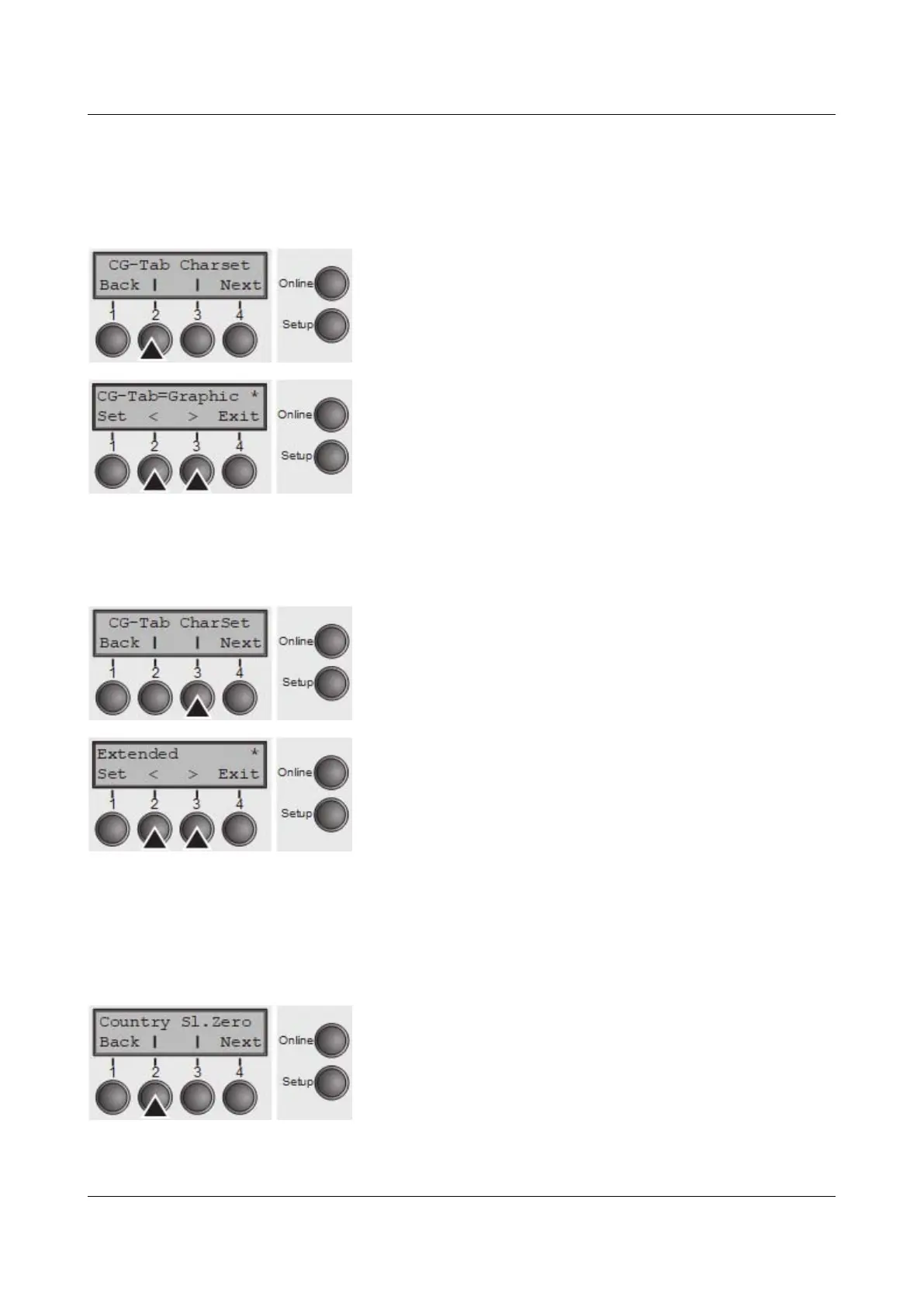
Press CG-Tab (2) key.
Use the < (2) or > (3) key to select the desired setting.
Setting Options: Graphic, DLL, Italic
Default Setting: Graphic
Confirm the setting by pressing the Set key (1).
IBM character set (CharSet)
Selects the IBM standard characters or the extended IBM characters.
Press CharSet (3) key.
Use the < (2) or > (3) key to select the desired setting.
Setting Options: Standard/Extended
Default Setting: Extended
Confirm the setting by pressing the Set key (1). Press the
Next key (4) to access the next group of parameters.
National character set (Country)
Selects the national character set. These character sets can be used according
to the selected emulation. The character sets are not necessarily available for all
fonts; see also Available character sets and fonts.
Press Country (2) key.
72



 To Next Page