SYNCHRO EXCITE Class & Trend: Service & maintenance manual - rev. 2.0
Pagina 7.8
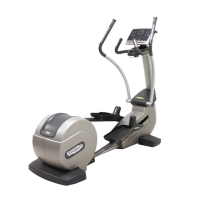
Figure 7.2-13
7. Back off the 10 screws (i) using a small
Phillips screwdriver.
8. Remove the touch screen protection plate (l).
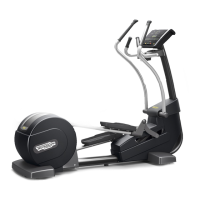
Figure 7.2-14
9. Shift touch screen (m) on one side, paying
attention to the cable which connect it to the
CPU Board.
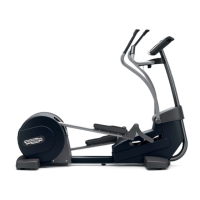
Figure -7.2-15
10. Back off the 4 screws (n) using a small
Phillips screwdriver.
11. Lift up and remove the LCD.




 To Next Page