C
LEAR
P
ATH
U
SER
M
ANUAL
R
EV
.
1.97
28
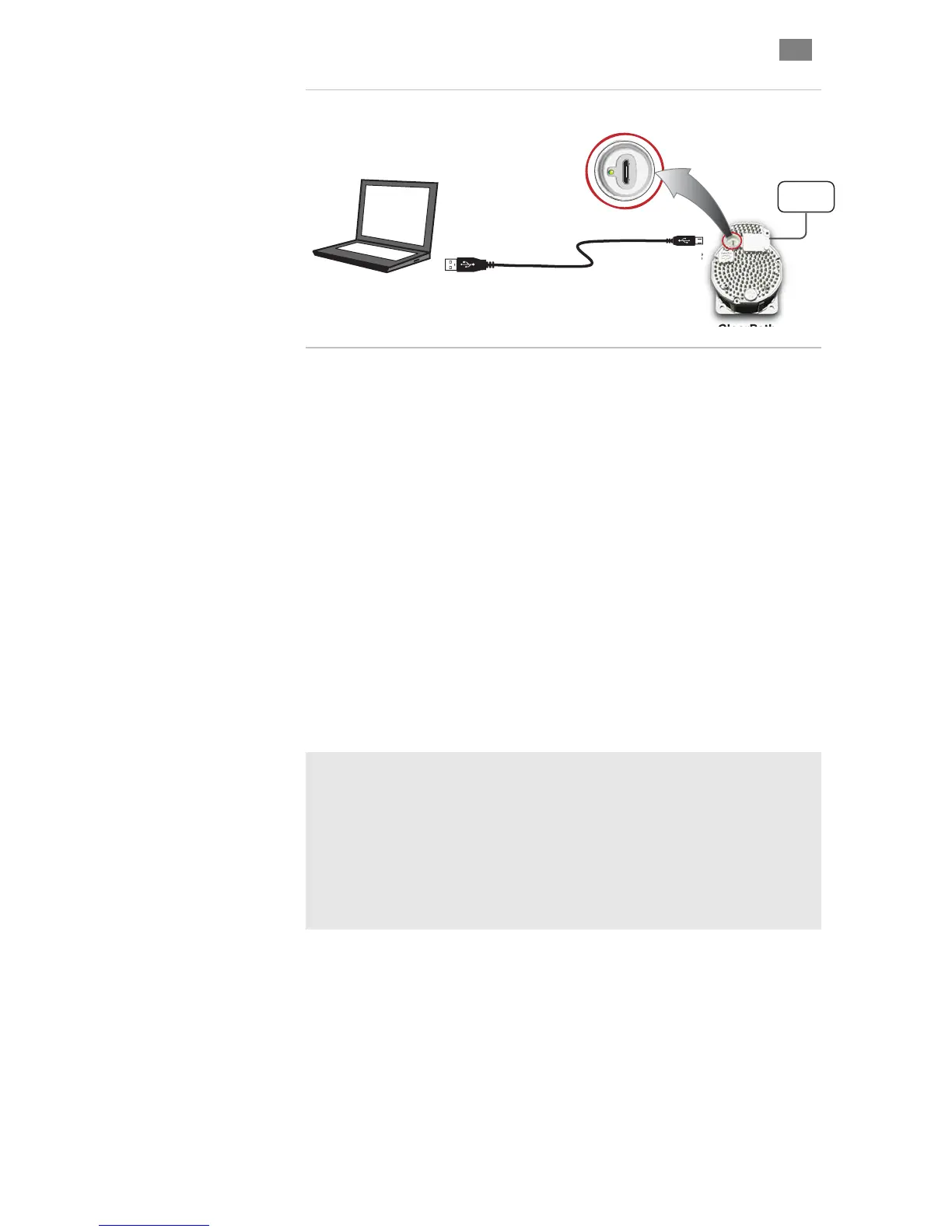
Micro-B
Ty pe ‘A’
Windows PC
(Win XP, Win 7 with
MSP application installed)
ClearPath
Communication Port
(USB Micro-B)
USB Cable
Power
Supply
ClearPath Communication Setup
l MS softwa Windows PC. See previous
ents.
ly 24-75VDC to the power input
tor. N te: A l or basic
unica on and
3. Connect ClearPath to the PC with a USB Type “A” to Micro-B
cable. This is a low cost standard cable.
4. Wait! In most cases Windows will detect the connected
his
e.
5. Launch MSP software by double clicking the desktop icon or
rograms menu: Teknic>ClearPath MSP>
p Program.
F
IRST
-T
IME
C
OMMUNICATION
S
ETUP
1. Instal P re on a qualified
page for Minimum System Requirem
2. Power up ClearPath. App
connec o ab power supply can be used f
comm ti low power, low speed testing.
ClearPath and install the correct USB driver automatically. T
step can take a few minutes to complete. Proceed only after
Windows reports the device is installed and ready for us
selecting from the P
ClearPath MSP Setu
Additional Notes
MSP is designed to communicate with one ClearPath at a time.
Before tuning a ClearPath, the motor must be powered up, connected to a
PC running MSP, and enabled.
The host PC can be disconnected after configuration and tuning are
complete. While ClearPath does not use a PC connection during normal
operation, you can connect a PC to ClearPath at any time for manual
control, system analysis, diagnostic and troubleshooting tasks.
T
EKNIC
,
I
NC
.
F
AX
(585)784-7460
V
OICE
(585)784-7454


 To Next Page