C
LEAR
P
ATH
U
SER
M
ANUAL
R
EV
.
1.97
53
F
OLLOW
D
IGITAL
V
ELOCITY
C
OMMAND
(U
NIPOLAR
PWM
I
NPUT
)
M
ODE SUMMA
Connect a digital PWM waveform from your PLC or other device, and
ClearPath will run at a speed proportional to the duty cycle of the PWM
waveform.
H
OW IT WORKS
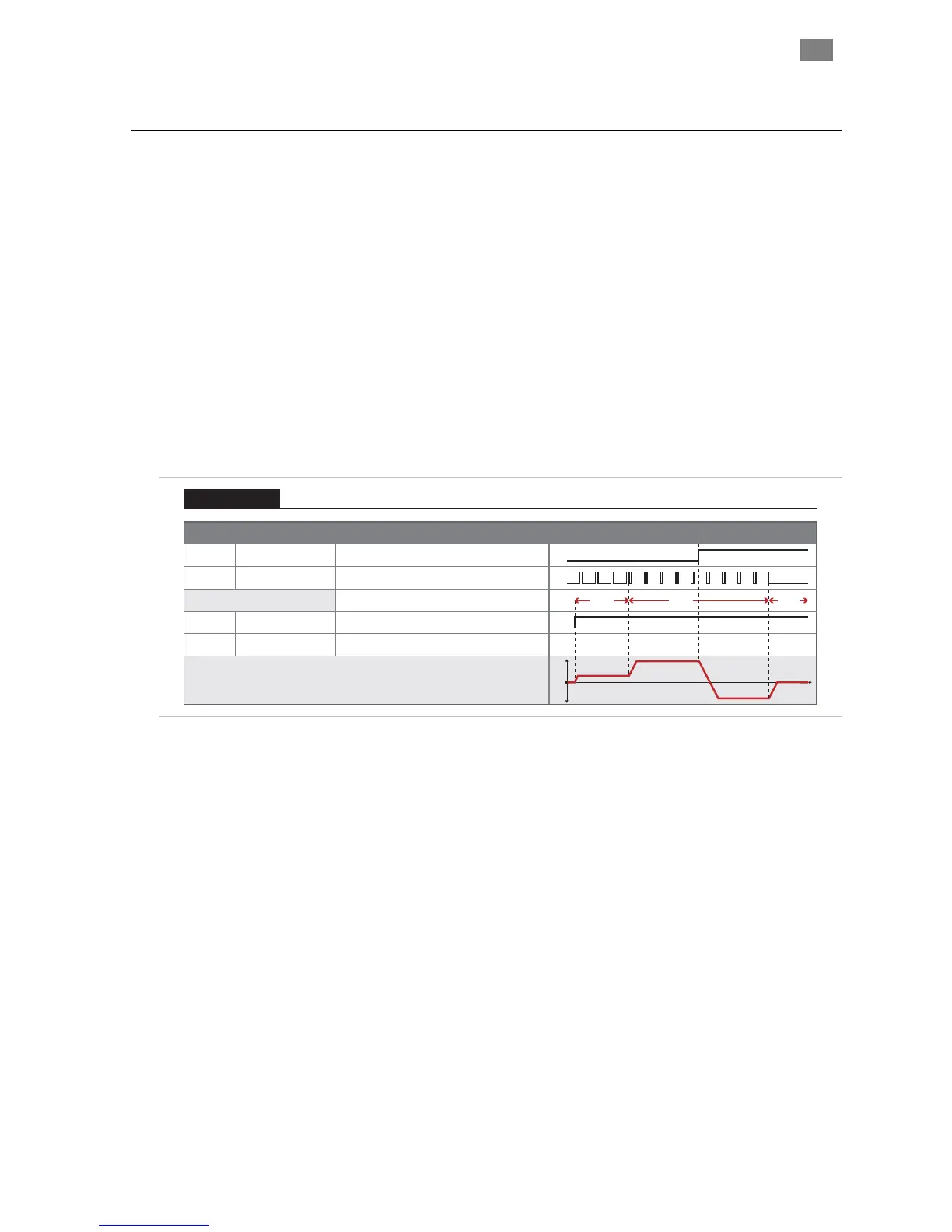
Assert the Enable Input to energize the motor. Once enabled, motor
velocity is controlled by sending a PWM signal to Input B. 0% PWM duty
cycle commands zero velocity, and 100% (minus a little) duty cycle
commands full-scale velocity. Changes in velocity occur at the user-
defined acceleration rate.
Direction of travel (CW/CCW) is controlled by the state of Input A. See
Inputs and Timing table below.
RY
Signal Function Input Type
Input A
Motor velocity vs. time
Input B
Enable
Direction
Velocity
Enable
NA NATrigger
Logic: High=CW Low=CCW
Pulse: Variable PWM
Logic: High=Enable Low=Disable
0
1
0
1
t
v
Example Timing
Notes:
0
1
0
1
Duty cycle of applied PWM signal (%)
90%10% OFF
Follow Digital Velocity Command (Unipolar PWM Command)
Velocity Control
Follow Digital Velocity
or more the PWM input is
considered off. This is interpreted by ClearPath as a zero-
• PWM Input, especially at higher frequencies, tends to have
more inherent inaccuracy. If a very high level of velocity
accuracy is important for your application, consider using
Frequency Input mode.
Command (Unipolar PWM Control): Inputs and Timing Diagram
Notes:
• PWM input frequency range: 20 Hz up to 30 kHz.
• If the PWM signal is off for 50Ms
velocity command.
• Disable time = 10 mS
T
EKNIC
,
I
NC
.
F
AX
(585)784-7460
V
OICE
(585)784-7454


 To Next Page