108
Appendix Raw Data Recording (RDR) SeaBat Sonar UI - User Manual
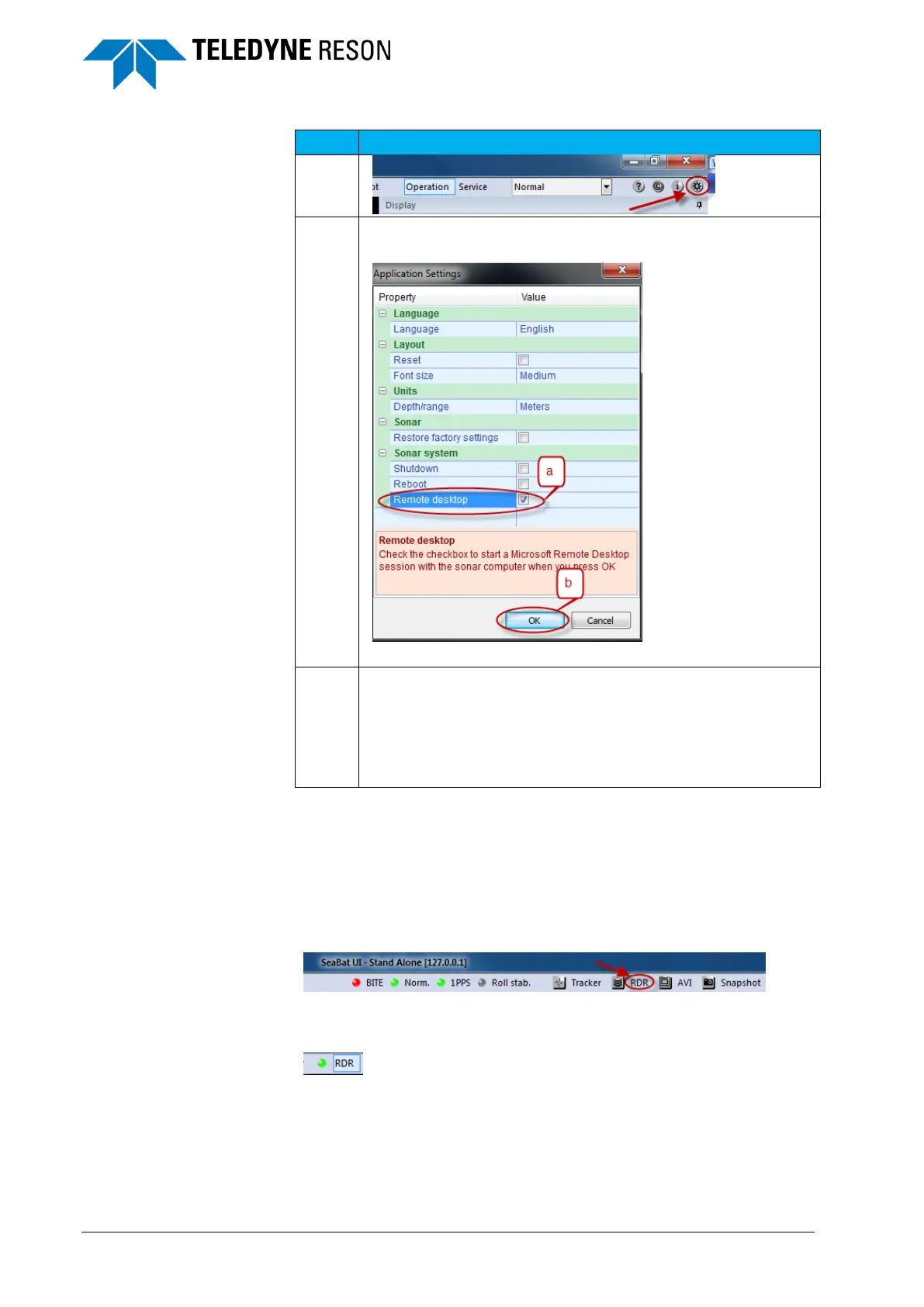
a. Tick the ‘Remote desktop’ icon.
b. Click ‘Ok’.
Enter in the windows security dialog box the PSP’s username
and password.
Username: RESON
Password: Contact Teledyne-RESON for the password as
a remote connection is used for advanced trouble shooting or
setup.
Note: when logged in a domain it is necessary to enter for the username
the PSP’s IP address followed by RESON. (E.g. 10.4.1.1\RESON)
7.8 Start RDR
Click in the SUI’s toolbar at RDR to start the logging.
Figure 7-10 Click ‘RDR’ to start the logging.
When the logging runs this is indicated by green LED.
Figure 7-11 green LED
See Figure 7-12.
a. The file name.
b. And the file size is indicated in the SUI’s recording pane.



 To Next Page