SeaBat Sonar UI - User Manual Operation
39
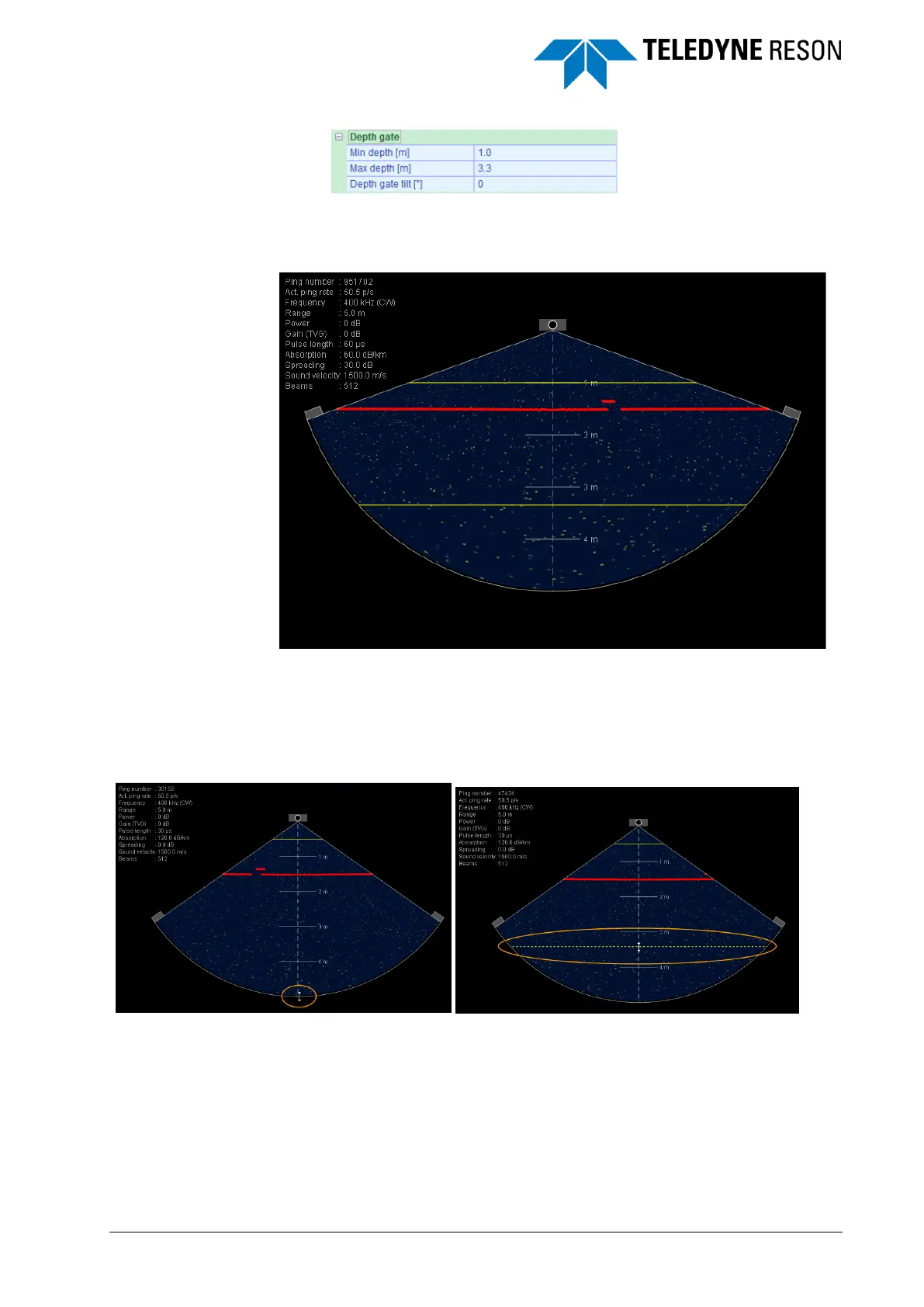
Figure 4-37 Depth gate
The minimum and maximum gate values can also manually be moved in
the Wedge screen by dragging them with the mouse.
Figure 4-38 Wedge with depth gates displayed.
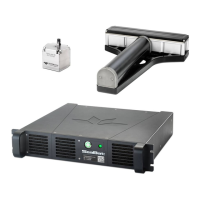
When the maximum depth gate is out of range of the wedge and therefore
not displayed it is most easy to move the pointer at the outer nadir range
of the wedge, click (pointer becomes a double arrow) and drag it inside
the wedge. On this way the maximum depth gate is moved inside the
range of the wedge as illustrated in Figure 4-39.
Figure 4-39 Wedge with maximum depth gate not displayed. Pointer moved
to Nadir outer range of wedge and maximum depth gate dragged back into the
wedge.
In case a maximum gate is dragged outside of the wedge range the gate
will get the maximum value (for the depth gate 400m).
Use of a motion sensor is required to rotate the depth gates with the
rolling motion of the vessel to ensure soundings are not clipped as the
seabed rotates with respect to the sonar.



 To Next Page