3-219
■
[Axial length measurement display function (ultrasonic (US) mode) / light interference (Opt)
mode]
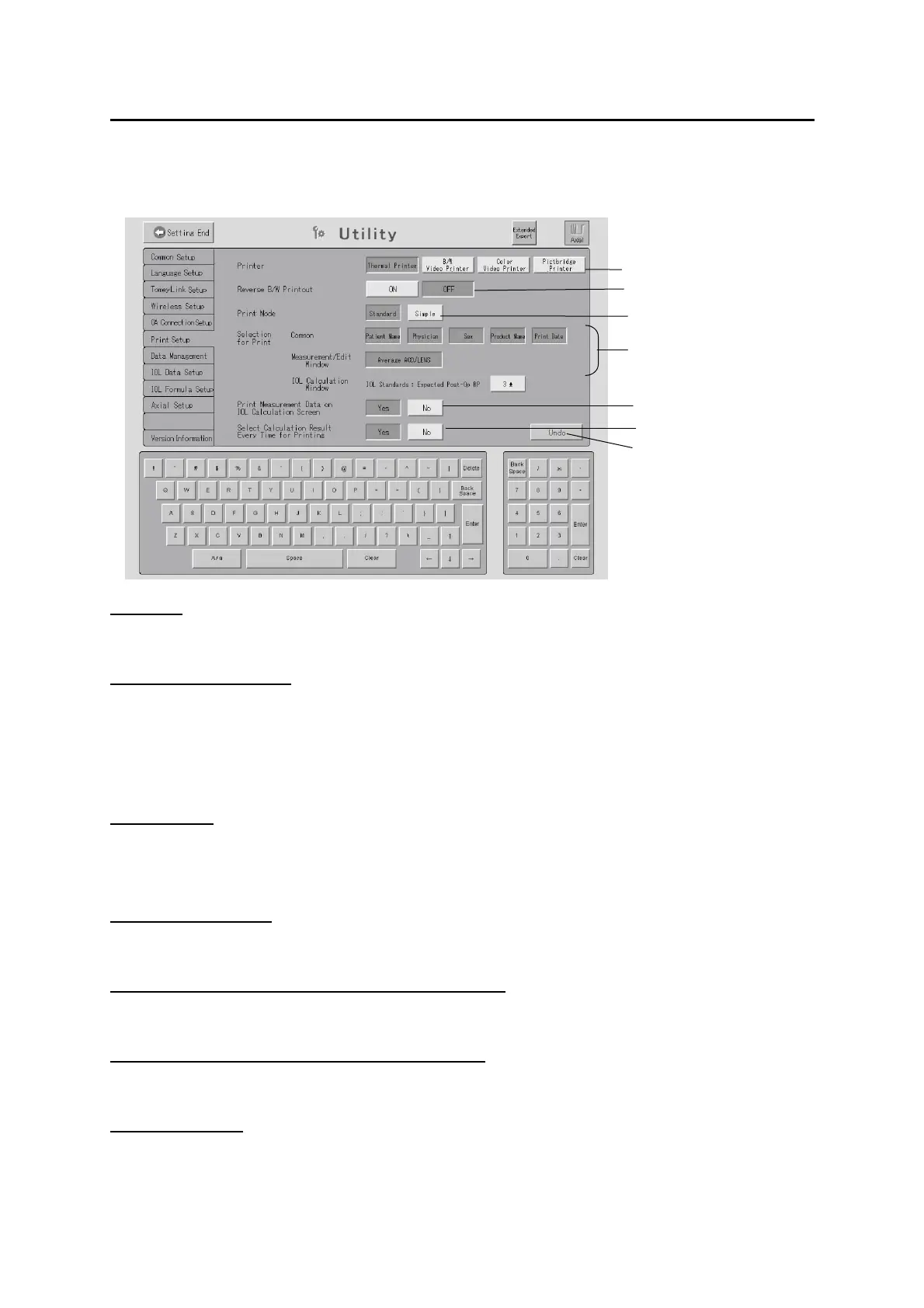
(1) Printer
Selects the printer for output.
(2) Reverse B/W Printout
This setting is available only when “B/W Video Printer” is selected in (1).
Select “ON” to print the data with black and white reversed and “OFF” to print the data as it is.
The following settings can be configured only when the Built-in printer is selected in (1).
(3) Print Mode
Sets the display mode for printing.
Standard / Simple
(4) Selection for Print
Selects the item(s) to be always displayed at printing.
(5) Print Measurement Data on IOL Calculation Screen
Prints the item(s) to be printed on the IOL Calculation screen.
(6) Select Calculation Result Every Time for Printing
Opens the calculation result selection window at printing.
(7) “UNDO” button
Cancels the entered data and settings to restore the settings when the Print Setting screen
was opened.
(1)
(2)
(3)
(4)
(5)
(6)
(7)
3-147


 To Next Page
 Loading...







