71
14. CALCULATION FUNCTIONS
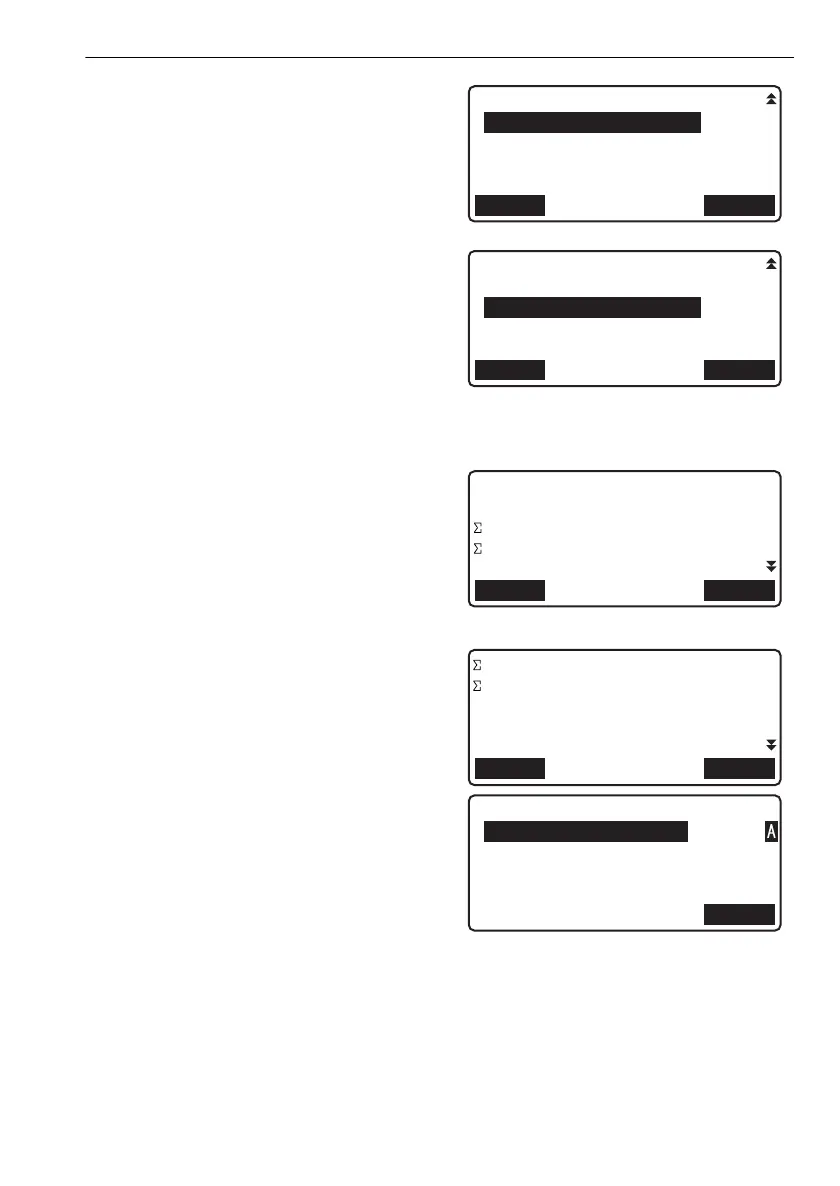
5. Align the cursor with "Reobs.end pt" and press
[LIST]. Align the cursor with the point you wish
to set as the end point and press {}.
Press [OK] to confirm settings. The reobs. start
point and reobs end point will define the section
of the base route being observed.
6. Align the cursor with "Route setting" and press
[LIST]. Align the cursor with the reobserved
route and press {}.
• Set points in the reobserved route in the
same order as in the base route.
Press [OK] to confirm settings.
7. Detailed information for all fixed points in the
merged route is displayed.
• [PREV]: Press to display detailed information
for the previous fixed point.
• [NEXT]: Press to display detailed information
for the next fixed point.
Check results, then press [OK].
8. Enter name for new route. A memo may also
be input.
•Pressing [OK] will accept input route name/
memo.
9. Press [OK] to record route name/memo and
end reobserved route merge.
<Calculation menu> is restored.
OKLIST
Reobs.end pt
:Route-01-ED0008
OKLIST
Reobs.route
Route setting
:Route-reobs01
OKNext
Fixed pt No.0005
Pt.id ABC0001
h -15.4567 m
H -51.4833 m
Z 1000.0277 m
OKNext
d 1502.38 m
D 7739.85 m
OK
Route id
:Route-Connect01
Memo
:
:
DL-501_E.book 71 ページ 2015年9月17日 木曜日 午後1時21分



 To Next Page