11. SIMPLE MEASUREMENT
42
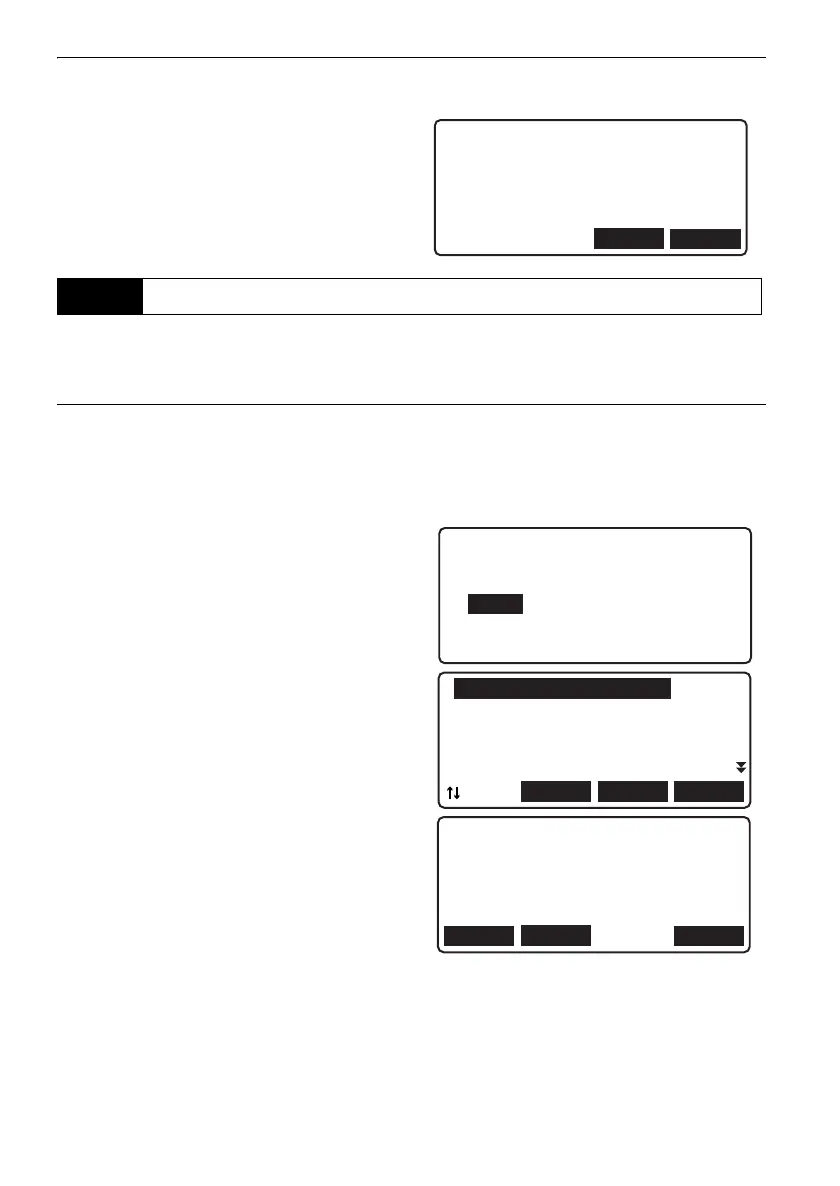
• When operation has been canceled after moving
screens during measurement, the following
message will be displayed the next time
"Elevation meas." is selected in <Simple meas.
menu>. Press [YES] to resume measurement
from where you left off last time.
It is possible to display measurement data obtained using simple measurement.
PROCEDURE
1. Select "Meas" in <Menu>.
2. Select "Simple measurement" in <Meas
menu>.
3. Select "View" in <Simple meas. menu>.
•Data can also be displayed via
<Management menu>
4. Align the cursor with the data to be displayed
and press {}.
Detailed information for the selected point is
displayed.
• [PREV]: Press to display detailed information
for the previous point.
• [NEXT]: Press to display detailed information
for the next point.
• [EDIT]: Press to edit point id and
measurement point type.
11.3 Viewing Simple Measurement Data
YES
Operation will continue
from last measurement.
OK?
NO
Simple meas. menu
1.Ht-diff. meas.
2.Elevation meas.
3.View
4.Deletion
BS0000 BS
FS0001 FS
IS0002 IS
IS0003 IS
FIX0004 FIX
LAST
TOP
...P
SRCH
EDIT
BS Go
BS0000
Rh 2.45678m
Hd 17.891 m
PREV
NEXT
DL-501_E.book 42 ページ 2015年9月17日 木曜日 午後1時21分



 To Next Page