14. CALCULATION FUNCTIONS
70
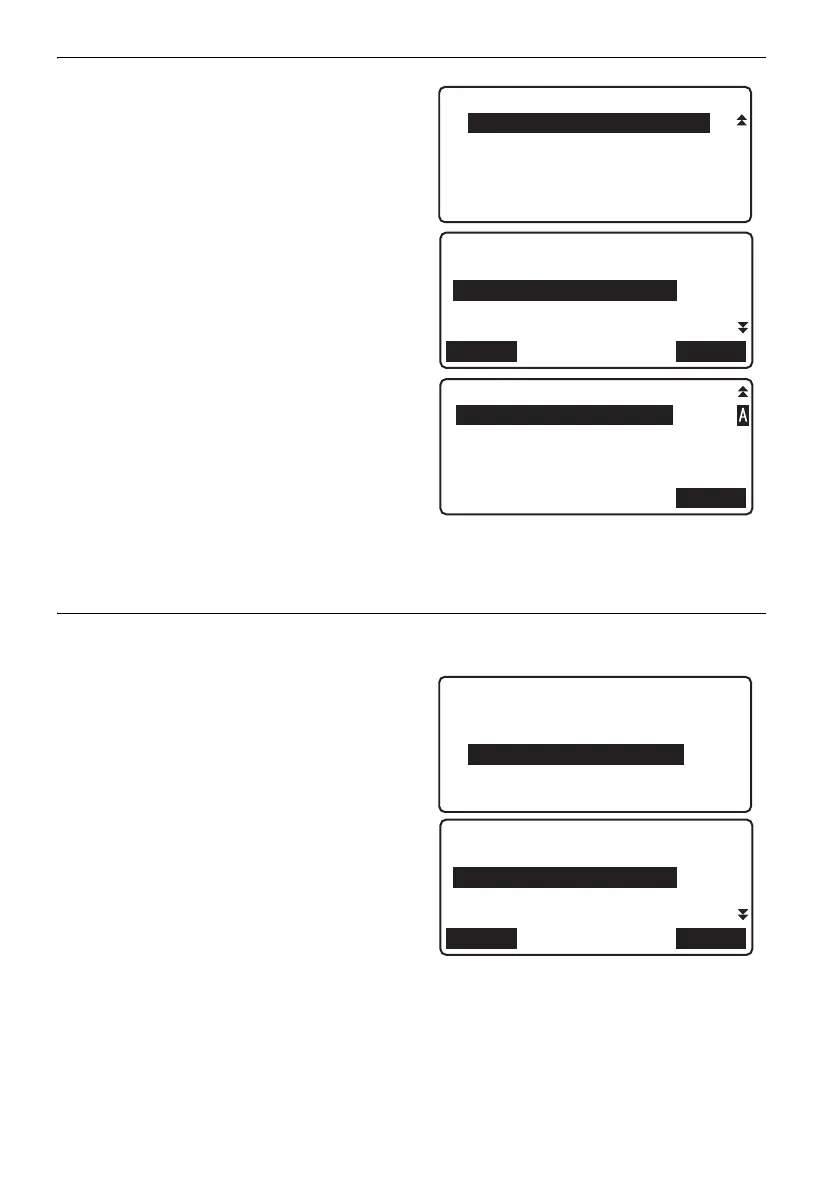
3. Select "Reobs.route setting" in <Route
menu>.
4. Align the cursor with "Base route id" and press
[LIST] Align the cursor with the route you wish
to reobserve and press {}.
5. Input a memo as necessary and press [OK] to
confirm.
Press [YES] in the next screen to finish
reobservation route settings.
• Reobserve points in the same order as in the
base route.
PROCEDURE Merging reobserved route and base route
1. Select "Calculation" in <Menu>.
2. Select "Reobs.route merge" in <Calculation
menu>.
3. Align the cursor with "Route setting" and press
[LIST]. Align the cursor with the route you
wish to set as the base route and press
{}.
4. Align the cursor with "Reobs.start pt" and
press [LIST]. Align the cursor with the point
you wish to set as the start point and press
{}.
Route menu
6.Reobs.route setting
OK
Reobs.route setting
Base route id
:Route-01
Reobs.route id
:
LIST
Calculation menu
1.Dble-run discrepancy
2.Closure error
3.Reobs.route merge
OK
Base route
Route setting
:Route-01
Reobs.start pt
:Route-01-ST0001
LIST
DL-501_E.book 70 ページ 2015年9月17日 木曜日 午後1時21分



 To Next Page